A floating IP address keeps client access stable by providing a single endpoint that can move to the active node during failover.
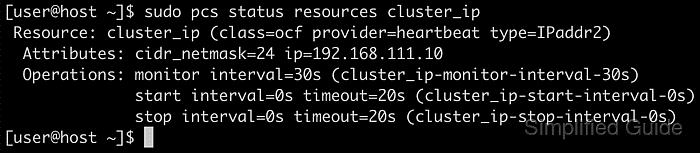
In Pacemaker, a floating IP is typically implemented with the ocf:heartbeat:IPaddr2 resource agent, which assigns the address to a network interface and monitors that it remains configured as the cluster changes state.
The address must be unused, routable on the client-facing subnet, and permitted by network controls such as firewalls, ARP inspection, and port security. Interface naming can vary across hosts, and failover validation can interrupt active connections depending on how services are ordered and how quickly clients refresh ARP caches.
Steps to create a floating IP address in Pacemaker:
- Confirm pacemaker, corosync, and pcs are installed on every node.
- Confirm the cluster is running before adding resources.
$ sudo pcs status
Cluster name: clustername
Cluster Summary:
  * Stack: corosync (Pacemaker is running)
  * Current DC: node-01 (version 2.1.6-6fdc9deea29) - partition with quorum
  * Last updated: Wed Dec 31 11:58:23 2025 on node-01
  * Last change:  Wed Dec 31 11:56:23 2025 by root via cibadmin on node-01
  * 3 nodes configured
  * 7 resource instances configured

Node List:
  * Online: [ node-01 node-02 node-03 ]

##### snipped #####
Related: How to create a Pacemaker cluster
- Choose an unused floating IP address on the client-facing subnet, and compare the planned address with existing IP inventory before reserving it.
$ ip -brief address
lo               UNKNOWN        127.0.0.1/8 ::1/128
##### snipped #####
eth0@if456       UP             192.0.2.11/24 192.0.2.40/24
$ ping -c1 -W1 192.0.2.50
PING 192.0.2.50 (192.0.2.50) 56(84) bytes of data.

--- 192.0.2.50 ping statistics ---
1 packets transmitted, 0 received, 100% packet loss, time 0ms
ICMP can be blocked, so packet loss does not guarantee the address is free; any replies strongly indicate an IP conflict.
Tool: IP Overlap Checker
- Create a floating IP resource with IPaddr2.
$ sudo pcs resource create floating_ip ocf:heartbeat:IPaddr2 ip=192.0.2.50 cidr_netmask=24 op monitor interval=30s
Add nic=eth0 when nodes have multiple networks and interface names match across nodes.
- Verify the floating IP resource is started.
$ sudo pcs status
##### snipped #####
Full List of Resources:
  * floating_ip (ocf:heartbeat:IPaddr2): Started node-02
##### snipped #####
- Review daemon status for corosync, pacemaker, and pcsd.
$ sudo pcs status
##### snipped #####
Daemon Status:
  corosync: active/enabled
  pacemaker: active/enabled
  pcsd: active/enabled
If any daemon shows disabled, enable it before relying on failover.
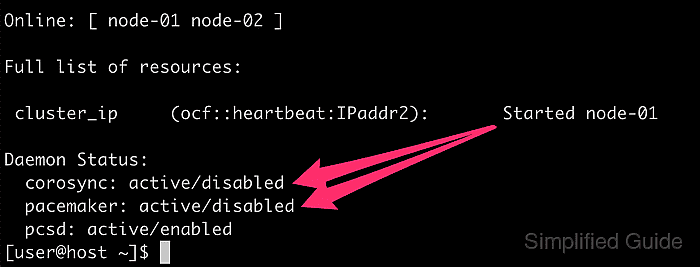
- Confirm the services are enabled to start on boot.
$ sudo systemctl is-enabled pacemaker corosync pcsd
enabled
enabled
enabled
Enable with sudo systemctl enable --now pacemaker corosync pcsd when any unit is disabled.
- Identify the network interface hosting the floating IP.
$ ip -brief address
lo               UNKNOWN        127.0.0.1/8 ::1/128
##### snipped #####
eth0@if457       UP             192.0.2.12/24 192.0.2.50/24
- Move the floating IP resource to another node to validate failover.
$ sudo pcs resource move floating_ip node-01
Location constraint to move resource 'floating_ip' has been created
Waiting for the cluster to apply configuration changes...
Location constraint created to move resource 'floating_ip' has been removed
Waiting for the cluster to apply configuration changes...
resource 'floating_ip' is running on node 'node-01'
Leaving the move constraint in place can pin the resource to a single node and defeat automatic failover.
- Check that the floating IP resource started on the target node.
$ sudo pcs status
##### snipped #####
Full List of Resources:
  * floating_ip (ocf:heartbeat:IPaddr2): Started node-01
##### snipped #####
- Ping the floating IP from another node to confirm reachability.
$ ping -c3 192.0.2.50
PING 192.0.2.50 (192.0.2.50) 56(84) bytes of data.
64 bytes from 192.0.2.50: icmp_seq=1 ttl=64 time=0.093 ms
64 bytes from 192.0.2.50: icmp_seq=2 ttl=64 time=0.053 ms
64 bytes from 192.0.2.50: icmp_seq=3 ttl=64 time=0.046 ms

--- 192.0.2.50 ping statistics ---
3 packets transmitted, 3 received, 0% packet loss, time 2060ms
rtt min/avg/max/mdev = 0.046/0.064/0.093/0.020 ms
One or two initial ping failures can occur while ARP caches refresh after the IP move.
- Clear the temporary move constraint created during testing.
$ sudo pcs resource clear floating_ip
No output indicates the constraint was removed.
- Confirm the floating IP resource remains started under cluster management.
$ sudo pcs status
##### snipped #####
Full List of Resources:
  * floating_ip (ocf:heartbeat:IPaddr2): Started node-01
##### snipped #####

Mohd Shakir Zakaria is a cloud architect with deep roots in software development and open-source advocacy. Certified in AWS, Red Hat, VMware, ITIL, and Linux, he specializes in designing and managing robust cloud and on-premises infrastructures.


