OpenTelemetry .NET instrumentation adds vendor-neutral traces and metrics to ASP.NET Core request handling. It is useful when a web service needs to send route names, status codes, and request-duration measurements to an OpenTelemetry Collector before a vendor backend is chosen.
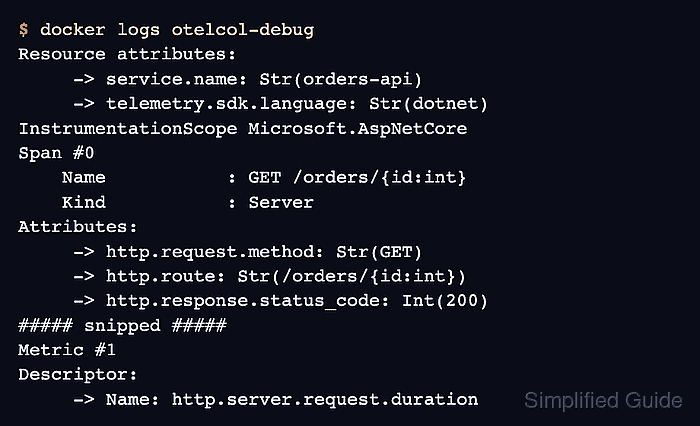
The ASP.NET Core instrumentation package hooks into the hosting pipeline through AddAspNetCoreInstrumentation(). The OTLP exporter sends collected telemetry to the Collector on port 4317, and the Collector debug exporter prints the received spans and metric points so the first request can be inspected before connecting a production backend.
Local instrumentation testing needs a .NET SDK 8 or newer project and Docker for the Collector. The sample service name and route are neutral; replace serviceName and the exporter endpoint for the real service after the local trace and HTTP server metric appear in Collector output.
Steps to instrument ASP.NET Core with OpenTelemetry .NET:
- Create a minimal ASP.NET Core web project.
$ dotnet new web -o aspnetcoreapp
The template "ASP.NET Core Empty" was created successfully.
##### snipped #####
Restore succeeded.
- Change into the project directory.
$ cd aspnetcoreapp
- Add the OpenTelemetry hosting package.
$ dotnet add package \
  OpenTelemetry.Extensions.Hosting
- Add the ASP.NET Core instrumentation package.
$ dotnet add package \
  OpenTelemetry.Instrumentation.AspNetCore
- Add the OTLP exporter package.
$ dotnet add package \
  OpenTelemetry.Exporter.OpenTelemetryProtocol
- Replace Program.cs with the instrumented request handler.
- Program.cs
using OpenTelemetry.Metrics;
using OpenTelemetry.Resources;
using OpenTelemetry.Trace;

const string serviceName = "orders-api";

var builder = WebApplication.CreateBuilder(args);

builder.Services.AddOpenTelemetry()
    .ConfigureResource(resource => resource.AddService(serviceName: serviceName))
    .WithTracing(tracing => tracing
        .AddAspNetCoreInstrumentation()
        .AddOtlpExporter())
    .WithMetrics(metrics => metrics
        .AddAspNetCoreInstrumentation()
        .AddOtlpExporter((exporterOptions, metricReaderOptions) =>
        {
            var readerOptions = metricReaderOptions.PeriodicExportingMetricReaderOptions;
            readerOptions.ExportIntervalMilliseconds = 1000;
        }));

var app = builder.Build();

app.MapGet("/orders/{id:int}", (int id) => Results.Ok(new { id, status = "accepted" }));

app.Run();
The one-second metric export interval keeps the local smoke test short. Use a normal export interval for service traffic after the first Collector check is complete.
- Create a local Collector configuration that accepts OTLP and prints telemetry through the debug exporter.
- collector-config.yaml
receivers:
  otlp:
    protocols:
      grpc:
        endpoint: 0.0.0.0:4317
      http:
        endpoint: 0.0.0.0:4318

exporters:
  debug:
    verbosity: detailed

service:
  pipelines:
    traces:
      receivers: [otlp]
      exporters: [debug]
    metrics:
      receivers: [otlp]
      exporters: [debug]
Use debug for local inspection only because it writes telemetry attributes to container logs.
Related: How to test OpenTelemetry Collector pipelines with the debug exporter
Tool: OpenTelemetry Collector Config Generator - Run the Collector in a separate terminal.
$ docker run -d --rm --name otelcol-debug \
  -p 4317:4317 \
  -p 4318:4318 \
  -v "$PWD/collector-config.yaml:/etc/otelcol/config.yaml:ro" \
  otel/opentelemetry-collector:latest
Keep this container running while the ASP.NET Core app sends telemetry.
Related: How to run the OpenTelemetry Collector in Docker - Set the local OTLP endpoint for the app shell.
$ export OTEL_EXPORTER_OTLP_ENDPOINT=http://localhost:4317
- Start the ASP.NET Core app.
$ dotnet run --urls http://localhost:5080
Building...
info: Microsoft.Hosting.Lifetime[14]
      Now listening on: http://localhost:5080
##### snipped #####
AddOtlpExporter() uses OTLP/gRPC by default, which matches the Collector listener on port 4317.
- Send one request to the instrumented route from another terminal.
$ curl -s http://localhost:5080/orders/42
{"id":42,"status":"accepted"}
- Check the Collector output for the ASP.NET Core trace and HTTP server metric.
$ docker logs otelcol-debug
Resource attributes:
     -> service.name: Str(orders-api)
     -> telemetry.sdk.language: Str(dotnet)
InstrumentationScope Microsoft.AspNetCore
Span #0
    Name           : GET /orders/{id:int}
    Kind           : Server
Attributes:
     -> http.request.method: Str(GET)
     -> http.route: Str(/orders/{id:int})
     -> http.response.status_code: Int(200)
##### snipped #####
Metric #1
Descriptor:
     -> Name: http.server.request.duration
The trace shows request instrumentation is active. The http.server.request.duration metric shows the ASP.NET Core server metric pipeline is also reaching the Collector.
- Stop the debug Collector after the local check is complete.
$ docker stop otelcol-debug
otelcol-debug

Mohd Shakir Zakaria is a cloud architect with deep roots in software development and open-source advocacy. Certified in AWS, Red Hat, VMware, ITIL, and Linux, he specializes in designing and managing robust cloud and on-premises infrastructures.


