Applications often depend on mature command-line tools for work that does not belong in JavaScript, such as media conversion, archive inspection, or repository operations. Node.js can start those executables asynchronously and keep their output and failure details inside the calling program.
The execFile() function from the built-in node:child_process module starts an executable directly and passes its arguments separately. This is a safer default than exec() when shell syntax is unnecessary because values stay in the argument array instead of being interpreted as part of a shell command.
The Promise form resolves with stdout and stderr after a zero exit, then rejects with the same streams attached to the error after a nonzero exit. A small wrapper can return one consistent result shape while a timeout and output limit bound the child process.
Steps to run a command from Node.js:
- Create run-command.mjs with the execFile() imports and output formatter.
- run-command.mjs
import { execFile } from "node:child_process";
import { promisify } from "node:util";

const execFileAsync = promisify(execFile);

function present(value = "") {
  const text = value.trimEnd();
  return text || "(empty)";
}
- Append the Promise wrapper beneath present() to capture successful and failed child processes.
- run-command.mjs
async function runCommand(file, args) {
  try {
    const { stdout, stderr } = await execFileAsync(file, args, {
      timeout: 5000,
      maxBuffer: 1024 * 1024,
      windowsHide: true,
    });

    return {
      ok: true,
      code: 0,
      signal: null,
      stdout: present(stdout),
      stderr: present(stderr),
    };
  } catch (error) {
    return {
      ok: false,
      code: error.code ?? null,
      signal: error.signal ?? null,
      stdout: present(error.stdout),
      stderr: present(error.stderr || error.message),
    };
  }
}
execFile() rejects on a nonzero exit, so the catch branch preserves the child's exit code and captured streams instead of losing them in a generic error message.
- Append the command selection and result reporting beneath runCommand().
- run-command.mjs
const mode = process.argv[2] ?? "success";
const childCode = mode === "failure"
  ? 'console.error("child stderr"); process.exit(2)'
  : 'console.log("child stdout")';

const result = await runCommand(process.execPath, ["--eval", childCode]);

console.log(`mode=${mode}`);
console.log(`ok=${result.ok}`);
console.log(`code=${result.code ?? "none"}`);
console.log(`signal=${result.signal ?? "none"}`);
console.log(`stdout=${result.stdout}`);
console.log(`stderr=${result.stderr}`);

if (!result.ok) {
  process.exitCode = result.code ?? 1;
}
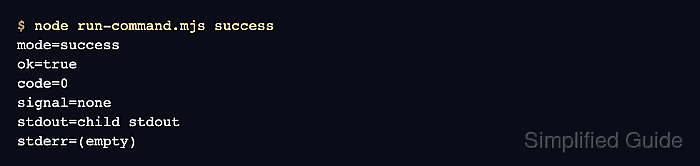
- Run the successful mode to confirm that the wrapper returns the child process stdout.
$ node run-command.mjs success
mode=success
ok=true
code=0
signal=none
stdout=child stdout
stderr=(empty)
- Run the failure mode to confirm that the wrapper returns the nonzero exit code and stderr.
$ node run-command.mjs failure
mode=failure
ok=false
code=2
signal=none
stdout=(empty)
stderr=child stderr