Files copied into a Nextcloud data directory outside the web UI may not appear for users until the file cache is refreshed. The occ files:scan command asks Nextcloud to inspect a user area and register new, changed, or removed files in the application index.
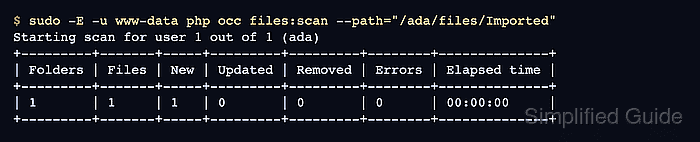
Run occ from the installed Nextcloud directory as the web-server user, commonly www-data on Debian and Ubuntu servers. A targeted --path scan is usually safer than scanning every user because it touches only the folder that changed.
The --path value is a Nextcloud file namespace path, not the operating-system path under /var/www/nextcloud/data. It must include the user ID and files/, such as /ada/files/Imported; use broader user or all-user scans only during planned maintenance windows.
Related: How to run Nextcloud occ commands
Related: How to restore Nextcloud from backup
Related: How to move the Nextcloud data directory
Steps to scan Nextcloud files with occ:
- Change to the Nextcloud installation directory.
$ cd /var/www/nextcloud
Use the directory that contains the occ file. Container, archive, and package installs can use paths such as /var/www/html or /usr/share/webapps/nextcloud.
- Identify the Nextcloud folder path to rescan.
For a file copied to /var/www/nextcloud/data/ada/files/Imported/report.txt, scan the containing folder as /ada/files/Imported. The prefix before files/ is the Nextcloud user ID.
- Run a targeted file scan as the web-server user.
$ sudo -E -u www-data php occ files:scan --path="/ada/files/Imported"
Starting scan for user 1 out of 1 (ada)
+---------+-------+-----+---------+---------+--------+--------------+
| Folders | Files | New | Updated | Removed | Errors | Elapsed time |
+---------+-------+-----+---------+---------+--------+--------------+
| 1       | 1     | 1   | 0       | 0       | 0      | 00:00:00     |
+---------+-------+-----+---------+---------+--------+--------------+
Use sudo -E -u www-data php occ files:scan ada to rescan one user's home, or sudo -E -u www-data php occ files:scan --all for all users. Do not combine --path, --all, and a user ID in one command.
files:scan updates the Nextcloud file cache. It does not repair wrong filesystem ownership, unreadable directories, or missing storage mounts.
- Confirm the scan summary reports zero errors.
New, Updated, and Removed show what changed during that run. A second scan can show all zeros after the cache already matches the files on disk.
- Read a scanned file through WebDAV.
$ curl --fail --user ada https://cloud.example.com/remote.php/dav/files/ada/Imported/report.txt
Enter host password for user 'ada':
quarterly storage check
Use a test user or an app password for command-line smoke tests. Avoid placing long-lived account passwords directly in the command.
Related: How to create a Nextcloud app password

Mohd Shakir Zakaria is a cloud architect with deep roots in software development and open-source advocacy. Certified in AWS, Red Hat, VMware, ITIL, and Linux, he specializes in designing and managing robust cloud and on-premises infrastructures.


