A Nextcloud backup needs both the files on disk and the database that tracks users, shares, apps, and file metadata. Copying only the web root or only the data directory leaves a restore with missing configuration or missing records, so a manual backup run should capture the complete server state while writes are paused.
For a manual server installation, the required set includes the config folder, custom apps if any are installed, the data directory, themes, and a database dump. The file backup and SQL dump should land in the same dated directory so the backup set can be inspected and restored together.
Maintenance mode blocks new logins and locks active sessions until it is disabled. Schedule the run during a maintenance window, keep the database password out of shell history, and store the finished backup outside the Nextcloud server after the local copy has been inspected.
Related: How to restore Nextcloud from backup
Steps to create a Nextcloud backup with occ, rsync, and mariadb-dump:
- Record the paths and database values for the backup run.
Web root: /var/www/nextcloud
Data directory: /var/www/nextcloud/data
Backup directory: ~/nextcloud-backup/2026-06-29
Database host: localhost
Database name: nextcloud
Database user: nextcloud
HTTP user: www-data
Read the real datadirectory, dbname, dbuser, and dbhost values from /var/www/nextcloud/config/config.php when the server uses different paths or a remote database.
- Change to the Nextcloud installation directory.
$ cd /var/www/nextcloud
Use the directory that contains the occ file.
- Create the dated backup directory.
$ mkdir -p ~/nextcloud-backup/2026-06-29
- Enable Nextcloud maintenance mode.
$ sudo -E -u www-data php occ maintenance:mode --on
Maintenance mode enabled
Maintenance mode interrupts active browser sessions and prevents new logins until it is turned off.
Related: How to enable Nextcloud maintenance mode
Related: How to run Nextcloud occ commands - Confirm that maintenance mode is active.
$ sudo -E -u www-data php occ status
  - installed: true
  - version: 34.0.0.12
  - versionstring: 34.0.0
  - edition:
  - maintenance: true
  - needsDbUpgrade: false
  - productname: Nextcloud
  - extendedSupport: false
- Back up the Nextcloud web root without duplicating the data directory.
$ rsync -Aavx --exclude "data/" /var/www/nextcloud/ ~/nextcloud-backup/2026-06-29/nextcloud/
sending incremental file list
created directory /home/admin/nextcloud-backup/2026-06-29/nextcloud
./
config/
config/config.php
custom_apps/
custom_apps/calendar/
custom_apps/calendar/appinfo.txt
themes/
themes/example/
themes/example/theme.txt

sent 635 bytes  received 166 bytes  1,602.00 bytes/sec
total size is 54  speedup is 0.07
Run the command with sudo when the current shell user cannot read the installation files. Remove the --exclude only when the data directory is intentionally being backed up as part of the same web-root copy.
- Back up the Nextcloud data directory.
$ rsync -Aavx /var/www/nextcloud/data/ ~/nextcloud-backup/2026-06-29/data/
sending incremental file list
created directory /home/admin/nextcloud-backup/2026-06-29/data
./
ada/
ada/files/
ada/files/budget.txt

sent 302 bytes  received 88 bytes  780.00 bytes/sec
total size is 19  speedup is 0.05
Use the real datadirectory from /config/config.php. Backing up the wrong directory can produce a SQL dump with no matching user files.
- Dump the Nextcloud MariaDB database.
$ mariadb-dump --single-transaction --host=localhost --user=nextcloud --password nextcloud > ~/nextcloud-backup/2026-06-29/nextcloud.sql
Enter password:
--single-transaction keeps InnoDB tables consistent during the dump. Add --default-character-set=utf8mb4 when the database uses MariaDB or MySQL 4-byte support.
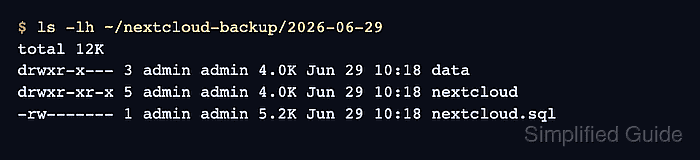
- Inspect the finished backup directory.
$ ls -lh ~/nextcloud-backup/2026-06-29
total 12K
drwxr-x--- 3 admin admin 4.0K Jun 29 10:18 data
drwxr-xr-x 5 admin admin 4.0K Jun 29 10:18 nextcloud
-rw------- 1 admin admin 5.2K Jun 29 10:18 nextcloud.sql
The directory should contain the file backup, the data backup, and the database dump before the server leaves maintenance mode.
- Disable Nextcloud maintenance mode.
$ sudo -E -u www-data php occ maintenance:mode --off
Maintenance mode disabled
- Confirm that the server has returned to normal mode.
$ sudo -E -u www-data php occ status
  - installed: true
  - version: 34.0.0.12
  - versionstring: 34.0.0
  - edition:
  - maintenance: false
  - needsDbUpgrade: false
  - productname: Nextcloud
  - extendedSupport: false

Mohd Shakir Zakaria is a cloud architect with deep roots in software development and open-source advocacy. Certified in AWS, Red Hat, VMware, ITIL, and Linux, he specializes in designing and managing robust cloud and on-premises infrastructures.


