Outbound firewall policy controls which external systems a workload may contact after resolver, route, proxy, and TLS controls all take effect. A scoped egress test from the actual source identity shows whether required destinations still work and whether denied paths fail at the boundary the policy owner expects.
The probe must originate from the same host, subnet, cloud security group, container namespace, service account, or proxy path that the policy targets. A small matrix keeps the test bounded by naming each destination, port, protocol, expected result, and evidence source before traffic leaves the host.
Client-side output rarely names the enforcement point by itself. DNS failure, TCP timeout, certificate mismatch, HTTP response, and proxy denial each point to a different layer, so pair the probe output with firewall, proxy, flow-log, or policy-engine evidence before marking a row as passed.
Steps to test outbound firewall egress policy:
- Record the approved egress test matrix.
- egress-matrix.csv
source_identity,destination,port,protocol,expected,evidence
workload-a.example.net,example.com,443,tcp+https,allow,pending
workload-a.example.net,203.0.113.10,25,tcp,deny,pending
Test only approved destinations and ports. Replace documentation addresses with owned test endpoints when the result becomes a change record or security evidence.
- Resolve the allowed hostname through the source resolver path.
$ dig +short example.com A
104.20.23.154
172.66.147.243
A blank answer, NXDOMAIN, or SERVFAIL points to the resolver path before any TCP or TLS probe can prove the egress policy.
- Open the allowed TCP port with netcat.
$ nc -vz -w 5 example.com 443
Connection to example.com (104.20.23.154) 443 port [tcp/*] succeeded!
-z checks the connection without sending application data, and -w limits how long a blocked path can hold the terminal. A successful TCP connection does not prove the HTTPS endpoint or certificate is correct.
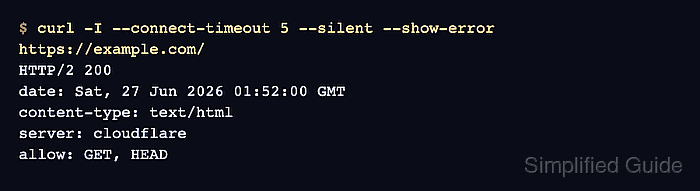
- Request the allowed HTTPS URL.
$ curl -I --connect-timeout 5 --silent --show-error https://example.com/
HTTP/2 200
date: Sat, 27 Jun 2026 01:52:00 GMT
content-type: text/html
server: cloudflare
allow: GET, HEAD
Use the real URL, path, and proxy environment expected by the application. A 2xx or approved 3xx response usually proves more than a raw port check because it exercises DNS, TCP, TLS, and HTTP together.
- Check the TLS handshake when TCP succeeds but HTTPS fails.
$ openssl s_client -connect example.com:443 -servername example.com -brief
Connecting to 104.20.23.154
CONNECTION ESTABLISHED
Protocol version: TLSv1.3
Ciphersuite: TLS_AES_256_GCM_SHA384
Peer certificate: CN=example.com
Verification: OK
DONE
A certificate-name error or failed verification means the path reached a TLS endpoint, but not necessarily the intended service. Keep that separate from a firewall deny.
- Probe the expected-deny destination.
$ nc -vz -w 3 203.0.113.10 25
nc: connect to 203.0.113.10 port 25 (tcp) timed out: Operation now in progress
A timeout commonly matches a drop-style deny. A connection refused result can still match an expected deny when the enforcement layer or destination host actively rejects the flow.
- Match the probe output to the enforcement log.
time=2026-06-27T01:52:03Z action=deny src=192.0.2.40 dst=203.0.113.10 dst_port=25 protocol=tcp policy=egress-deny-smtp
time=2026-06-27T01:52:00Z action=allow src=192.0.2.40 dst=104.20.23.154 dst_port=443 protocol=tcp policy=egress-allow-web
Use the log source that owns the boundary, such as an edge firewall, proxy, cloud flow log, Kubernetes policy log, or service mesh telemetry. The source, destination, port, action, and time window should match the matrix row.
- Record the final pass or finding in the matrix.
- egress-matrix.csv
source_identity,destination,port,protocol,expected,evidence
workload-a.example.net,example.com,443,tcp+https,allow,pass:dns_tcp_https_tls;policy=egress-allow-web
workload-a.example.net,203.0.113.10,25,tcp,deny,pass:nc_timeout;policy=egress-deny-smtp
If a required flow fails or a denied flow succeeds, keep the row as a finding with the raw probe output and policy-log reference instead of broadening the test to unrelated ports.