Changing a database user's password rotates an application secret, blocks access after a credential leak, or moves ownership to a new maintainer without dropping the account or rebuilding its grants.
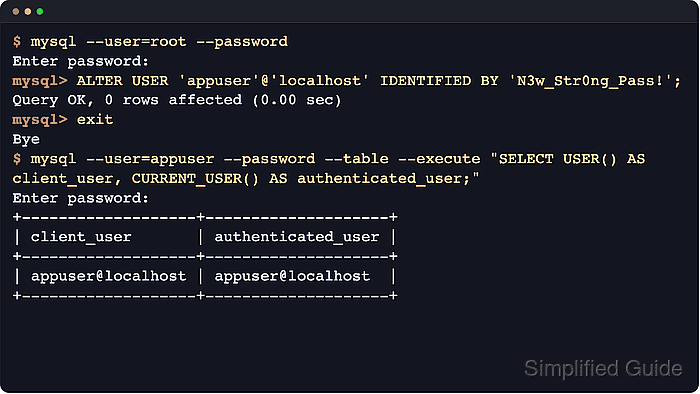
In MySQL and MariaDB, the password belongs to one exact 'user'@'host' account definition, not just to a username. ALTER USER changes that account's authentication data while leaving the account, host scope, and existing privileges in place.
The host portion and authentication plugin decide which login is affected and which ALTER USER syntax to use. MySQL uses caching_sha2_password as the default first-factor password plugin when policy does not name another plugin, while MariaDB uses mysql_native_password by default for password accounts when old_passwords is 0; inspect the target account first when old clients, unix_socket, ed25519, PAM, or multi-authentication accounts are involved.
Steps to change a MySQL or MariaDB user password:
- Open a privileged mysql client session on the target server.
$ mysql --user=root --password
Enter password:
mysql>
On socket-authenticated local installs, sudo mysql or sudo mariadb can open the administrative session without a password prompt. Add --host and --port for a remote server, and use mariadb if that is the installed client command.
- Identify the exact 'user'@'host' account and its current authentication plugin.
mysql> SELECT User, Host, plugin FROM mysql.user WHERE User = 'appuser';
+---------+-----------+-----------------------+
| User    | Host      | plugin                |
+---------+-----------+-----------------------+
| appuser | localhost | caching_sha2_password |
+---------+-----------+-----------------------+
1 row in set (0.00 sec)
'appuser'@'localhost', 'appuser'@'127.0.0.1', and 'appuser'@'%' are separate accounts with separate passwords. If the query returns no row, or the wrong host, changing another entry will not fix the login that is failing.
MariaDB password accounts show mysql_native_password here by default when old_passwords is 0. If the account might use unix_socket, auth_socket, ed25519, PAM, or another non-default method, inspect the full definition with
SHOW CREATE USER 'appuser'@'localhost'\G
before changing it. MariaDB 10.4 and later can attach more than one authentication method to a single account, so redact hashes before sharing that output.
- Change the password for the selected account with ALTER USER.
mysql> ALTER USER 'appuser'@'localhost' IDENTIFIED BY 'N3w_Str0ng_Pass!';
Query OK, 0 rows affected (0.00 sec)
ALTER USER takes effect immediately; do not run FLUSH PRIVILEGES after this statement unless someone manually edited grant tables, which is not part of routine password rotation.
New connections start using the new password immediately. Rotate the secret in every application, job, or option file before restarting pools or services, or the next reconnect will fail with Access denied.
The statement text can be written to client history or server logs on some setups. Run the change from a trusted administration host and avoid leaving the new secret in shared history files or saved terminal captures.
- Update every application, job, and option file that uses the modified account.
Long-lived connection pools can keep working until they reconnect, so recycle the pool or restart the service after the secret is updated to prove the old password is no longer in use.
- Log in with the new password using the same host path that the workload uses, then confirm which account the server matched.
$ mysql --user=appuser --password --table --execute="SELECT USER() AS client_user, CURRENT_USER() AS authenticated_user;"
Enter password:
+-------------------+--------------------+
| client_user       | authenticated_user |
+-------------------+--------------------+
| appuser@localhost | appuser@localhost  |
+-------------------+--------------------+
1 row in set (0.00 sec)
Use the same connection method as the real workload. A local socket login against localhost and a TCP login to 127.0.0.1 can match different 'user'@'host' accounts. USER() shows the identity supplied by the client, while CURRENT_USER() shows the account entry used for authentication and privilege checks.

Mohd Shakir Zakaria is a cloud architect with deep roots in software development and open-source advocacy. Certified in AWS, Red Hat, VMware, ITIL, and Linux, he specializes in designing and managing robust cloud and on-premises infrastructures.


