Box plots make several numeric distributions comparable in one compact figure. In Matplotlib, a box plot shows each group's median, quartile range, whiskers, and outlier points, which helps when values need more context than a single average.
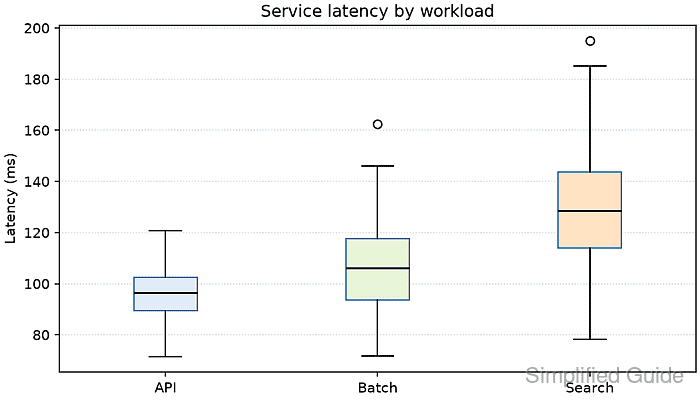
Pass one numeric sequence per category to Axes.boxplot(). The sequences stay in their supplied order, so each tick_labels entry must match the data sequence at the same position.
Set patch_artist=True when the boxes need fill colors, because that option returns each box as a patch that can be styled after plotting. The finished figure should retain three category labels and expose unusually distant values as individual outlier markers.
Related: How to create a histogram in Matplotlib
Related: How to set axis labels in Matplotlib
Steps to create a Matplotlib box plot:
- Create box_plot_create.py containing the imports, grouped latency samples, matching labels, and box palette.
- box_plot_create.py
from pathlib import Path

import matplotlib.pyplot as plt
import numpy as np

rng = np.random.default_rng(42)
latency_ms = [
    rng.normal(95, 12, 80),
    rng.normal(110, 18, 80),
    rng.normal(132, 25, 80),
]
labels = ["API", "Batch", "Search"]
colors = ["#d8ecff", "#e6f4d7", "#ffe2c2"]
Each array in latency_ms corresponds to the labels string at the same position.
- Append the figure and box-plot construction below the data definitions.
- box_plot_create.py
fig, ax = plt.subplots(figsize=(7, 4), layout="constrained")
result = ax.boxplot(
    latency_ms,
    tick_labels=labels,
    patch_artist=True,
    medianprops={"color": "black", "linewidth": 1.4},
    boxprops={"edgecolor": "#3973ac"},
)
The tick_labels argument supplies one label per data sequence. Setting patch_artist=True makes the returned boxes artists fillable.
- Add the box colors, axis text, title, and horizontal reference grid after the boxplot() call.
- box_plot_create.py
for box, color in zip(result["boxes"], colors):
    box.set_facecolor(color)

ax.set_ylabel("Latency (ms)")
ax.set_title("Service latency by workload")
ax.grid(axis="y", linestyle=":", alpha=0.5)
- Finish the script with PNG export and plot-object checks.
- box_plot_create.py
output = Path("box-plot-create.png")
fig.savefig(output, dpi=150)

tick_text = ", ".join(label.get_text() for label in ax.get_xticklabels())
print(f"boxes: {len(result['boxes'])}")
print(f"tick labels: {tick_text}")
print(f"saved: {output}")
- Run box_plot_create.py from the directory that should receive the exported image.
$ python3 box_plot_create.py
boxes: 3
tick labels: API, Batch, Search
saved: box-plot-create.png
- Inspect the exported PNG file type and pixel dimensions.
$ file box-plot-create.png
box-plot-create.png: PNG image data, 1050 x 600, 8-bit/color RGBA, non-interlaced
- Confirm box-plot-create.png shows three labeled distributions with median lines, whiskers, and outlier markers.

Mohd Shakir Zakaria is a cloud architect with deep roots in software development and open-source advocacy. Certified in AWS, Red Hat, VMware, ITIL, and Linux, he specializes in designing and managing robust cloud and on-premises infrastructures.


