Model files on disk are separate from the model instances available to an application. In LM Studio, lms loads a downloaded model into memory so a local client can send it requests.
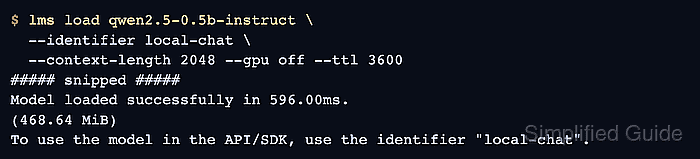
A model key selects the downloaded weights, while an identifier names the loaded instance. A fixed identifier lets a script address that instance without putting a model filename in every request.
The CLI needs a running LM Studio service and a downloaded GGUF model. On a headless Linux host, the vendor's llmster setup provides the service; lms get downloads the model files.
Steps to load a model with lms in LM Studio:
- List the downloaded models to find the key for your GGUF model.
$ lms ls

You have 2 models, taking up 575.51 MB of disk space.

LLM                      PARAMS    ARCH     SIZE         DEVICE
qwen2.5-0.5b-instruct    630M      Qwen2    491.40 MB    Local

##### snipped #####
The Qwen2.5 0.5B Instruct model shown here uses the Q4_K_M quantization. A downloaded model is available on disk; it is not necessarily loaded in memory.
- Load your model using its key from lms ls in place of qwen2.5-0.5b-instruct.
$ lms load qwen2.5-0.5b-instruct \
  --identifier local-chat \
  --context-length 2048 --gpu off --ttl 3600
##### snipped #####
Model loaded successfully in 596.00ms.
(468.64 MiB)
To use the model in the API/SDK, use the identifier "local-chat".
–identifier local-chat sets the name for API requests. The 2048-token context keeps memory use modest for this small model, and –gpu off selects CPU-only loading. The 3600-second TTL unloads the instance after an hour without use; it does not delete the downloaded file. Larger models or context lengths need more memory. These load options are optional; without them, LM Studio uses its defaults.
Related: lms load options - Check that lms ps lists local-chat with the requested context and idle TTL.
$ lms ps

IDENTIFIER    MODEL                    STATUS    SIZE         CONTEXT    PARALLEL    LOAD CONFIG    DEVICE    TTL
local-chat    qwen2.5-0.5b-instruct    IDLE      491.40 MB    2048       4           LM Studio      Local     60m / 1h
IDLE means the instance is loaded and waiting for a request. The remaining TTL decreases while it is unused. An absent identifier means the instance is not loaded.
- Start the HTTP server on the loopback address at port 1234.
$ lms server start --bind 127.0.0.1 --port 1234
Success! Server is now running on port 1234
The loopback binding keeps this API local to the machine. For an existing server on a different port, the request URL needs that port.
- Send a chat request to the loaded local-chat identifier. Example output:
$ curl --fail-with-body --silent --show-error \
  http://127.0.0.1:1234/v1/chat/completions \
  -H 'Content-Type: application/json' \
  -d '{
    "model": "local-chat",
    "messages": [{"role": "user", "content": "What is 2 + 2? Answer briefly."}],
    "max_tokens": 32
  }'
##### snipped #####
  "model": "local-chat",
  "choices": [
    {
      "index": 0,
      "message": {
        "role": "assistant",
        "content": "2 + 2 equals 4.",
##### snipped #####
The request assumes a local server without API-token authentication. The response names local-chat and contains the generated text in choices[0].message.content. The wording varies, and max_tokens limits the reply length. Curl reports an HTTP error if the request fails.