A GGUF file describes the model architecture as well as its weights. When llama.cpp reports unknown model architecture, the executable cannot recognize that architecture, and a build with the required support can let the same model load and generate text.
Architecture support can reach upstream source before it reaches a packaged release or an application that bundles llama.cpp. A filename or quantization label does not establish compatibility; the architecture stored inside the file and the executable actually loading it matter.
A separate CPU source build provides a way to test newer support while keeping the existing installation available. On Ubuntu or Debian, the CMake source-build guide supplies the required compiler and development packages; the affected local GGUF must already be available.
Steps to fix the unknown model architecture error in llama.cpp:
- Set MODEL to the absolute path of your failing GGUF file.
$ MODEL="$HOME/models/Qwen3-0.6B-Q8_0.gguf"
The path shown refers to Qwen's public Qwen3-0.6B GGUF; the final test uses the same file as the failed load.
- Record the version of the executable that reports the error.
$ llama-cli --version
version: 1 (a133566)
built with cc (Ubuntu 15.2.0-16ubuntu1) 15.2.0 for aarch64-linux-gnu
This output identifies a source build of release b4500 by its commit; shallow checkouts may report a build count of 1. If the failing command uses an explicit executable path, that same path belongs here and in the next command. A wrapper application may bundle a different build from the llama-cli on PATH.
- Capture the failed load with your existing executable.
$ llama-cli -m "$MODEL" -p "What is two plus two? /no_think" \
  -n 32 2>&1 | tee architecture-before.log
##### snipped #####
llama_model_load: error loading model: error loading model architecture: unknown model architecture: 'qwen3'
llama_model_load_from_file_impl: failed to load model
common_init_from_params: failed to load model '/home/user/models/Qwen3-0.6B-Q8_0.gguf'
main: error: unable to load model
The log is saved in the current directory. A different failure, such as a missing file, insufficient memory, or an unsupported tensor type, needs its own diagnosis.
- Read the architecture name from the failed load log.
$ grep -oE 'general\.architecture.*|unknown model architecture.*' \
  architecture-before.log
general.architecture str              = qwen3
unknown model architecture: 'qwen3'
general.architecture is the model's metadata value; the error also names the unrecognized architecture. Changing that value or renaming the file does not implement the model's layers.
- Clone current upstream source into a separate directory.
$ git clone --depth 1 https://github.com/ggml-org/llama.cpp \
  "$HOME/llama.cpp-current"
The destination must be unused so the existing installation and any local source changes remain available. Build prerequisites are listed in How to build llama.cpp from source with CMake.
- Check the new source for your error's exact architecture name in place of qwen3.
$ grep -n '"qwen3"' "$HOME/llama.cpp-current/src/llama-arch.cpp"
38:    { LLM_ARCH_QWEN3,            "qwen3"            },
A matching entry identifies support in that checkout, but a successful load and generation are still required. If there is no entry, check the upstream support request and the model publisher's requirements before proceeding; an unmerged implementation cannot be obtained by rebuilding the current source. Renaming metadata to a similar supported architecture is not a fix.
- Configure the separate source tree for a release build.
$ cmake -S "$HOME/llama.cpp-current" \
  -B "$HOME/llama.cpp-current/build" \
  -DCMAKE_BUILD_TYPE=Release
- Compile the new llama-cli executable.
$ cmake --build "$HOME/llama.cpp-current/build" --config Release \
  --target llama-cli --parallel 2
##### snipped #####
[100%] Built target llama-cli
--parallel 2 limits concurrent compiler jobs. Building runs as your regular user and does not replace the older installation.
- Confirm the version through the new executable's explicit path.
$ "$HOME/llama.cpp-current/build/bin/llama-cli" --version
version: 0.9.0-dev (build 1, commit 0fb8f15)
built with GNU 15.2.0 for Linux aarch64
The commit identifies the source used for this binary and changes as upstream develops. An old commit here indicates that the intended build was not completed or that the executable path is wrong.
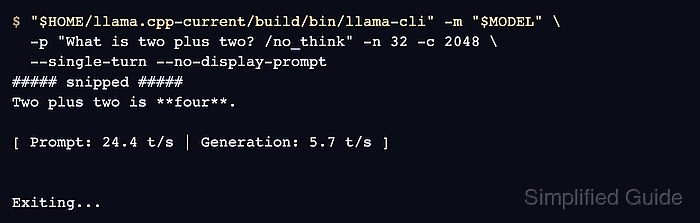
- Retest the same GGUF with a short inference request through the new executable. Example output:
$ "$HOME/llama.cpp-current/build/bin/llama-cli" -m "$MODEL" \
  -p "What is two plus two? /no_think" -n 32 -c 2048 \
  --single-turn --no-display-prompt
##### snipped #####
Two plus two is **four**.

[ Prompt: 24.4 t/s | Generation: 5.7 t/s ]


Exiting...
-c 2048 caps the context at 2,048 tokens to reduce memory use for this short test. A generated answer followed by Exiting… confirms that the model passed architecture recognition and inference; wording varies by model. Qwen3 recognizes /no_think in the prompt to request a response without a reasoning section. An unchanged architecture error means the model still lacks support in that binary. For an application that bundles llama.cpp, its bundled backend also needs a supporting version.
Related: How to run a local GGUF model with llama-cli