Language models cannot inspect files on a developer's machine through a chat prompt alone. Tool calling lets a client connected to the llama.cpp server supply a file's size and receive a final answer based on that result.
The model returns a function name and JSON arguments through the chat completions API. The client validates the request, runs the function locally, and sends a tool message back alongside the original assistant message. llama-server generates the replies but does not execute the client's functions.
A tool-capable model and its matching chat template are needed for reliable requests. Qwen2.5-1.5B-Instruct provides a small CPU option, and Python 3 can handle the HTTP exchange without an SDK. A client restricted to one local document keeps file access separate from arbitrary model-generated commands.
Steps to use tool calling with the llama.cpp server:
- Build llama.cpp with the CMake source installation method.
The Linux commands below use a checkout at ~/llama.cpp, with the binaries under build/bin. A checkout elsewhere needs its corresponding binary path.
- Refresh the APT package index on Ubuntu or Debian.
$ sudo apt-get update
- Install Python 3 for the client.
$ sudo apt-get install --assume-yes python3
The client uses only Python's standard library. The package installation needs sudo; the server and client run as your regular user.
- Start llama-server with Qwen2.5-1.5B-Instruct and its embedded chat template.
$ ~/llama.cpp/build/bin/llama-server \
  -hf Qwen/Qwen2.5-1.5B-Instruct-GGUF:Q4_K_M \
  --alias local-tools --jinja --ctx-size 4096 \
  --parallel 1 --threads 2 --host 127.0.0.1 --port 8080
The first start downloads the public quantized model from Qwen's repository. The alias local-tools matches the client's model value. --jinja enables tool-aware template rendering; this model needs no template override. The context and single slot limit memory use. The Linux source build uses CPU inference without a GPU backend. The explicit port keeps the client URL consistent across server versions. The terminal stays occupied while the server runs. A listening on http://127.0.0.1:8080 log line indicates that model loading has finished.
The listener has no API key and is accessible to local processes. Keeping it on 127.0.0.1 prevents direct connections from other computers. Model-provided function names and arguments are untrusted input, even on a local server.
- Save a new report.txt containing the following text in your working directory.
- report.txt
Monthly sales summary.
The client runs in a second terminal while the server remains active. This document is the only file the tool will inspect; its contents are not sent to the model. A trailing newline affects the byte count.
- Create tool_client.py in the same directory using your text editor.
- tool_client.py
import json
from pathlib import Path
from urllib.request import Request, urlopen


def complete(messages, tools, tool_choice):
    payload = {
        "model": "local-tools",
        "messages": messages,
        "tools": tools,
        "tool_choice": tool_choice,
        "temperature": 0,
        "max_tokens": 128,
    }
    request = Request(
        "http://127.0.0.1:8080/v1/chat/completions",
        data=json.dumps(payload).encode("utf-8"),
        headers={"Content-Type": "application/json"},
    )
    with urlopen(request, timeout=120) as response:
        return json.load(response)["choices"][0]
The helper sends a non-streaming JSON request and returns its first completion choice. HTTP errors raise an exception rather than being treated as a model answer.
- Append the file-size tool definition at the end of tool_client.py.
tools = [{
    "type": "function",
    "function": {
        "name": "get_file_size",
        "description": "Return the size of report.txt in bytes.",
        "parameters": {
            "type": "object",
            "properties": {
                "filename": {
                    "type": "string",
                    "enum": ["report.txt"],
                }
            },
            "required": ["filename"],
            "additionalProperties": False,
        },
    },
}]
The schema describes the function to the model. It does not implement the function or replace client-side argument validation.
- Append the initial messages and tool-call request at the end of tool_client.py.
messages = [
    {"role": "system", "content": "Use tool results for file information."},
    {"role": "user", "content": "How many bytes are in report.txt?"},
]
first = complete(messages, tools, "required")
assistant = first["message"]
calls = assistant.get("tool_calls", [])
if first["finish_reason"] != "tool_calls" or len(calls) != 1:
    raise RuntimeError("Expected one complete tool call")
print("Tool call:", json.dumps(calls[0], indent=2))
messages.append(assistant)
tool_choice set to required requests a tool call for this turn. With auto, the model may answer without calling a tool. Retaining the assistant message preserves the call ID that the tool response must reference.
- Append the validated local lookup and tool-result message at the end of tool_client.py.
call = calls[0]
function = call["function"]
arguments = json.loads(function["arguments"])
if (
    call["type"] != "function"
    or function["name"] != "get_file_size"
    or arguments != {"filename": "report.txt"}
):
    raise ValueError("Unsupported tool or arguments")
result = {"filename": "report.txt", "bytes": Path("report.txt").stat().st_size}
print("Tool result:", json.dumps(result))
messages.append({
    "role": "tool",
    "tool_call_id": call["id"],
    "content": json.dumps(result),
})
The client reads the actual file metadata only after checking the function name and the complete argument object. It executes no shell command, evaluates no generated code, and accepts no model-selected path. The content field carries the tool result as a JSON string.
- Append the final-answer request at the end of tool_client.py.
final = complete(messages, tools, "none")
answer = final["message"]
if (
    final["finish_reason"] != "stop"
    or answer.get("tool_calls")
    or not answer.get("content")
):
    raise RuntimeError("Expected a complete final answer")
print("Final answer:", answer["content"])
The second request includes the original conversation, assistant tool call, and matching tool result. tool_choice set to none asks for a text answer instead of another tool call. A length finish reason is rejected because the token limit may have cut off the reply.
- Save tool_client.py with all five sections in order.
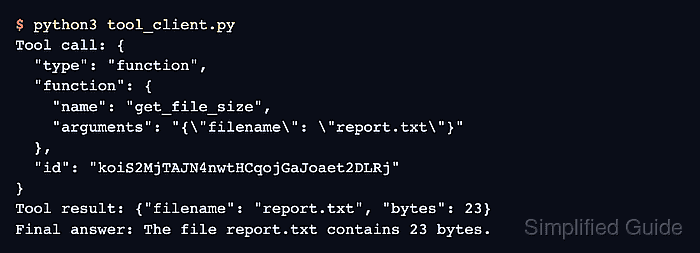
- Run the client to confirm the tool call, local byte count, and final answer agree. Example output:
$ python3 tool_client.py
Tool call: {
  "type": "function",
  "function": {
    "name": "get_file_size",
    "arguments": "{\"filename\": \"report.txt\"}"
  },
  "id": "koiS2MjTAJN4nwtHCqojGaJoaet2DLRj"
}
Tool result: {"filename": "report.txt", "bytes": 23}
Final answer: The file report.txt contains 23 bytes.
The tool call must name get_file_size with report.txt, and the final answer must use the byte count printed in Tool result. The call IDs and answer wording vary. A plain assistant answer without tool_calls, an HTTP error, or a mismatched byte count does not complete the exchange.