Generation parameters in llama.cpp control how the sampler chooses tokens after a prompt has been evaluated. Setting them on a server request helps when one call needs a colder repeatable answer, a wider creative answer, a fixed token budget, or a stop sequence that hands control back to an application.
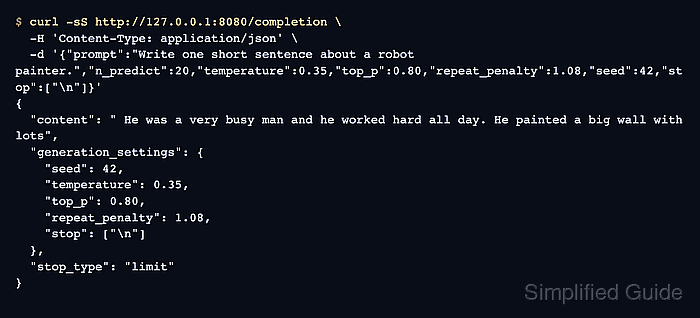
The native /completion endpoint accepts request-level fields such as temperature, top_p, repeat_penalty, seed, n_predict, and stop. Those fields apply to the current generation task, so one client can tune a request without changing the server startup command or the defaults used by another client.
A fixed seed is useful for comparing parameter changes, but it is not a cross-version promise that every backend, model file, and build will emit identical text forever. Treat the echoed generation_settings object as the proof that the server received the intended values for that request.
Steps to set llama.cpp generation parameters:
- Start llama-server with a small GGUF model.
$ llama-server \
  --hf-repo ggml-org/tiny-llamas \
  --hf-file stories15M-q4_0.gguf \
  --host 127.0.0.1 \
  --port 8080 \
  --ctx-size 128
##### snipped #####
srv    load_model: loading model 'ggml-org/tiny-llamas'
srv  llama_server: model loaded
srv  llama_server: listening on http://127.0.0.1:8080
Replace the sample --hf-repo and --hf-file values with -m models/chat-model.gguf when using a local model file.
Related: How to start the llama.cpp server - Check that the server is ready before sending a tuned request.
$ curl -sS http://127.0.0.1:8080/health
{"status":"ok"}
- Send a completion request with explicit sampling values.
$ curl -sS http://127.0.0.1:8080/completion \
  -H 'Content-Type: application/json' \
  -d '{
    "prompt": "Write one short sentence about a robot painter.",
    "n_predict": 20,
    "temperature": 0.35,
    "top_p": 0.80,
    "repeat_penalty": 1.08,
    "seed": 42,
    "stop": ["\n"]
  }'
{
  "content": " He was a very busy man and he worked hard all day. He painted a big wall with lots",
  "generation_settings": {
    "seed": 42,
    "temperature": 0.3499999940395355,
    "top_p": 0.800000011920929,
    "repeat_penalty": 1.0800000429153442,
    "stop": ["\n"]
  },
  "stop_type": "limit",
  "tokens_predicted": 20
}
The full response also includes model, timing, cache, and token fields. The generation_settings object should echo the request values after normal floating-point rounding.
- Lower or raise one sampling value at a time when comparing output style.
$ curl -sS http://127.0.0.1:8080/completion \
  -H 'Content-Type: application/json' \
  -d '{
    "prompt": "Write one short sentence about a robot painter.",
    "n_predict": 20,
    "temperature": 0.80,
    "top_p": 0.95,
    "repeat_penalty": 1.00,
    "seed": 42,
    "stop": ["\n"]
  }'
{
  "content": " The robot painted a big, beautiful house.",
  "generation_settings": {
    "seed": 42,
    "temperature": 0.800000011920929,
    "top_p": 0.949999988079071,
    "repeat_penalty": 1.0,
    "stop": ["\n"]
  },
  "stop_type": "word",
  "tokens_predicted": 10
}
Temperature changes randomness, top_p limits the nucleus sampling pool, repeat_penalty discourages repeated token sequences, seed makes comparison runs easier, and stop ends generation when the listed string appears.
- Confirm the application uses the same parameter names when it calls llama-server.
{
  "n_predict": 120,
  "temperature": 0.35,
  "top_p": 0.80,
  "repeat_penalty": 1.08,
  "seed": 42,
  "stop": ["\nUser:"]
}
Use /v1/chat/completions for OpenAI-compatible chat clients. Use /completion when the client needs llama.cpp-specific fields such as repeat_penalty and the native generation_settings response.
Related: How to call the llama.cpp chat completions API

Mohd Shakir Zakaria is a cloud architect with deep roots in software development and open-source advocacy. Certified in AWS, Red Hat, VMware, ITIL, and Linux, he specializes in designing and managing robust cloud and on-premises infrastructures.


