Automated workflows sometimes reach an action that should not proceed on application logic alone. A LangGraph interrupt can suspend the active run at that boundary and expose the pending action to a reviewer before a protected node is allowed to execute.
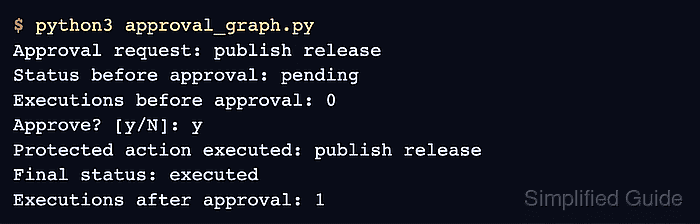
Checkpointed state keeps the paused run available for the approval decision, while a stable thread_id tells LangGraph which run to resume. The local example uses InMemorySaver within one Python process; approvals that must survive restarts need a durable checkpointer.
Resuming an interrupt restarts the approval node from its beginning. Placing the protected operation in a separate destination node keeps it behind the decision and prevents node replay from repeating that operation before approval.
Steps to add human approval with LangGraph interrupts:
- Create approval_graph.py with the LangGraph imports plus an ApprovalState schema.
- approval_graph.py
from typing import Literal, TypedDict

from langgraph.checkpoint.memory import InMemorySaver
from langgraph.graph import END, START, StateGraph
from langgraph.types import Command, interrupt


class ApprovalState(TypedDict):
    action: str
    status: Literal["pending", "executed", "cancelled"]
    execution_count: int
- Add the interrupting approval node below ApprovalState.
- approval_graph.py
def request_approval(
    state: ApprovalState,
) -> Command[Literal["perform_action", "cancel_action"]]:
    approved = interrupt(
        {
            "question": "Approve this protected action?",
            "action": state["action"],
        }
    )
    return Command(goto="perform_action" if approved else "cancel_action")
The interrupt payload contains only JSON-serializable values, so a CLI, web application, or queue consumer can present the same request to a reviewer.
- Add the protected action node below request_approval().
- approval_graph.py
def perform_action(state: ApprovalState) -> dict:
    print(f"Protected action executed: {state['action']}")
    return {
        "status": "executed",
        "execution_count": state["execution_count"] + 1,
    }
- Add the cancellation node below perform_action().
- approval_graph.py
def cancel_action(state: ApprovalState) -> dict:
    return {"status": "cancelled"}
- Append the graph topology with an in-memory checkpointer to approval_graph.py.
- approval_graph.py
builder = StateGraph(ApprovalState)
builder.add_node("request_approval", request_approval)
builder.add_node("perform_action", perform_action)
builder.add_node("cancel_action", cancel_action)
builder.add_edge(START, "request_approval")
builder.add_edge("perform_action", END)
builder.add_edge("cancel_action", END)

graph = builder.compile(checkpointer=InMemorySaver())
InMemorySaver is appropriate for a local demonstration but loses checkpoints when the process exits. A database-backed checkpointer allows a production reviewer to resume the same thread from another process.
- Append the initial graph invocation to approval_graph.py.
- approval_graph.py
config = {"configurable": {"thread_id": "approval-demo"}}

paused = graph.invoke(
    {
        "action": "publish release",
        "status": "pending",
        "execution_count": 0,
    },
    config=config,
)
request = paused["__interrupt__"][0].value
print(f"Approval request: {request['action']}")
The same thread_id must be supplied to the initial invocation and the resume command because it identifies the saved checkpoint.
- Append the paused-state inspection to approval_graph.py.
- approval_graph.py
paused_state = graph.get_state(config).values
print(f"Status before approval: {paused_state['status']}")
print(f"Executions before approval: {paused_state['execution_count']}")
- Append the approval resume path to approval_graph.py.
- approval_graph.py
approved = input("Approve? [y/N]: ").strip().lower() == "y"
final_state = graph.invoke(Command(resume=approved), config=config)

print(f"Final status: {final_state['status']}")
print(f"Executions after approval: {final_state['execution_count']}")
A response other than y sends the saved run to cancel_action, leaving execution_count at 0.
- Run the approval workflow from the project environment.
$ python3 approval_graph.py
Approval request: publish release
Status before approval: pending
Executions before approval: 0
Approve? [y/N]:
- Enter y at the approval prompt.
Approve? [y/N]: y
Protected action executed: publish release
Final status: executed
Executions after approval: 1

Mohd Shakir Zakaria is a cloud architect with deep roots in software development and open-source advocacy. Certified in AWS, Red Hat, VMware, ITIL, and Linux, he specializes in designing and managing robust cloud and on-premises infrastructures.


