LangChain v1 moved agent construction out of LangGraph's prebuilt module and split legacy chains into a compatibility package. A Python application written for LangChain 0.3 reaches v1 by changing its dependencies, imports and agent constructor together, and keeps its tools and request handling.
The v1 agent constructor accepts a system prompt and middleware in place of the older prompt and hook arguments. Existing tools and model initialization can usually stay in place, although a model already bound to tools must be replaced with its original unbound instance.
A separate virtual environment keeps the original installation available during migration. Python 3.10 or later is required; the shell commands assume Linux or macOS and an application with an active environment, an agent entry point named app.py, and dependencies in requirements.txt. The before-and-after runs call the application's real model, so its credentials must be available in the shell.
Steps to migrate a Python application to LangChain v1:
- Record the installed dependencies from the application's original environment.
$ python -m pip freeze > requirements-before-v1.txt
Dependency upgrades can break provider integrations and other application packages. The frozen versions and the original environment provide a recovery point before any files change.
- Back up the agent entry point.
$ cp app.py app-before-v1.py
For an application with multiple source files, a source-control commit or complete source backup must also cover the modules being edited. Neither backup should include credentials.
- Back up the dependency file.
$ cp requirements.txt requirements-before-edit.txt
Rollback restores the saved source and requirements and selects the original environment; downgrading LangChain alone does not restore old code.
- Create a file named trace_agent.py beside app.py using your text editor.
- Enter the following trace script, replacing the question with a request that uses one of your application's tools.
- trace_agent.py
from app import agent

result = agent.invoke({
    "messages": [
        {"role": "user", "content": "What is 7 times 6?"}
    ]
})
for message in result["messages"]:
    print(message.type, message.content)
    for call in getattr(message, "tool_calls", []):
        print("call", call["name"])
        print("args", call["args"])
The script imports the agent object from app.py, so the same file runs before and after migration without touching the application's own input and output. If the object has another name, the import line uses that name. If app.py starts its own request at the top level, that code needs to sit under if __name__ == "__main__": before the import works.
- Save trace_agent.py.
- Run the trace script in the original environment.
$ python trace_agent.py
##### snipped #####
human What is 7 times 6?
ai
call multiply
args {'a': 7, 'b': 6}
tool 42
ai 7 times 6 is 42.
A call line, a tool line and a final reply show that the request went through the tool. A reply without them bypassed the tool, so the question needs changing before the comparison means anything. The snipped line is a LangChainPendingDeprecationWarning from the original packages and is harmless. Tested with a local Qwen2.5 model; tool names, arguments and reply wording depend on the application and model.
Message traces can expose private prompts, tool arguments, or tool results. A test should use non-sensitive input and tools that cannot modify production data; the trace does not belong in a public log.
- Open requirements.txt in your text editor.
- Replace the LangChain, LangGraph and provider lines with v1-compatible constraints, using your own provider package in place of langchain-openai.
- requirements.txt
langchain==1.4.9
langchain-openai>=1,<2
langgraph>=1,<2
The application's other dependencies stay as they are. A kept 0.3 pin on langchain-openai ends in ResolutionImpossible, because that release needs langchain-core below 1 and LangChain 1.4.9 needs 1.7.5 or later. Other providers need a release that supports langchain-core 1, which is not always a 1.x number: langchain-google-genai is on 4.x. If requirements.txt came from pip freeze, remove the remaining LangChain pins such as langchain-core and langgraph-checkpoint, and keep only the other packages the application imports directly. An application retaining legacy chains also needs langchain-classic in this file; an application using only the migrated agent does not.
- Save requirements.txt.
- Create a candidate environment with Python 3.10 or later.
$ python3 -m venv .venv-v1
An application still on Python 3.9 cannot install LangChain 1.4.9 into an environment made from the same interpreter, so a newer one is needed here, such as python3.12 -m venv .venv-v1.
Related: How to create a virtual environment for LangChain - Activate the candidate environment.
$ source .venv-v1/bin/activate
- Install the application's complete requirements into the candidate environment.
$ python -m pip install -r requirements.txt
The installation includes provider integrations and other application dependencies, not only the LangChain upgrade.
- Open the agent entry point in your text editor.
- Replace the old agent import with the v1 agent and middleware imports.
from langchain.agents import AgentState, create_agent
from langchain.agents.middleware import before_model
from langgraph.runtime import Runtime
These imports replace the import of create_react_agent from the old prebuilt module. The existing model initialization and tool definitions remain below the imports. An application without a pre-model hook needs only create_agent from these lines.
- Convert an existing pre-model hook to middleware above the agent constructor.
@before_model
def require_question(state: AgentState, runtime: Runtime):
    if not state["messages"]:
        raise ValueError("A question is required")
    return None
This input guard shows the middleware signature and decorator. An existing hook's checks move into this function, which returns None when it changes nothing, and a returned messages update changes the agent state as before. before_model ignores llm_input_messages, so a hook that shortens what the model receives would silently send the full history; that hook moves to wrap_model_call, imported in place of before_model, and calls its handler with request.override carrying the shorter messages list. Under ainvoke, a wrap_model_call function must be async. An application without a pre-model hook needs neither this function nor its middleware entry. For an existing post-model hook, the corresponding decorator is after_model. Dynamic prompt functions use dynamic_prompt middleware instead of being passed as a static system prompt.
Related: How to create custom middleware for a LangChain agent - Replace the old agent constructor with create_agent below the tool and middleware definitions, using your application's own instruction as the system prompt.
agent = create_agent(
    model=model,
    tools=tools,
    system_prompt="Use the multiply tool and reply briefly.",
    middleware=[require_question],
)
The variables model and tools refer to the application's existing unbound chat model and tool list. The old prompt argument becomes system_prompt, retaining the application's instruction as a string; a SystemMessage contributes its text content. The middleware list replaces pre_model_hook and post_model_hook arguments. An application without middleware can omit the list. The invoke call and the code that reads its result stay as they are.
- Redirect any deliberately retained legacy chain imports to the compatibility package.
from langchain_classic.chains import LLMChain
This replacement applies only where the application still uses LLMChain or another legacy chain. It requires the langchain-classic dependency already added to requirements.txt; it is unnecessary for create_agent. Other removed legacy namespaces and advanced agent features have their own mappings in the upstream migration reference.
Related: How to fix ModuleNotFoundError for langchain.chains in LangChain - Save app.py.
- Check the candidate environment for incompatible installed dependencies.
$ python -m pip check
No broken requirements found.
- Confirm that the candidate environment contains the selected LangChain release.
$ python -c 'import langchain; print(langchain.__version__)'
1.4.9
The selected target is 1.4.9 within the v1 series, rather than an unconstrained upgrade to a future major release.
Related: How to check the LangChain version - Check the agent source for old import paths.
$ grep -nE 'langgraph[.]prebuilt|langchain[.]chains' app.py
No output and exit status 1 mean neither old path was found; a printed line is an old import to replace. In a larger application, the same search must cover every maintained Python source file, excluding backups and virtual environments. Other removed imports, such as langchain.memory, are not matched here and stop the next trace with an import error.
- Freeze the candidate's resolved dependency versions.
$ python -m pip freeze > requirements-v1.lock
The original dependency record remains in requirements-before-v1.txt. If migration testing fails, the original environment can still run the saved entry point with .venv/bin/python app-before-v1.py when the original environment is named .venv.
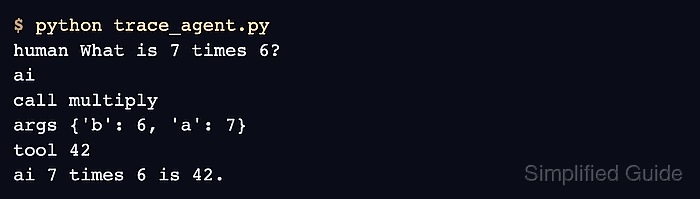
- Run the trace script in the candidate environment.
$ python trace_agent.py
human What is 7 times 6?
ai
call multiply
args {'b': 6, 'a': 7}
tool 42
ai 7 times 6 is 42.
The trace should keep the baseline's shape, with a call line, a tool line and a final reply using that result; the argument order and reply wording can differ between runs. A final reply without the tool line does not demonstrate that the migrated tool path works.
- Delete the temporary trace script.
$ rm trace_agent.py
- Run the migrated application the way you normally start it.
$ python app.py "What is 7 times 6?"
7 times 6 is 42.
app.py keeps its own input handling and output, so a command line, service or interface other than this one works as it did before the migration.