Kubernetes namespaces often hold workloads from one team, application, or environment, but they still share cluster CPU, memory, and object capacity. A ResourceQuota sets namespace-level hard limits so the API server can reject new objects that would push that namespace over its allocation.
A ResourceQuota is enforced by the Kubernetes control plane during object creation or update. CPU and memory quotas work against the requests and limits declared in Pod specs, so workload manifests need those fields before the namespace policy can admit them consistently.
Apply the quota before tenant workloads are created, because changing the quota does not resize or remove existing objects. A namespace named team-a, a small CPU and memory budget, one accepted Pod, and a server-side dry run are enough to prove the policy without consuming real tenant capacity.
Steps to configure a Kubernetes ResourceQuota:
- Create the namespace that will receive the quota.
$ kubectl create namespace team-a
namespace/team-a created
Use an existing tenant namespace instead of team-a when the namespace already exists.
Related: How to create a Kubernetes namespace
- Save the ResourceQuota manifest.
- team-a-quota.yaml
apiVersion: v1
kind: ResourceQuota
metadata:
  name: team-a-quota
spec:
  hard:
    pods: "2"
    requests.cpu: "1"
    requests.memory: 1Gi
    limits.cpu: "2"
    limits.memory: 2Gi
pods limits the object count, while requests.* and limits.* cap the aggregate CPU and memory values declared by non-terminal Pods in the namespace.
- Apply the quota to the namespace.
$ kubectl apply -f team-a-quota.yaml --namespace team-a
resourcequota/team-a-quota created
- Inspect the quota status.
$ kubectl describe resourcequota team-a-quota --namespace team-a
Name:            team-a-quota
Namespace:       team-a
Resource         Used  Hard
--------         ----  ----
limits.cpu       0     2
limits.memory    0     2Gi
pods             0     2
requests.cpu     0     1
requests.memory  0     1Gi
Hard shows the enforced namespace limits. Used starts at zero because no matching Pods exist yet.
- Save a Pod manifest that stays within the quota.
- within-quota-pod.yaml
apiVersion: v1
kind: Pod
metadata:
  name: within-quota
spec:
  containers:
  - name: nginx
    image: nginx:1.29.5-alpine
    resources:
      requests:
        cpu: 400m
        memory: 256Mi
      limits:
        cpu: 800m
        memory: 512Mi
CPU and memory quotas that include request or limit resources require workload manifests to declare matching resource fields before admission.
Tool: Kubernetes Resource Requests Checker - Apply the Pod manifest to consume part of the quota.
$ kubectl apply -f within-quota-pod.yaml --namespace team-a
pod/within-quota created
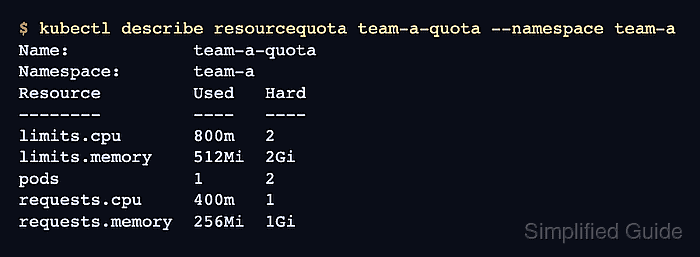
- Check the updated quota usage.
$ kubectl describe resourcequota team-a-quota --namespace team-a
Name:            team-a-quota
Namespace:       team-a
Resource         Used   Hard
--------         ----   ----
limits.cpu       800m   2
limits.memory    512Mi  2Gi
pods             1      2
requests.cpu     400m   1
requests.memory  256Mi  1Gi
The accepted Pod now counts against the namespace quota even if the container image has not finished pulling.
- Save an over-quota Pod manifest.
- too-large-pod.yaml
apiVersion: v1
kind: Pod
metadata:
  name: too-large
spec:
  containers:
  - name: nginx
    image: nginx:1.29.5-alpine
    resources:
      requests:
        cpu: 800m
        memory: 512Mi
      limits:
        cpu: 1600m
        memory: 1Gi
- Run a server-side dry run for the over-quota Pod.
$ kubectl apply --dry-run=server -f too-large-pod.yaml --namespace team-a
Error from server (Forbidden): error when creating "too-large-pod.yaml": pods "too-large" is forbidden: exceeded quota: team-a-quota, requested: limits.cpu=1600m,requests.cpu=800m, used: limits.cpu=800m,requests.cpu=400m, limited: limits.cpu=2,requests.cpu=1
--dry-run=server sends the object through API validation and admission without saving it.
- Delete the temporary verification Pod.
$ kubectl delete pod within-quota --namespace team-a --ignore-not-found
pod "within-quota" deleted from team-a namespace
- Delete the temporary Pod manifests.
$ rm within-quota-pod.yaml too-large-pod.yaml
Keep team-a-quota.yaml in source control or the platform configuration repository so the namespace policy can be reviewed and reapplied.

Mohd Shakir Zakaria is a cloud architect with deep roots in software development and open-source advocacy. Certified in AWS, Red Hat, VMware, ITIL, and Linux, he specializes in designing and managing robust cloud and on-premises infrastructures.


