Kubernetes node maintenance is safer when the scheduler stops placing new pods before the machine is rebooted, patched, replaced, or inspected. Cordoning marks a node unschedulable, and draining asks the API to evict movable pods so controllers can recreate them somewhere else.
The drain operation is a voluntary disruption. It waits for graceful termination, respects matching PodDisruptionBudget objects, and leaves DaemonSet pods alone when --ignore-daemonsets is used. Pods without a controller, pods with local emptyDir data, or workloads protected by a strict budget need an explicit decision before the node is taken out of service.
Run the commands from a workstation or bastion with kubectl access to the target cluster. In the command output, worker-2 is the node being maintained and web is a Deployment with replicas that can move to worker-1; replace those names with the node and workload labels from the cluster being maintained.
Steps to cordon and drain a Kubernetes node:
- List the nodes and choose the maintenance target.
$ kubectl get nodes
NAME            STATUS   ROLES           AGE   VERSION
control-plane   Ready    control-plane   6d    v1.36.1
worker-1        Ready    <none>          6d    v1.36.1
worker-2        Ready    <none>          6d    v1.36.1
- Check disruption budgets before evicting application pods.
$ kubectl get poddisruptionbudgets --all-namespaces
NAMESPACE   NAME      MIN AVAILABLE   MAX UNAVAILABLE   ALLOWED DISRUPTIONS   AGE
default     web-pdb   3               N/A               1                     2d
Drain can proceed only while the affected workload has enough allowed disruptions. A value of 0 under ALLOWED DISRUPTIONS means kubectl drain waits or stops until the budget allows an eviction.
Tool: Kubernetes Cluster Capacity Calculator - List the workload pods that should move away from the node.
$ kubectl get pods -l app=web -o wide
NAME                   READY   STATUS    RESTARTS   AGE   IP           NODE       NOMINATED NODE   READINESS GATES
web-847f49cc4d-h2446   1/1     Running   0          5m    10.244.1.3   worker-2   <none>           <none>
web-847f49cc4d-kq7z5   1/1     Running   0          5m    10.244.2.3   worker-1   <none>           <none>
web-847f49cc4d-lk4m2   1/1     Running   0          5m    10.244.1.2   worker-2   <none>           <none>
web-847f49cc4d-n86g6   1/1     Running   0          5m    10.244.2.2   worker-1   <none>           <none>
Use the label selector for the workload being protected, or use --all-namespaces with --field-selector spec.nodeName=worker-2 when you need a node-wide pod inventory.
- Cordon the node.
$ kubectl cordon worker-2
node/worker-2 cordoned
kubectl drain also marks the node unschedulable, but cordoning first stops new scheduler placements while you inspect disruption and pod placement state.
- Confirm the node no longer accepts scheduled pods.
$ kubectl get node worker-2
NAME       STATUS                     ROLES    AGE   VERSION
worker-2   Ready,SchedulingDisabled   <none>   6d    v1.36.1
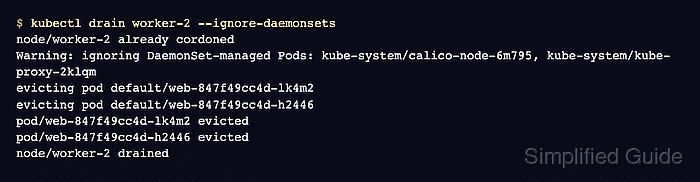
- Drain the node while leaving DaemonSet pods in place.
$ kubectl drain worker-2 --ignore-daemonsets
node/worker-2 already cordoned
Warning: ignoring DaemonSet-managed Pods: kube-system/calico-node-6m795, kube-system/kube-proxy-2klqm
evicting pod default/web-847f49cc4d-lk4m2
evicting pod default/web-847f49cc4d-h2446
pod/web-847f49cc4d-lk4m2 evicted
pod/web-847f49cc4d-h2446 evicted
node/worker-2 drained
Use --force only after identifying unmanaged pods that can be removed. Use --delete-emptydir-data only when local emptyDir data on the drained pods can be discarded. --disable-eviction bypasses PodDisruptionBudget checks.
Related: How to check Kubernetes events
Related: How to troubleshoot a pending Kubernetes pod - Verify the workload pods are running away from the drained node.
$ kubectl get pods -l app=web -o wide
NAME                   READY   STATUS    RESTARTS   AGE   IP           NODE       NOMINATED NODE   READINESS GATES
web-847f49cc4d-7ck4r   1/1     Running   0          8s    10.244.2.5   worker-1   <none>           <none>
web-847f49cc4d-kq7z5   1/1     Running   0          6m    10.244.2.3   worker-1   <none>           <none>
web-847f49cc4d-kzbjz   1/1     Running   0          8s    10.244.2.4   worker-1   <none>           <none>
web-847f49cc4d-n86g6   1/1     Running   0          6m    10.244.2.2   worker-1   <none>           <none>
- Complete the maintenance work while the node remains drained.
Do not power off or replace the node until kubectl drain returns successfully. A failed drain means at least one pod, budget, or controller exception still needs review.
- Uncordon the node after maintenance.
$ kubectl uncordon worker-2
node/worker-2 uncordoned
- Confirm the node is schedulable again.
$ kubectl get node worker-2
NAME       STATUS   ROLES    AGE   VERSION
worker-2   Ready    <none>   6d    v1.36.1

Mohd Shakir Zakaria is a cloud architect with deep roots in software development and open-source advocacy. Certified in AWS, Red Hat, VMware, ITIL, and Linux, he specializes in designing and managing robust cloud and on-premises infrastructures.


