Private container images need registry credentials before a Kubernetes node can pull them for a Pod. An image pull secret stores those credentials as a kubernetes.io/dockerconfigjson Secret, letting the workload reference a registry login without putting the username and token directly in the Pod manifest.
kubectl create secret docker-registry builds the Docker config JSON that the kubelet can use during image pulls. The Secret must live in the same namespace as the Pod, and the --docker-server value must match the registry host in the image reference.
A disposable namespace and a single test Pod keep the check separate from application workloads. Use a pull-only registry token or robot account for the Secret, then verify that the Pod moves past the image pull and starts before copying the pattern into a Deployment or another controller.
Related: How to create a Kubernetes Secret
Related: How to create a Kubernetes Deployment
Steps to create a Kubernetes image pull secret:
- Create a namespace for the private image test.
$ kubectl create namespace app-private
namespace/app-private created
Use the application namespace instead of app-private when adding a pull Secret to an existing workload.
Related: How to create a Kubernetes namespace
- Create the image pull Secret for the private registry.
$ kubectl create secret docker-registry regcred --namespace app-private --docker-server=registry.example.com --docker-username=registry-user --docker-password='registry-token' --docker-email=ops@example.com
secret/regcred created
Use a pull-only token or robot account rather than a personal registry password. Avoid saving real registry credentials in shared shell history, screenshots, or support transcripts.
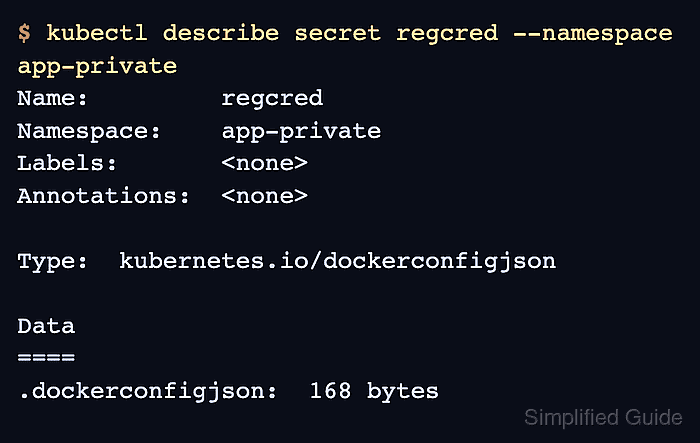
- Confirm that the Secret has the Docker config type.
$ kubectl describe secret regcred --namespace app-private
Name:         regcred
Namespace:    app-private
Labels:       <none>
Annotations:  <none>

Type:  kubernetes.io/dockerconfigjson

Data
====
.dockerconfigjson:  168 bytes
- Create a Pod manifest that references the private image and pull Secret.
- private-image-pod.yaml
apiVersion: v1
kind: Pod
metadata:
  name: private-web
  namespace: app-private
spec:
  restartPolicy: Never
  imagePullSecrets:
    - name: regcred
  containers:
    - name: private-web
      image: registry.example.com/team/private-web:1.0
      command: ["sh", "-c", "echo private image pull ok; sleep 300"]
The Secret name under imagePullSecrets must exist in app-private. Use the same field inside a Deployment, Job, CronJob, DaemonSet, or StatefulSet Pod template.
- Apply the Pod manifest.
$ kubectl apply -f private-image-pod.yaml
pod/private-web created
- Wait for the Pod to become ready.
$ kubectl wait --for=condition=Ready pod/private-web --namespace app-private --timeout=120s
pod/private-web condition met
A Pod that stays in ImagePullBackOff or ErrImagePull usually needs the registry host, Secret namespace, token scope, or image name checked.
- Check the Pod status.
$ kubectl get pod private-web --namespace app-private
NAME          READY   STATUS    RESTARTS   AGE
private-web   1/1     Running   0          1s
- Read the container output to confirm the pulled image started.
$ kubectl logs private-web --namespace app-private
private image pull ok
- Inspect the Pod events for a successful image pull.
$ kubectl describe pod private-web --namespace app-private
Name:             private-web
Namespace:        app-private
Status:           Running
##### snipped #####
Containers:
  private-web:
    Image:         registry.example.com/team/private-web:1.0
    State:         Running
    Ready:         True
##### snipped #####
Events:
  Type    Reason     Age   From     Message
  ----    ------     ----  ----     -------
  Normal  Scheduled  0s    default-scheduler  Successfully assigned app-private/private-web to worker-1
  Normal  Pulling    0s    kubelet  Pulling image "registry.example.com/team/private-web:1.0"
  Normal  Pulled     0s    kubelet  Successfully pulled image "registry.example.com/team/private-web:1.0"
  Normal  Created    0s    kubelet  Container created
  Normal  Started    0s    kubelet  Container started
If the event reason is FailedToRetrieveImagePullSecret, ErrImagePull, or ImagePullBackOff, inspect the event message before changing the workload.
Related: How to check Kubernetes events
Tool: Kubernetes Events Timeline Analyzer - Delete the test namespace when the pull check is finished.
$ kubectl delete namespace app-private
namespace "app-private" deleted
Skip this command for a real application namespace. Delete only the test Pod and test Secret if the namespace contains other workloads.

Mohd Shakir Zakaria is a cloud architect with deep roots in software development and open-source advocacy. Certified in AWS, Red Hat, VMware, ITIL, and Linux, he specializes in designing and managing robust cloud and on-premises infrastructures.


