Kubernetes scheduling rules decide where a Pod may run after the API server accepts its spec. Pod affinity and anti-affinity let a workload express placement relative to other labeled Pods, so latency-sensitive parts can stay together while replicas that should survive a node failure can stay apart.
Affinity terms compare labels on existing Pods, not labels on nodes. The topologyKey tells the scheduler which node label defines “together” or “apart”, with kubernetes.io/hostname meaning the same node and labels such as topology.kubernetes.io/zone meaning the same zone.
A required rule filters eligible nodes during scheduling, while a preferred rule changes node scoring without making placement mandatory. A temporary namespace keeps the placement test isolated, and deleting that namespace removes only the objects created for the test.
Steps to configure Kubernetes pod affinity and anti-affinity:
- Create a namespace for the placement test.
$ kubectl create namespace affinity-demo
namespace/affinity-demo created
- Create a labeled cache Pod.
$ kubectl run cache --image=registry.k8s.io/pause:3.10 --labels=app=cache --restart=Never -n affinity-demo
pod/cache created
The app=cache label is the target that the pod-affinity rule will match.
- Wait for the cache Pod to become ready.
$ kubectl wait pod/cache -n affinity-demo --for=condition=Ready --timeout=180s
pod/cache condition met
- Check the node that received the cache Pod.
$ kubectl get pod cache -n affinity-demo -o wide
NAME    READY   STATUS    RESTARTS   AGE   IP           NODE       NOMINATED NODE   READINESS GATES
cache   1/1     Running   0          1s    10.244.2.2   worker-2   <none>           <none>
- Create a manifest named affinity-demo.yaml.
- affinity-demo.yaml
apiVersion: v1
kind: Pod
metadata:
  name: web-near-cache
  namespace: affinity-demo
  labels:
    app: web-near-cache
spec:
  affinity:
    podAffinity:
      requiredDuringSchedulingIgnoredDuringExecution:
        - labelSelector:
            matchExpressions:
              - key: app
                operator: In
                values:
                  - cache
          topologyKey: kubernetes.io/hostname
  containers:
    - name: pause
      image: registry.k8s.io/pause:3.10
---
apiVersion: apps/v1
kind: Deployment
metadata:
  name: web-spread
  namespace: affinity-demo
spec:
  replicas: 2
  selector:
    matchLabels:
      app: web-spread
  template:
    metadata:
      labels:
        app: web-spread
    spec:
      affinity:
        podAntiAffinity:
          requiredDuringSchedulingIgnoredDuringExecution:
            - labelSelector:
                matchLabels:
                  app: web-spread
              topologyKey: kubernetes.io/hostname
      containers:
        - name: pause
          image: registry.k8s.io/pause:3.10
web-near-cache must run on the same kubernetes.io/hostname value as a Pod labeled app=cache. Each web-spread replica rejects nodes that already have another Pod labeled app=web-spread.
- Apply the affinity manifest.
$ kubectl apply -f affinity-demo.yaml
pod/web-near-cache created
deployment.apps/web-spread created
- Wait for the pod-affinity Pod to become ready.
$ kubectl wait pod/web-near-cache -n affinity-demo --for=condition=Ready --timeout=180s
pod/web-near-cache condition met
If this wait reaches the timeout, describe the Pod and check for FailedScheduling events.
Related: How to troubleshoot a pending Kubernetes pod - Wait for the anti-affinity Deployment rollout to finish.
$ kubectl rollout status deployment/web-spread -n affinity-demo --timeout=180s
deployment "web-spread" successfully rolled out
- Verify the scheduled node placement.
$ kubectl get pods -n affinity-demo -o wide
NAME                          READY   STATUS    RESTARTS   AGE   IP           NODE       NOMINATED NODE   READINESS GATES
cache                         1/1     Running   0          2s    10.244.2.2   worker-2   <none>           <none>
web-near-cache                1/1     Running   0          1s    10.244.2.3   worker-2   <none>           <none>
web-spread-7df5c547c8-fhrf5   1/1     Running   0          1s    10.244.2.4   worker-2   <none>           <none>
web-spread-7df5c547c8-ptlx2   1/1     Running   0          1s    10.244.1.2   worker-1   <none>           <none>
cache and web-near-cache share the same NODE value because required pod affinity matched app=cache. The web-spread replicas use different NODE values because required pod anti-affinity rejects another matching replica on the same hostname.
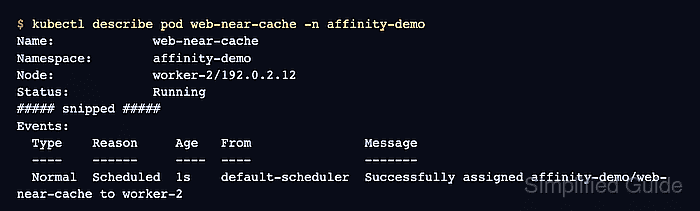
- Inspect the scheduling event for the affinity Pod.
$ kubectl describe pod web-near-cache -n affinity-demo
Name:             web-near-cache
Namespace:        affinity-demo
Node:             worker-2/192.0.2.12
Status:           Running
##### snipped #####
Events:
  Type    Reason     Age   From               Message
  ----    ------     ----  ----               -------
  Normal  Scheduled  1s    default-scheduler  Successfully assigned affinity-demo/web-near-cache to worker-2
  Normal  Pulled     0s    kubelet            Container image "registry.k8s.io/pause:3.10" already present on machine and can be accessed by the pod
  Normal  Created    0s    kubelet            Container created
  Normal  Started    0s    kubelet            Container started
- Delete the demo namespace after the placement test.
$ kubectl delete namespace affinity-demo
namespace "affinity-demo" deleted
Run this cleanup against the temporary namespace only. Deleting a namespace removes all objects inside it.

Mohd Shakir Zakaria is a cloud architect with deep roots in software development and open-source advocacy. Certified in AWS, Red Hat, VMware, ITIL, and Linux, he specializes in designing and managing robust cloud and on-premises infrastructures.


