JAX-backed Keras training often needs checkpoint directories that preserve array state for accelerator and distributed jobs. OrbaxCheckpoint saves Keras model state through Orbax during model.fit(), which gives JAX projects a checkpoint format aligned with the wider Orbax ecosystem.
The callback receives a checkpoint directory instead of a single .keras file path. Each saved epoch becomes a step directory under that root, and max_to_keep controls how many recent steps remain available for restore.
Use this path when the Keras backend is JAX and the Python environment has orbax-checkpoint installed. Resolve the checkpoint directory before passing it to the callback so Orbax and TensorStore receive an absolute path, then load the saved root with keras.saving.load_model() when save_weights_only stays at its default.
Related: How to set the Keras backend
Related: How to use ModelCheckpoint in Keras
Related: How to resume Keras training from a checkpoint
Steps to use Orbax checkpointing in Keras:
- Install Keras, JAX, Orbax, and NumPy in the active Python environment.
$ python -m pip install --upgrade keras jax orbax-checkpoint numpy
OrbaxCheckpoint is available in current Keras 3 releases. Use the platform-specific JAX installation path instead when the project needs GPU or TPU wheels.
Related: How to install Keras with pip - Select the JAX backend before importing Keras.
$ export KERAS_BACKEND=jax
Keras reads KERAS_BACKEND during import, so set it in the shell, job runner, or notebook kernel before any module imports Keras.
Related: How to set the Keras backend - Create use_orbax_checkpoint.py with an OrbaxCheckpoint callback and a restore check.
- use_orbax_checkpoint.py
import os
from pathlib import Path

os.environ.setdefault("KERAS_BACKEND", "jax")

import keras
import numpy as np


checkpoint_dir = Path("orbax-credit-score-checkpoints").resolve()
if checkpoint_dir.exists():
    raise SystemExit(f"Remove the existing checkpoint root first: {checkpoint_dir}")

keras.utils.set_random_seed(42)

x_train = np.linspace(-1.0, 1.0, 256, dtype="float32").reshape(64, 4)
y_train = (
    0.6 * x_train[:, :1]
    - 0.2 * x_train[:, 1:2]
    + 0.1 * x_train[:, 2:3]
    + 0.3
)
x_val = np.linspace(-0.8, 0.8, 64, dtype="float32").reshape(16, 4)
y_val = (
    0.6 * x_val[:, :1]
    - 0.2 * x_val[:, 1:2]
    + 0.1 * x_val[:, 2:3]
    + 0.3
)
sample = x_val[:3]

model = keras.Sequential(
    [
        keras.layers.Input(shape=(4,), name="features"),
        keras.layers.Dense(8, activation="relu", name="hidden"),
        keras.layers.Dense(1, name="score"),
    ]
)
model.compile(
    optimizer=keras.optimizers.Adam(learning_rate=0.05),
    loss="mse",
    metrics=["mae"],
)

checkpoint = keras.callbacks.OrbaxCheckpoint(
    directory=checkpoint_dir,
    max_to_keep=2,
    save_on_background=False,
)

history = model.fit(
    x_train,
    y_train,
    validation_data=(x_val, y_val),
    epochs=3,
    batch_size=16,
    callbacks=[checkpoint],
    verbose=0,
)

restored = keras.saving.load_model(checkpoint_dir)
restored_prediction = restored.predict(sample, verbose=0)
checkpoint_steps = sorted(
    path.name for path in checkpoint_dir.iterdir() if path.is_dir()
)

print(f"Keras backend: {keras.config.backend()}")
print(f"Checkpoint root: {checkpoint_dir}")
print(f"Checkpoint steps kept: {checkpoint_steps}")
print(f"Final val_loss: {history.history['val_loss'][-1]:.4f}")
print(f"Restored model type: {type(restored).__name__}")
print(f"Restored prediction shape: {restored_prediction.shape}")
Leave save_weights_only at its default when restoring with keras.saving.load_model(). If save_weights_only=True is used, rebuild the same architecture first and restore with model.load_weights(checkpoint_dir) instead.
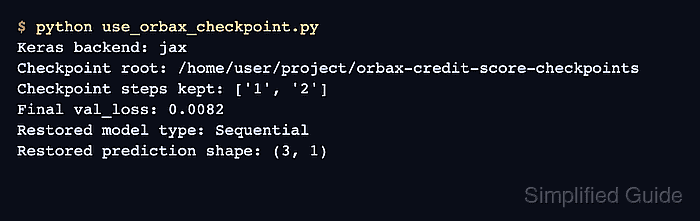
- Run the script and confirm the restored model can predict from the checkpoint root.
$ python use_orbax_checkpoint.py
Keras backend: jax
Checkpoint root: /home/user/project/orbax-credit-score-checkpoints
Checkpoint steps kept: ['1', '2']
Final val_loss: 0.0082
Restored model type: Sequential
Restored prediction shape: (3, 1)
The checkpoint root may also print Orbax or TensorStore warnings on CPU-only local runs. The kept step list, restored model type, and prediction shape confirm that Keras saved and loaded the Orbax checkpoint.
- Remove the demo script and checkpoint directory after the restore test.
$ rm -rf use_orbax_checkpoint.py orbax-credit-score-checkpoints
Do not remove a real training checkpoint root until the checkpoint has been copied, promoted, or replaced by a newer run.

Mohd Shakir Zakaria is a cloud architect with deep roots in software development and open-source advocacy. Certified in AWS, Red Hat, VMware, ITIL, and Linux, he specializes in designing and managing robust cloud and on-premises infrastructures.


