ESLint gives a JavaScript project a repeatable way to catch syntax problems and project-specific rule violations before code is merged or shipped. A project-level config keeps lint rules beside package metadata, so every developer and CI job can run the same checks.
Current ESLint releases use the flat config format, with eslint.config.mjs or another supported eslint.config.* file at the project root. The saved config loads the official @eslint/js recommended rules and adds eqeqeq so the setup checks both the shared baseline and a project rule.
Start from an npm project that already has package.json. The sample src/status.js file is only a lint target for verification, and removing it after the clean run leaves ESLint, @eslint/js, package-lock.json, package.json, and the lint script as the project changes.
Steps to configure ESLint for JavaScript:
- Install ESLint and the official JavaScript config package as development dependencies.
$ npm install --save-dev eslint @eslint/js

added 70 packages, and audited 71 packages in 5s

17 packages are looking for funding
  run `npm fund` for details

found 0 vulnerabilities
- Create the flat config file.
- eslint.config.mjs
import { defineConfig } from "eslint/config";
import js from "@eslint/js";

export default defineConfig([
  js.configs.recommended,
  {
    files: ["**/*.js"],
    rules: {
      eqeqeq: "error",
      "no-unused-vars": ["warn", { argsIgnorePattern: "^_" }]
    }
  }
]);
eslint.config.mjs avoids CommonJS loading rules in projects whose package.json still uses the default type value.
- Add an npm script that lints the project source directory.
$ npm pkg set scripts.lint="eslint src"
Change src to the directory that holds the JavaScript files in the project.
- Create a small file that violates the custom eqeqeq rule.
- src/status.js
function isReady(status) {
  return status == "ready";
}

isReady("ready");
- Run ESLint against the sample file.
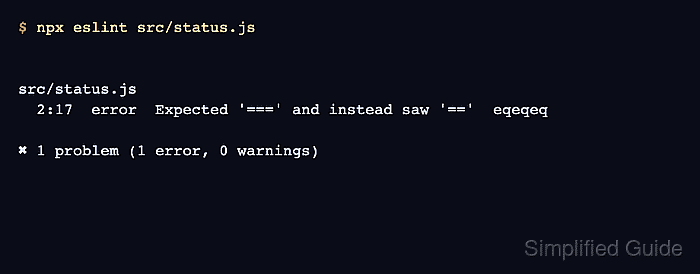
$ npx eslint src/status.js

src/status.js
  2:17  error  Expected '===' and instead saw '=='  eqeqeq

✖ 1 problem (1 error, 0 warnings)
The eqeqeq rule name in the last column comes from the custom project rule.
- Change the loose comparison to strict equality.
- src/status.js
function isReady(status) {
  return status === "ready";
}

isReady("ready");
- Run the saved lint script.
$ npm run lint

> eslint-demo@1.0.0 lint
> eslint src
No lint messages after the npm script header means ESLint exited without errors.
- Remove the sample file if it was only created for verification.
$ rm src/status.js
Skip this cleanup if src/status.js is real project source.

Mohd Shakir Zakaria is a cloud architect with deep roots in software development and open-source advocacy. Certified in AWS, Red Hat, VMware, ITIL, and Linux, he specializes in designing and managing robust cloud and on-premises infrastructures.


