Embedding retrieval in Haystack finds documents by vector similarity rather than exact word overlap. It suits semantic search and RAG pipelines where a question should match relevant text even when the wording differs.
The InMemoryEmbeddingRetriever component reads document vectors from InMemoryDocumentStore and accepts one query vector for each search. The store selects the similarity function, while the retriever's top_k value limits how many ranked documents are returned.
Small hand-written vectors keep the configuration visible without a model download or API credentials. Production indexing and query paths must generate vectors with compatible embedders that use the same model and dimensions.
Steps to configure a Haystack embedding retriever:
- Create the document fixture in haystack-embedding-retriever.py.
$ cat > haystack-embedding-retriever.py <<'PY'
from haystack import Document
from haystack.components.retrievers.in_memory import InMemoryEmbeddingRetriever
from haystack.document_stores.in_memory import InMemoryDocumentStore


documents = [
    Document(content="Reset a forgotten password.", meta={"title": "password reset"}, embedding=[0.98, 0.12, 0.01]),
    Document(content="Rotate the API key before deployment.", meta={"title": "api key rotation"}, embedding=[0.10, 0.98, 0.04]),
    Document(content="Archive old billing records.", meta={"title": "billing archive"}, embedding=[0.02, 0.10, 0.99]),
]
PY
- Append the cosine-similarity document store configuration.
$ cat >> haystack-embedding-retriever.py <<'PY'

document_store = InMemoryDocumentStore(embedding_similarity_function="cosine")
document_store.write_documents(documents)
PY
InMemoryDocumentStore keeps this fixture in the current Python process. A persistent document store is required when indexed vectors must survive restarts or serve multiple processes.
- Append the retriever configuration.
$ cat >> haystack-embedding-retriever.py <<'PY'

retriever = InMemoryEmbeddingRetriever(document_store=document_store, top_k=2)
PY
top_k=2 returns the two closest documents.
- Append the query execution.
$ cat >> haystack-embedding-retriever.py <<'PY'

result = retriever.run(query_embedding=[0.05, 0.99, 0.02])
best_document = result["documents"][0]
PY
- Append the semantic-match assertion and ranked output.
$ cat >> haystack-embedding-retriever.py <<'PY'

assert best_document.meta["title"] == "api key rotation"

print(f"stored_documents={document_store.count_documents()}")
print(f"semantic_match={best_document.meta['title']}")
for rank, document in enumerate(result["documents"], start=1):
    print(f"rank={rank} score={document.score:.4f} title={document.meta['title']}")
PY
assert makes a wrong first result fail instead of printing a success-looking marker.
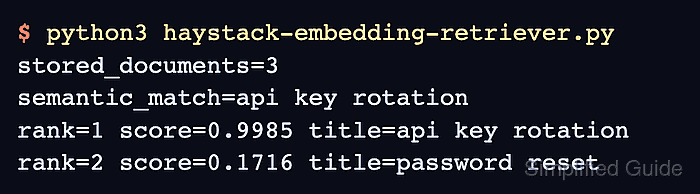
- Run the completed script to verify the semantic ranking.
$ python3 haystack-embedding-retriever.py
stored_documents=3
semantic_match=api key rotation
rank=1 score=0.9985 title=api key rotation
rank=2 score=0.1716 title=password reset

Mohd Shakir Zakaria is a cloud architect with deep roots in software development and open-source advocacy. Certified in AWS, Red Hat, VMware, ITIL, and Linux, he specializes in designing and managing robust cloud and on-premises infrastructures.


