Commit history is the record to check when a branch contains an unexpected change, a release note needs proof, or a review handoff needs the commits behind a file. git log lists commits from newest to oldest by default, so recent repository activity can be inspected before opening individual commits.
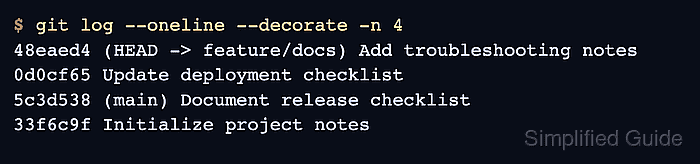
The default log includes full commit metadata and messages, while compact options make routine review easier. --oneline keeps each commit to one row, --decorate shows branch and tag names beside the commits they point to, and --graph --all exposes diverged branch history.
Run the command from a repository that already has the refs being inspected. Fetch remote branches before expecting them in decorations, and put path filters after -- so Git treats the final value as a file path rather than a revision name.
Steps to view Git commit history:
- Open a terminal inside the repository whose history needs review.
- Show the latest commits in a compact one-line view.
$ git log --oneline --decorate -n 4
48eaed4 (HEAD -> feature/docs) Add troubleshooting notes
0d0cf65 Update deployment checklist
5c3d538 (main) Document release checklist
33f6c9f Initialize project notes
-n 4 limits the output to four commits. Use a larger number, or omit the option, when more history is needed.
- Show branch shape across repository refs.
$ git log --oneline --decorate --graph --all -n 5
* 48eaed4 (HEAD -> feature/docs) Add troubleshooting notes
* 0d0cf65 Update deployment checklist
| * 9551a8a (release) Prepare release branch
|/
* 5c3d538 (main) Document release checklist
* 33f6c9f Initialize project notes
--graph draws the branch topology, --decorate prints ref names, and --all includes commits reachable from refs beyond the current branch.
- Open one commit with its changed-file summary.
$ git log -1 --stat 0d0cf65
commit 0d0cf6553df9609119fd109c6ba52248c8af4062
Author: Example User <user@example.net>
Date:   Thu Jun 4 09:00:00 2026 +0000

    Update deployment checklist

 docs/deploy.md | 1 +
 1 file changed, 1 insertion(+)
Replace 0d0cf65 with the abbreviated or full commit hash from the log output.
- List commits on a branch that are not already reachable from main.
$ git log --oneline main..feature/docs
48eaed4 Add troubleshooting notes
0d0cf65 Update deployment checklist
The main..feature/docs range shows commits reachable from feature/docs after subtracting commits already reachable from main.
- Limit the log to commits that changed one path.
$ git log --oneline -- docs/deploy.md
0d0cf65 Update deployment checklist
5c3d538 Document release checklist
33f6c9f Initialize project notes
The -- separator keeps docs/deploy.md in pathspec position. Path-limited history omits commits that did not touch that path.

Mohd Shakir Zakaria is a cloud architect with deep roots in software development and open-source advocacy. Certified in AWS, Red Hat, VMware, ITIL, and Linux, he specializes in designing and managing robust cloud and on-premises infrastructures.


