Setting fixed Kibana encryption keys keeps browser sessions, report jobs, and encrypted saved object secrets usable after restarts. Without persisted keys, self-managed Kibana can generate temporary startup keys, and the next restart can sign users out, fail pending reports, or block access to connector and alerting secrets.
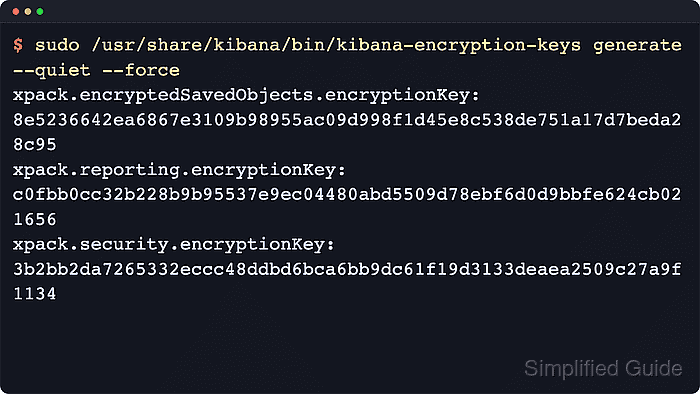
Kibana has separate key settings for session state, reporting job metadata, and encrypted saved object attributes. The kibana-encryption-keys utility prints one value for each setting so the session, reporting, and saved-object keys can be saved before the service restarts.
Self-managed deployments need identical key values on every Kibana instance that belongs to the same deployment or load-balanced group. During saved object key rotation, keep old saved-object keys in the decryption-only list until older connectors, rules, and other encrypted saved objects have been re-encrypted or no longer need the old key.
Related: How to configure Kibana session timeouts
Related: How to enable Kibana reporting
Steps to set Kibana encryption keys:
- Generate three Kibana encryption key settings.
$ sudo /usr/share/kibana/\
bin/kibana-encryption-keys \
generate --quiet --force
The utility prints one value for each key setting. Use --quiet for paste-ready YAML output and --force to generate values for every supported key setting even when existing keys are configured. For archive installs, run bin/kibana-encryption-keys from the Kibana install directory.
- Back up the active Kibana configuration file.
$ sudo cp --archive \
/etc/kibana/kibana.yml \
/etc/kibana/kibana.yml.bak
DEB and RPM installs usually use /etc/kibana/kibana.yml. For archive or container installs, edit the file under the active KBN_PATH_CONF directory instead.
- Add the generated key settings to /etc/kibana/kibana.yml.
xpack:
  encryptedSavedObjects:
    encryptionKey: "<key>"
  reporting:
    encryptionKey: "<key>"
  security:
    encryptionKey: "<key>"
Keep the same values on every Kibana instance in the same deployment or load-balanced group.
Store the values in the Kibana keystore instead when deployment policy keeps secrets out of plain text configuration.
Related: How to add a secret to a Kibana keystore
Tool: YAML Validator - Preserve old saved-object keys when rotating an existing value.
xpack:
  encryptedSavedObjects:
    encryptionKey: "<new-key>"
    keyRotation:
      decryptionOnlyKeys:
        - "<old-key>"
Skip this stanza for first-time key setup. The decryption-only list lets Kibana decrypt saved objects that were encrypted before the new primary key was saved.
Removing an old saved-object key before re-encryption can make connectors, rules, and other encrypted saved objects unreadable.
- Restart the kibana service to load the keys.
$ sudo systemctl restart \
kibana.service
Changing the session key signs out active browser sessions, and changing the reporting key can invalidate pending report jobs.
- Confirm the Kibana service is active after the restart.
$ systemctl is-active \
kibana.service
active
If the service does not return active, inspect the recent journal before rolling the same keys to other instances.
Related: How to check Kibana status
- Check recent Kibana logs for missing encryption key warnings.
$ sudo journalctl \
--unit kibana.service \
--since -10m \
--grep "random key" \
--no-pager
-- No entries --
No matching entries means the recent startup log did not include the common random or missing encryption key warnings.
Related: How to set Kibana logging levels

Mohd Shakir Zakaria is a cloud architect with deep roots in software development and open-source advocacy. Certified in AWS, Red Hat, VMware, ITIL, and Linux, he specializes in designing and managing robust cloud and on-premises infrastructures.


