Running Kibana behind a reverse proxy under a subpath such as /kibana lets the same public host serve Kibana beside other applications without exposing port 5601 directly. The base path setting makes Kibana generate links, static asset paths, and API routes that include the client-facing prefix.
Kibana uses server.basePath to know the prefix it is mounted under. server.rewriteBasePath controls whether Kibana removes that prefix from incoming requests itself, or whether the reverse proxy must remove it before forwarding traffic to Kibana.
The prefix must start with / and must not end with a trailing slash. Match any configured server.publicBaseUrl to the same external scheme, host, and prefix so redirects, notifications, and integrations point users back to the public Kibana URL.
Related: How to set the Kibana public base URL
Related: How to check Kibana status
Steps to configure the Kibana base path:
- Choose the public URL prefix for Kibana, such as /kibana.
server.basePath must start with / and must not end with /.
- Decide where the prefix will be stripped before Kibana routes the request.
Set server.rewriteBasePath to true when Kibana receives requests that still include the prefix. Keep it false when the reverse proxy removes the prefix before forwarding.
- Edit the Kibana configuration file.
$ sudoedit /etc/kibana/kibana.yml
Container images commonly use /usr/share/kibana/config/kibana.yml instead of /etc/kibana/kibana.yml.
- Add the base path settings.
server.basePath: "/kibana"
server.rewriteBasePath: true
When server.publicBaseUrl is set, include the same base path in the public URL, such as https://kibana.example.net/kibana.
Related: How to set the Kibana public base URL - Restart the Kibana service to apply the file change.
$ sudo systemctl restart kibana
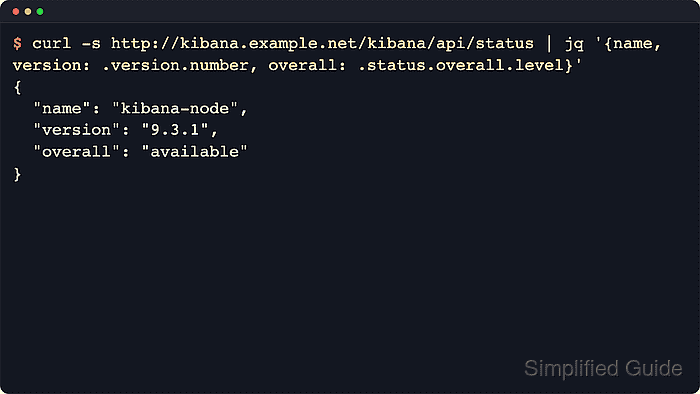
- Request the status endpoint through the public base path.
$ curl --silent --show-error http://kibana.example.net/kibana/api/status
{"status":{"overall":{"level":"available"}}}
An HTTP response from /kibana/api/status with overall.level set to available confirms the prefix reaches Kibana. Add authentication, TLS, or private-CA options when the public URL requires them.
Related: How to check Kibana status - Check the unprefixed status URL from the same public host.
$ curl --silent --show-error --output /dev/null --write-out "%{http_code}\n" http://kibana.example.net/api/status
404
A not-found response on the unprefixed path confirms browsers are using the mounted Kibana route instead of the proxy root.

Mohd Shakir Zakaria is a cloud architect with deep roots in software development and open-source advocacy. Certified in AWS, Red Hat, VMware, ITIL, and Linux, he specializes in designing and managing robust cloud and on-premises infrastructures.


