Creating a Kibana alert rule turns changes in Elasticsearch data into scheduled checks that can raise alerts before operators notice the issue on a dashboard. A rule is the control point for conditions such as sudden error spikes, missing heartbeats, or log patterns that should trigger action.
The Kibana alerting API creates a saved object that binds a rule type, a schedule, condition parameters, and optional actions. The same rule later appears in Stack Management → Alerts and insights → Rules, where its last response, last run, and action history can be reviewed from the UI.
Self-managed Kibana requires a stable xpack.encryptedSavedObjects.encryptionKey before alerting can store encrypted state, and each rule runs later with an API key snapshot taken from the user who created or last updated it. Use a least-privilege account, keep API requests on HTTPS, and set the correct space-aware API path when the rule belongs to a non-default space.
Related: How to set Kibana encryption keys
Related: How to create a Kibana webhook connector
Related: How to create a Kibana space
Steps to create a Kibana alert rule:
- Set the Kibana API variables for the target base URL, optional base path, optional space path, and credentials.
$ export KIBANA_URL="https://kibana-1.example.net:5601"
$ export KIBANA_BASE_PATH=""
$ export KIBANA_SPACE_PATH=""
$ export KIBANA_API_BASE="$KIBANA_URL$KIBANA_BASE_PATH$KIBANA_SPACE_PATH/api"
$ export KIBANA_AUTH="alerting_api:change-me"
$ export KIBANA_CA="/etc/kibana/certs/http-ca.crt"
Use KIBANA_BASE_PATH only when server.basePath or a reverse proxy prefix is configured, and set KIBANA_SPACE_PATH to /s/<space_id> for a non-default space.
Username and password authentication is convenient, but the rule still receives an API key snapshot from that user after creation, so avoid broad administrator accounts for routine automation.
- List the available rule types and confirm the chosen rule type allows the intended consumer value.
$ curl --silent --show-error --fail \
  --cacert "$KIBANA_CA" \
  --user "$KIBANA_AUTH" \
  "$KIBANA_API_BASE/alerting/rule_types" | jq '[.[] | select(.id==".index-threshold") | {id: .id, name: .name, authorized_consumers: .authorized_consumers.alerts, action_groups: .action_groups}]'
[
  {
    "id": ".index-threshold",
    "name": "Index threshold",
    "authorized_consumers": {
      "all": true,
      "read": true
    },
    "action_groups": [
      {
        "id": "threshold met",
        "name": "Threshold met"
      },
      {
        "id": "recovered",
        "name": "Recovered"
      }
    ]
  }
]
The consumer field must be accepted for the rule type, so checking authorized_consumers avoids create requests that fail with a privilege or ownership error.
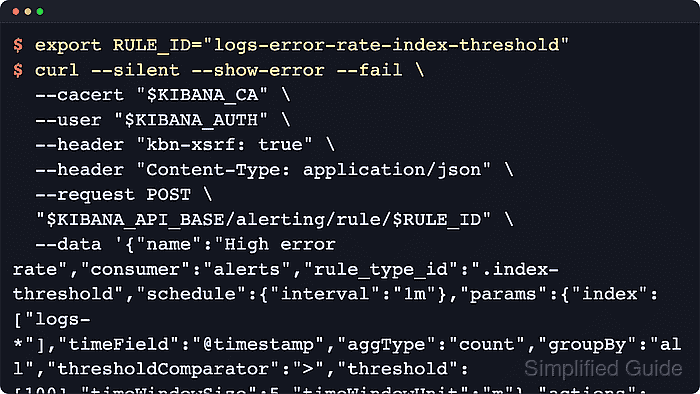
- Create the rule with an explicit rule ID so later API calls can address the same path.
$ export RULE_ID="logs-error-rate-index-threshold"
$ curl --silent --show-error --fail \
  --cacert "$KIBANA_CA" \
  --user "$KIBANA_AUTH" \
  --header "kbn-xsrf: true" \
  --header "Content-Type: application/json" \
  --request POST \
  "$KIBANA_API_BASE/alerting/rule/$RULE_ID" \
  --data '{
    "name": "High error rate",
    "consumer": "alerts",
    "rule_type_id": ".index-threshold",
    "schedule": {
      "interval": "1m"
    },
    "params": {
      "index": [
        "logs-*"
      ],
      "timeField": "@timestamp",
      "aggType": "count",
      "groupBy": "all",
      "thresholdComparator": ">",
      "threshold": [
        100
      ],
      "timeWindowSize": 5,
      "timeWindowUnit": "m"
    },
    "actions": [],
    "tags": [
      "logs",
      "ops"
    ]
  }' | jq '{id: .id, name: .name, enabled: .enabled, consumer: .consumer, rule_type_id: .rule_type_id}'
{
  "id": "logs-error-rate-index-threshold",
  "name": "High error rate",
  "enabled": true,
  "consumer": "alerts",
  "rule_type_id": ".index-threshold"
}
Post to $KIBANA_API_BASE/alerting/rule instead when Kibana should generate the rule ID automatically.
An empty actions array creates the rule without notifications, which is useful while the condition is being tuned.
- Fetch the rule details and wait for the first scheduled run to move beyond pending.
$ curl --silent --show-error --fail \
  --cacert "$KIBANA_CA" \
  --user "$KIBANA_AUTH" \
  "$KIBANA_API_BASE/alerting/rule/$RULE_ID" | jq '{id: .id, enabled: .enabled, execution_status: .execution_status.status, last_run: .last_run.outcome}'
{
  "id": "logs-error-rate-index-threshold",
  "enabled": true,
  "execution_status": "ok",
  "last_run": "succeeded"
}
Current Kibana responses expose both execution_status.status values such as ok, warning, or pending and last_run.outcome values such as succeeded or failed.
- Open Stack Management → Alerts and insights → Rules and confirm the new rule appears with a healthy Last response.
Rules and connectors are space-isolated, so the rule is visible only in the same Kibana space whose API path was used for creation.


Mohd Shakir Zakaria is a cloud architect with deep roots in software development and open-source advocacy. Certified in AWS, Red Hat, VMware, ITIL, and Linux, he specializes in designing and managing robust cloud and on-premises infrastructures.


