Sending Filebeat events to Redis places a queue or pub/sub hop between log collection and the next processing stage. That buffer is useful when Logstash or another consumer needs to scale, restart, or process events separately from the hosts producing the logs.
Filebeat uses the output.redis block in /etc/filebeat/filebeat.yml. With datatype: list, events are written with RPUSH so a consumer can drain a backlog from a Redis list, while datatype: channel publishes live messages through Redis pub/sub without storing queue depth.
Only one Filebeat output can be enabled at a time, so output.elasticsearch, output.logstash, output.kafka, or any other output.* block must stay disabled when output.redis is active. Elastic documents Redis 3.2.4 through 5.0.8 as the expected support range for this output, so test the exact Filebeat and Redis versions before a production rollout.
Steps to configure Filebeat output to Redis:
- Open the main Filebeat configuration file.
$ sudo nano /etc/filebeat/filebeat.yml
Package installs normally keep the active configuration in /etc/filebeat/filebeat.yml.
- Comment out the currently enabled output block.
#output.elasticsearch:
#  hosts: ["https://es.example.net:9200"]
Filebeat fails startup when more than one output.* block is enabled.
- Add the Redis output block with the target host, key, database, and data type.
output.redis:
  hosts: ["redis-1.example.net:6379"]
  key: "filebeat"
  db: 0
  datatype: list
  timeout: 5
  # password: "${REDIS_PASSWORD}"
  # ssl.certificate_authorities: ["/etc/filebeat/certs/redis-ca.crt"]
Use datatype: list when consumers should drain a backlog. Use datatype: channel only for live pub/sub delivery where missing a disconnected subscriber is acceptable.
Related: How to add a secret to a Filebeat keystore
Related: How to configure Filebeat for TLS - Test the Filebeat configuration before restarting the service.
$ sudo filebeat test config -c /etc/filebeat/filebeat.yml
Config OK
With output.redis enabled, filebeat test output returns redis output doesn't support testing, so use the service journal and a direct Redis key check after the syntax test.
Related: How to test a Filebeat configuration
Related: How to test Filebeat output connectivity
Tool: YAML Validator - Restart the Filebeat service.
$ sudo systemctl restart filebeat
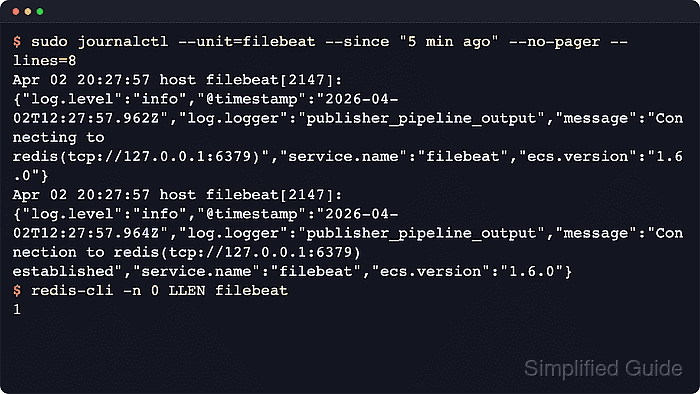
- Check recent Filebeat logs for the Redis connection.
$ sudo journalctl --unit=filebeat --since "5 min ago" --no-pager --lines=20
Apr 02 20:27:57 host filebeat[2147]: {"log.level":"info","@timestamp":"2026-04-02T12:27:57.962Z","log.logger":"publisher_pipeline_output","message":"Connecting to redis(tcp://redis-1.example.net:6379)","service.name":"filebeat","ecs.version":"1.6.0"}
Apr 02 20:27:57 host filebeat[2147]: {"log.level":"info","@timestamp":"2026-04-02T12:27:57.964Z","log.logger":"publisher_pipeline_output","message":"Connection to redis(tcp://redis-1.example.net:6379) established","service.name":"filebeat","ecs.version":"1.6.0"}
Review authentication failures, TLS verification errors, or repeated reconnect messages when publishing still fails after the restart.
- Verify that new events reach the configured Redis list.
$ redis-cli -n 0 LLEN filebeat
1
This queue-length check applies to datatype: list. Add -h, -p, -a, or -u rediss://... when the Redis server is remote, authenticated, or using TLS.
If the length stays at 0, confirm at least one Filebeat input or module is enabled, generate a fresh log line, and make sure a consumer is not draining the list before the sample.

Mohd Shakir Zakaria is a cloud architect with deep roots in software development and open-source advocacy. Certified in AWS, Red Hat, VMware, ITIL, and Linux, he specializes in designing and managing robust cloud and on-premises infrastructures.


