A Filebeat httpjson input polls an HTTP API and publishes each returned JSON event through the normal Filebeat output. It is a good fit for SaaS audit feeds, security findings, and operational APIs that need regular collection without a separate polling script.
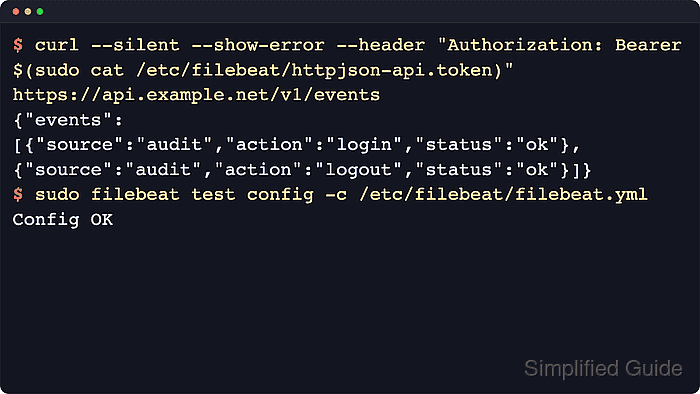
The input runs on its configured interval, sends an HTTP request to request.url, decodes the response body, and can split an array into separate events with response.split. File-based authentication reads a token from disk and sends it in the Authorization header when auth.file.header is omitted.
Use httpjson for straightforward JSON polling where one request returns the events that should be shipped. For multi-step API flows, heavy transformations, cursor logic, or custom state handling, Elastic's CEL input is usually the better starting point. Keep API tokens out of the YAML when possible, validate the config before restart, and treat request tracing as sensitive because it can capture headers and response bodies.
Steps to configure a Filebeat httpjson input:
- Create the bearer token file that httpjson will read.
$ printf '%s' 'replace-with-api-token' | sudo tee /etc/filebeat/httpjson-api.token >/dev/null
Use the real API token for the target service. The sample value is a placeholder and should not be copied into production.
- Restrict the token file permissions.
$ sudo chmod 600 /etc/filebeat/httpjson-api.token
By default, Filebeat requires auth.file.path to be readable and writable only by the owner on POSIX systems. A more permissive token file can stop Filebeat from starting.
- Confirm the token file permissions.
$ sudo ls -l /etc/filebeat/httpjson-api.token
-rw------- 1 root root 23 Jun 18 06:28 /etc/filebeat/httpjson-api.token
- Query the API once with the same authorization style.
$ curl --silent --show-error \
  --header 'Authorization: Bearer replace-with-api-token' \
  https://api.example.net/v1/events
{"events":[{"source":"audit","action":"login","status":"ok"},{"source":"audit","action":"logout","status":"ok"}]}
Replace the placeholder token and URL with the real API values. Confirm the response body is JSON and note whether the event list is under a field such as events or at the response root.
Tool: JSON Validator - Back up the active Filebeat configuration file.
$ sudo cp /etc/filebeat/filebeat.yml /etc/filebeat/filebeat.yml.bak
- Open the Filebeat configuration file.
$ sudoedit /etc/filebeat/filebeat.yml
Packaged Linux installs normally use /etc/filebeat/filebeat.yml. If the host uses filebeat.config.inputs to load external snippets, add the input to the configured snippets directory instead of duplicating filebeat.inputs.
- Add the httpjson input under filebeat.inputs.
filebeat.inputs:
  - type: httpjson
    id: audit-api
    enabled: true
    interval: 1m
    auth.file:
      path: /etc/filebeat/httpjson-api.token
      prefix: "Bearer "
      refresh_interval: 1m
    request.url: "https://api.example.net/v1/events"
    response.split:
      target: body.events
If filebeat.inputs already exists, add only the new - type: httpjson list item under the existing key. Use response.split.target: body.events when the API returns an object with an events array, use body when the response root is the array, and omit response.split when one response object should become one event. Add request.method: POST and request.body only when the API requires a JSON request body.
- Test the Filebeat configuration.
$ sudo filebeat test config -c /etc/filebeat/filebeat.yml
Config OK
Related: How to test a Filebeat configuration
- Restart the Filebeat service.
$ sudo systemctl restart filebeat
Restarting Filebeat briefly pauses event collection. Keep the backup from the earlier step until the input has polled successfully.
- Check that the Filebeat service returned to an active state.
$ sudo systemctl status filebeat --no-pager --lines=12 ● filebeat.service - Filebeat sends log files to Logstash or directly to Elasticsearch. Loaded: loaded (/usr/lib/systemd/system/filebeat.service; enabled; preset: enabled) Active: active (running) since Thu 2026-06-18 06:29:20 UTC; 8s ago ##### snipped ##### - Review recent Filebeat logs for the httpjson input.
$ sudo journalctl -u filebeat.service --since "5 min ago" --no-pager
Jun 18 06:29:20 filebeat-host filebeat[2211]: {"log.level":"info","log.logger":"input.httpjson-stateless","message":"Input 'httpjson-stateless' starting","service.name":"filebeat","id":"audit-api","ecs.version":"1.6.0"}
Jun 18 06:29:20 filebeat-host filebeat[2211]: {"log.level":"info","log.logger":"input.httpjson-stateless","message":"request finished: 2 events published","service.name":"filebeat","id":"audit-api","input_url":"https://api.example.net/v1/events","ecs.version":"1.6.0"}
If the request finishes but events do not arrive in Elasticsearch, Logstash, or another destination, test the configured output separately.
Related: How to test Filebeat output connectivityEnable request.tracer.enabled only during a short troubleshooting window and write the trace file under the httpjson directory in the Filebeat logs path. Request traces can include bearer tokens, headers, query strings, and response bodies.

Mohd Shakir Zakaria is a cloud architect with deep roots in software development and open-source advocacy. Certified in AWS, Red Hat, VMware, ITIL, and Linux, he specializes in designing and managing robust cloud and on-premises infrastructures.


