Filebeat config reloading lets a running shipper notice new or changed external input files without restarting the service for every log source. It is useful on hosts where applications are added regularly and each application needs its own small collection snippet.
The reloader watches a glob under filebeat.config.inputs or filebeat.config.modules in the main /etc/filebeat/filebeat.yml file. When matching external files change, Filebeat starts or stops the corresponding inputs or modules from those files.
The main filebeat.yml file is not live-reloaded, so enabling the reloader still requires one service restart. External input files must contain a list of input definitions that starts with - type, and filestream inputs need stable, unique id values so registry state stays tied to the intended log source.
Steps to enable Filebeat config reloading:
- Create the external input directory.
$ sudo install -d -o root -g root -m 0750 /etc/filebeat/inputs.d
Keep /etc/filebeat/inputs.d writable only by trusted administrators because every matching file can become an active Filebeat input.
- Back up the main Filebeat configuration file.
$ sudo cp -a /etc/filebeat/filebeat.yml /etc/filebeat/filebeat.yml.bak
- Open the main Filebeat configuration file.
$ sudoedit /etc/filebeat/filebeat.yml
- Add the external input loader block.
- /etc/filebeat/filebeat.yml
filebeat.config.inputs:
  enabled: true
  path: /etc/filebeat/inputs.d/*.yml
  reload.enabled: true
  reload.period: 10s
reload.period controls how often Filebeat checks matching files for changes. Keep it at 1s or higher, and put input-specific settings inside the external files rather than under filebeat.config.inputs.
- Create the first external input file.
- /etc/filebeat/inputs.d/app.yml
- type: filestream
  id: app-logs
  paths:
    - /var/log/app.log
Use a unique id for each filestream input and avoid overlapping paths across running inputs. Duplicate IDs or overlapping paths can duplicate events or stop an input from starting.
- Test the Filebeat configuration.
$ sudo filebeat test config -c /etc/filebeat/filebeat.yml
Config OK
Related: How to test a Filebeat configuration
- Restart the Filebeat service to activate the reloader settings.
$ sudo systemctl restart filebeat
- Add another external input file without restarting Filebeat.
- /etc/filebeat/inputs.d/nginx.yml
- type: filestream
  id: nginx-access
  paths:
    - /var/log/nginx/access.log
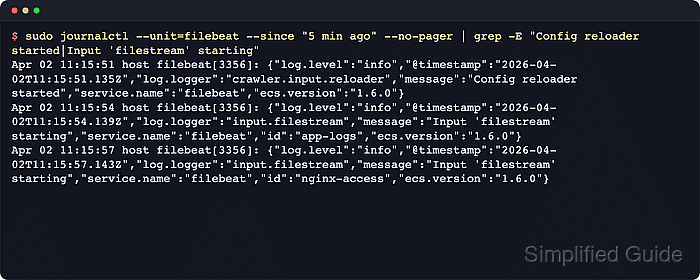
- Review recent Filebeat logs after at least one reload.period interval.
$ sudo journalctl --unit=filebeat --since "5 min ago" --no-pager
Jun 18 13:46:12 host filebeat[2275]: {"log.logger":"crawler.input.reloader","message":"Config reloader started","service.name":"filebeat"}
Jun 18 13:46:15 host filebeat[2275]: {"log.logger":"input.filestream","message":"Input 'filestream' starting","service.name":"filebeat","id":"app-logs"}
##### snipped #####
Jun 18 13:46:39 host filebeat[2275]: {"log.logger":"input.filestream","message":"Input 'filestream' starting","service.name":"filebeat","id":"nginx-access"}
Config reloader started confirms the reloader is active. A later Input 'filestream' starting line for the newly added nginx-access ID confirms Filebeat picked up the snippet without another service restart. Very small test log files can delay harvesting with current filestream fingerprint defaults, so input startup is the cleaner reload proof.

Mohd Shakir Zakaria is a cloud architect with deep roots in software development and open-source advocacy. Certified in AWS, Red Hat, VMware, ITIL, and Linux, he specializes in designing and managing robust cloud and on-premises infrastructures.


