Running a search query in Elasticsearch lets an operator confirm that indexed documents answer a specific question before dashboards, alerts, or applications depend on the result. A focused search starts with the target index, alias, or data stream and the field mappings that decide whether a field is analyzed text, an exact value, sortable data, or a date.
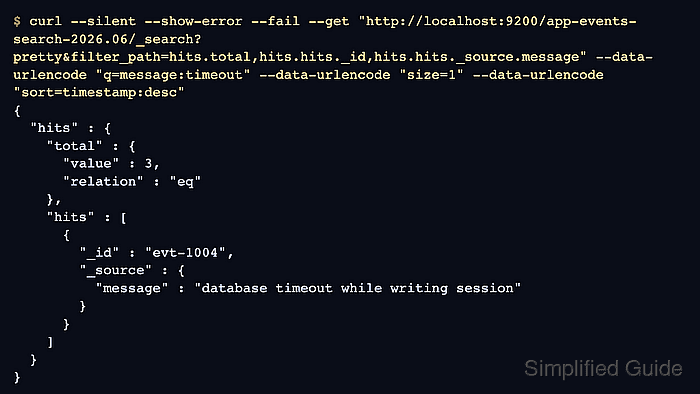
The Search API accepts a quick Lucene query-string search through the q parameter and structured JSON request bodies through the Query DSL. A URI q search is useful for ad hoc checks, while a JSON body is better when the query needs full-text matching, exact filters, sorting, source-field control, or hit-count behavior in one request.
An unsecured local endpoint keeps the query shape easy to read. Secured clusters should use the cluster HTTPS URL and the authentication method operators already use for that environment, such as basic authentication, an API key, and a trusted CA certificate. Fixed sample timestamps keep the date range behavior repeatable whenever the commands are rerun.
Steps to perform a search query in Elasticsearch:
- List the available indices to confirm the search target name.
$ curl --silent --show-error --fail "http://localhost:9200/_cat/indices/app-events-search-2026.06?v&h=health,status,index,docs.count,store.size"
health status index                     docs.count store.size
green  open   app-events-search-2026.06          4        7kb
If the data lives behind an alias or data stream, query that logical name instead of a hidden backing index so rollovers do not break the search target.
- Inspect the mapping before choosing query and filter fields.
$ curl --silent --show-error --fail "http://localhost:9200/app-events-search-2026.06/_mapping?pretty&filter_path=*.mappings.properties"
{
  "app-events-search-2026.06" : {
    "mappings" : {
      "properties" : {
        "level" : {
          "type" : "keyword"
        },
        "message" : {
          "type" : "text",
          "fields" : {
            "keyword" : {
              "type" : "keyword",
              "ignore_above" : 256
            }
          }
        },
        "service" : {
          "type" : "keyword"
        },
        "timestamp" : {
          "type" : "date"
        }
      }
    }
  }
}
Use match queries for analyzed text fields such as message. Use term filters, sorting, and exact comparisons on fields such as level, service, timestamp, or message.keyword.
- Run a quick URI search with q for an ad hoc result check.
$ curl --silent --show-error --fail --get "http://localhost:9200/app-events-search-2026.06/_search" --data-urlencode "pretty=true" --data-urlencode "filter_path=took,hits.total,hits.hits._id,hits.hits._source" --data-urlencode "q=message:timeout" --data-urlencode "size=2" --data-urlencode "sort=timestamp:desc"
{
  "took" : 49,
  "hits" : {
    "total" : {
      "value" : 3,
      "relation" : "eq"
    },
    "hits" : [
      {
        "_id" : "evt-1004",
        "_source" : {
          "timestamp" : "2026-06-18T09:23:44Z",
          "level" : "ERROR",
          "service" : "billing",
          "message" : "database timeout while writing session"
        }
      },
      {
        "_id" : "evt-1002",
        "_source" : {
          "timestamp" : "2026-06-18T09:17:21Z",
          "level" : "WARN",
          "service" : "checkout",
          "message" : "upstream timeout threshold reached"
        }
      }
    ]
  }
}
Use --data-urlencode so characters in the Lucene query string are escaped before curl sends the request.
If a request sends both q and a JSON query body, Elasticsearch uses the q parameter and ignores the body query.
- Use a structured Query DSL body when the search needs full-text matching, exact filters, source filtering, and sorting together.
$ curl --silent --show-error --fail --header "Content-Type: application/json" --request POST "http://localhost:9200/app-events-search-2026.06/_search?pretty&filter_path=took,hits.total,hits.hits._id,hits.hits._source" --data '{
  "size": 2,
  "_source": ["timestamp", "level", "service", "message"],
  "sort": [
    { "timestamp": { "order": "desc" } }
  ],
  "query": {
    "bool": {
      "must": [
        { "match": { "message": "timeout" } }
      ],
      "filter": [
        { "term": { "level": "ERROR" } },
        { "range": { "timestamp": { "gte": "2026-06-18T09:00:00Z", "lt": "2026-06-18T10:00:00Z" } } }
      ]
    }
  }
}'
{
  "took" : 14,
  "hits" : {
    "total" : {
      "value" : 2,
      "relation" : "eq"
    },
    "hits" : [
      {
        "_id" : "evt-1004",
        "_source" : {
          "timestamp" : "2026-06-18T09:23:44Z",
          "level" : "ERROR",
          "service" : "billing",
          "message" : "database timeout while writing session"
        }
      },
      {
        "_id" : "evt-1001",
        "_source" : {
          "timestamp" : "2026-06-18T09:15:00Z",
          "level" : "ERROR",
          "service" : "checkout",
          "message" : "connection timeout while opening upstream socket"
        }
      }
    ]
  }
}
The match clause searches analyzed text tokens, while the term and range filters narrow the result set without changing score.
Tool: JSON Formatter - Page through a shallow result set with a stable sort order.
$ curl --silent --show-error --fail --header "Content-Type: application/json" --request POST "http://localhost:9200/app-events-search-2026.06/_search?pretty&filter_path=hits.total,hits.hits._id,hits.hits._source" --data '{
  "from": 1,
  "size": 1,
  "_source": ["timestamp", "level", "message"],
  "sort": [
    { "timestamp": { "order": "desc" } }
  ],
  "query": {
    "match": { "message": "timeout" }
  }
}'
{
  "hits" : {
    "total" : {
      "value" : 3,
      "relation" : "eq"
    },
    "hits" : [
      {
        "_id" : "evt-1002",
        "_source" : {
          "timestamp" : "2026-06-18T09:17:21Z",
          "level" : "WARN",
          "message" : "upstream timeout threshold reached"
        }
      }
    ]
  }
}
Use from and size only for shallow paging. By default, Elasticsearch blocks paging beyond 10,000 hits through index.max_result_window; use search_after with the same query and sort values for deeper paging.
- Request an exact total hit count when automation or a dashboard needs to know whether the match count is complete.
$ curl --silent --show-error --fail --header "Content-Type: application/json" --request POST "http://localhost:9200/app-events-search-2026.06/_search?pretty&filter_path=took,hits.total" --data '{
  "track_total_hits": true,
  "query": {
    "match": {
      "message": "timeout"
    }
  }
}'
{
  "took" : 5,
  "hits" : {
    "total" : {
      "value" : 3,
      "relation" : "eq"
    }
  }
}
track_total_hits set to true returns the exact count at extra query cost. A relation value of eq means the count is exact; gte means Elasticsearch returned a lower bound.

Mohd Shakir Zakaria is a cloud architect with deep roots in software development and open-source advocacy. Certified in AWS, Red Hat, VMware, ITIL, and Linux, he specializes in designing and managing robust cloud and on-premises infrastructures.


