Running one search across local and remote Elasticsearch clusters keeps investigations, dashboards, and historical lookups in a single workflow instead of forcing data to be reindexed, exported, or queried cluster by cluster during an incident.
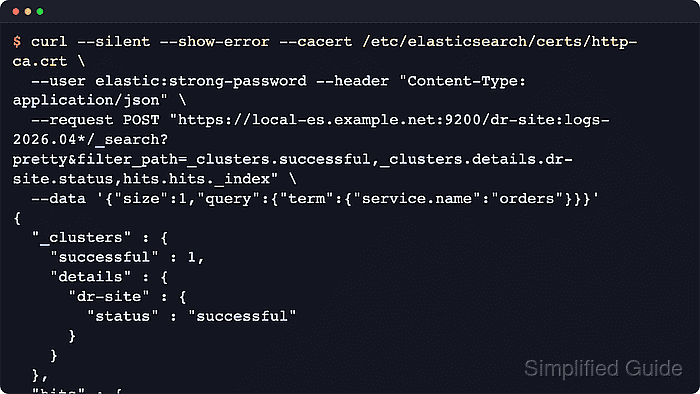
In cross-cluster search (CCS), a local coordinating node receives a normal Search API request, forwards the remote portions to configured cluster aliases, and merges the results into one response. Remote hits are identified by the remote cluster alias in the _index field, using the format <alias>:<index>.
On current self-managed deployments, API-key remotes use the dedicated remote-cluster interface, which defaults to port 9443, while certificate-based remotes usually use the transport interface on 9300. Send CCS requests through nodes that keep the remote_cluster_client role, and check both the cross-cluster API key privileges and the local user's remote_indices privileges before trusting an empty result set. Since Elasticsearch 8.15, a remote alias without an explicit skip_unavailable setting is optional, so required remotes should be pinned to skip_unavailable: false on the local cluster.
Steps to run an Elasticsearch cross-cluster search:
- Confirm the remote-cluster alias exists and is currently connected from the local cluster.
$ curl --silent --show-error --user elastic:strong-password "https://local-es.example.net:9200/_remote/info?pretty&filter_path=dr-site.connected,dr-site.mode,dr-site.skip_unavailable,dr-site.num_nodes_connected,dr-site.proxy_address,dr-site.seeds,dr-site.cluster_credentials"
{
  "dr-site" : {
    "connected" : true,
    "mode" : "sniff",
    "skip_unavailable" : false,
    "num_nodes_connected" : 1,
    "seeds" : [
      "remote-es.example.net:9443"
    ],
    "cluster_credentials" : "::es_redacted::"
  }
}
The _remote/info response reflects the current state on the local cluster rather than a fresh availability probe. If the alias is disconnected, a new CCS request or GET /_resolve/cluster/... attempt will trigger another connection attempt. When cluster_credentials is present, the alias is using API-key authentication.
- Resolve the exact cluster and index expression before running the full search.
$ curl --silent --show-error --user elastic:strong-password "https://local-es.example.net:9200/_resolve/cluster/logs-2026.04*,dr-site:logs-2026.04*?pretty&timeout=5s"
{
  "(local)" : {
    "connected" : true,
    "skip_unavailable" : false,
    "matching_indices" : true,
    "version" : {
      "number" : "9.3.2"
    }
  },
  "dr-site" : {
    "connected" : true,
    "skip_unavailable" : false,
    "matching_indices" : true,
    "version" : {
      "number" : "9.3.2"
    }
  }
}
The _resolve/cluster API actively checks each cluster for connectivity, matching indices, and version support before the search runs. If an error field appears, fix the permission, routing, or index-pattern problem first, or exclude the affected cluster or index from the search expression when that omission is acceptable.
- Run a cross-cluster search query against a remote index pattern.
$ curl --silent --show-error --user elastic:strong-password --header "Content-Type: application/json" --request POST "https://local-es.example.net:9200/dr-site:logs-2026.04*/_search?pretty&filter_path=_clusters.total,_clusters.successful,_clusters.skipped,_clusters.partial,_clusters.failed,_clusters.details.dr-site.status,_clusters.details.dr-site.indices,hits.total,hits.hits._index,hits.hits._id" --data '{
  "size": 1,
  "query": {
    "term": {
      "service.name": "orders"
    }
  },
  "track_total_hits": true
}'
{
  "_clusters" : {
    "total" : 1,
    "successful" : 1,
    "skipped" : 0,
    "partial" : 0,
    "failed" : 0,
    "details" : {
      "dr-site" : {
        "status" : "successful",
        "indices" : "logs-2026.04*"
      }
    }
  },
  "hits" : {
    "total" : {
      "value" : 2,
      "relation" : "eq"
    },
    "hits" : [
      {
        "_index" : "dr-site:logs-2026.04.02",
        "_id" : "a1"
      }
    ]
  }
}
The remote alias prefix in _index confirms the hit came from the remote cluster rather than the local cluster. Keep the target pattern as narrow as possible so the request does not fan out to unnecessary remote shards.
- Run the same search across local and remote indices by listing both index expressions in the request path.
$ curl --silent --show-error --user elastic:strong-password --header "Content-Type: application/json" --request POST "https://local-es.example.net:9200/logs-2026.04*,dr-site:logs-2026.04*/_search?pretty&filter_path=_clusters.total,_clusters.successful,_clusters.skipped,_clusters.partial,_clusters.failed,_clusters.details.*.status,hits.hits._index" --data '{
  "size": 2,
  "query": {
    "term": {
      "service.name": "orders"
    }
  }
}'
{
  "_clusters" : {
    "total" : 2,
    "successful" : 2,
    "skipped" : 0,
    "partial" : 0,
    "failed" : 0,
    "details" : {
      "(local)" : {
        "status" : "successful"
      },
      "dr-site" : {
        "status" : "successful"
      }
    }
  },
  "hits" : {
    "hits" : [
      {
        "_index" : "logs-2026.04.02"
      },
      {
        "_index" : "dr-site:logs-2026.04.02"
      }
    ]
  }
}
Local hits do not include a cluster prefix in _index, while remote hits do. The same Query DSL body is applied across every included cluster.
- Check the _clusters.details section before treating the result set as complete.
$ curl --silent --show-error --user elastic:strong-password --header "Content-Type: application/json" --request POST "https://local-es.example.net:9200/logs-2026.04*,dr-site:logs-2026.04*/_search?pretty&filter_path=_clusters.total,_clusters.successful,_clusters.skipped,_clusters.partial,_clusters.failed,_clusters.details.*.status,_clusters.details.*._shards.failed,hits.total" --data '{
  "size": 0,
  "track_total_hits": true,
  "query": {
    "match_all": {}
  }
}'
{
  "_clusters" : {
    "total" : 2,
    "successful" : 2,
    "skipped" : 0,
    "partial" : 0,
    "failed" : 0,
    "details" : {
      "(local)" : {
        "status" : "successful",
        "_shards" : {
          "failed" : 0
        }
      },
      "dr-site" : {
        "status" : "successful",
        "_shards" : {
          "failed" : 0
        }
      }
    }
  },
  "hits" : {
    "total" : {
      "value" : 2,
      "relation" : "eq"
    }
  }
}
successful means the search completed on all shards for that cluster. partial means at least one shard succeeded and at least one failed. skipped means an optional remote alias was omitted, and failed means a required remote alias failed the whole CCS request.
Since Elasticsearch 8.15, a remote alias with no explicit skip_unavailable setting is treated as optional. A CCS request can therefore return HTTP 200 while omitting remote data unless the alias is configured with skip_unavailable: false.

Mohd Shakir Zakaria is a cloud architect with deep roots in software development and open-source advocacy. Certified in AWS, Red Hat, VMware, ITIL, and Linux, he specializes in designing and managing robust cloud and on-premises infrastructures.


