Cluster bootstrap settings tell a brand-new Elasticsearch cluster which master-eligible nodes are allowed to vote in the first election. Setting them deliberately keeps the first cluster UUID from being committed by an accidental one-node island.
Self-managed Elasticsearch uses discovery.seed_hosts to find peers over the transport layer and cluster.initial_master_nodes to define the first voting configuration. The bootstrap list must use the exact node.name values of the master-eligible nodes, or the nodes can discover each other without agreeing that they are the same voters.
Configure cluster.initial_master_nodes only while forming a new cluster for the first time. Remove the setting after the cluster forms, leave it off nodes that join an existing cluster, and do not add it during node restarts or a full-cluster restart.
Steps to configure Elasticsearch cluster bootstrap settings:
- Create a backup copy of the Elasticsearch configuration file on each master-eligible node.
$ sudo cp -a /etc/elasticsearch/elasticsearch.yml /etc/elasticsearch/elasticsearch.yml.bak
- Open /etc/elasticsearch/elasticsearch.yml on the first master-eligible node.
$ sudo nano /etc/elasticsearch/elasticsearch.yml
- Set a shared cluster.name and a unique local node.name.
cluster.name: search-cluster
node.name: es-master-a
The cluster.initial_master_nodes entries must match the final node.name values exactly. If node.name uses fully qualified domain names, use the same names in the bootstrap list.
- Add the discovery seed hosts and one-time bootstrap list.
discovery.seed_hosts:
  - es-master-a:9300
  - es-master-b:9300
  - es-master-c:9300

cluster.initial_master_nodes:
  - es-master-a
  - es-master-b
  - es-master-c
Use the same cluster.initial_master_nodes list on every master-eligible node where the setting is present.
Do not configure cluster.initial_master_nodes on master-ineligible nodes, on nodes joining an existing cluster, or during a full-cluster restart.
- Repeat the same discovery and bootstrap lists on the remaining master-eligible nodes.
Change only the local node.name value on each node. Use resolvable DNS names or reachable IP addresses in discovery.seed_hosts; if the port is omitted, Elasticsearch uses the transport port, usually 9300.
- Start the Elasticsearch service on the participating nodes.
$ sudo systemctl start elasticsearch
If a node already belongs to another cluster, stop it and remove the bootstrap setting instead of starting it with a new cluster.initial_master_nodes list.
- Confirm that the local service is running after startup.
$ systemctl is-active elasticsearch
active
If the unit does not return active, inspect /var/log/elasticsearch/elasticsearch.log or the service status before retrying.
- Wait for the expected node count through the HTTP API.
$ curl -sS "http://localhost:9200/_cluster/health?wait_for_nodes=>=3&timeout=60s&filter_path=cluster_name,status,timed_out,number_of_nodes&pretty"
{
  "cluster_name" : "search-cluster",
  "status" : "green",
  "timed_out" : false,
  "number_of_nodes" : 3
}
number_of_nodes and timed_out confirm formation more directly than the health color. Fresh clusters can briefly report red or yellow while startup tasks finish.
Secured clusters typically use https://host:9200 with a CA file and authentication, for example curl -u elastic "https://localhost:9200/..." or an API key header.
- List the joined nodes and confirm that exactly one node is elected master.
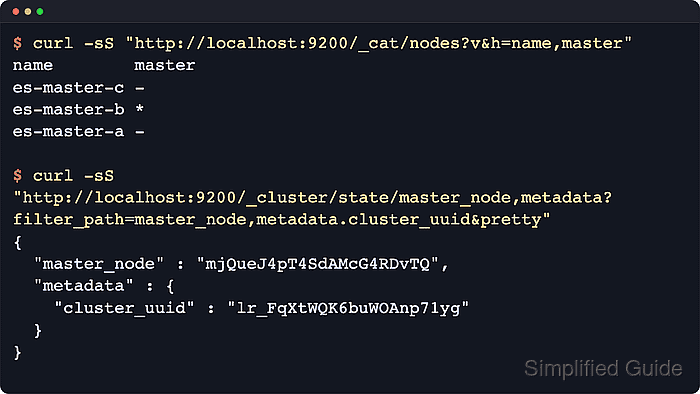
$ curl -sS "http://localhost:9200/_cat/nodes?v&s=name&h=ip,name,node.role,master"
ip         name        node.role   master
192.0.2.40 es-master-a cdfhilmrstw -
192.0.2.41 es-master-b cdfhilmrstw -
192.0.2.42 es-master-c cdfhilmrstw *
A single * in the master column marks the elected master node. The compact node.role string includes m on master-eligible nodes.
- Record the committed cluster UUID.
$ curl -sS "http://localhost:9200/_cluster/state/master_node,metadata?filter_path=master_node,metadata.cluster_uuid&pretty"
{
  "master_node" : "ESpsk09AQKir9vAgCcV9ZQ",
  "metadata" : {
    "cluster_uuid" : "NxZQF2GwQTuzJo1IkXmTcw"
  }
}
When separate bootstrap is suspected, query GET /?filter_path=name,cluster_name,cluster_uuid on each node before indexing data. Matching cluster_uuid values confirm the nodes joined the same cluster instead of separate bootstrapped clusters.
- Remove the cluster.initial_master_nodes block from every participating node after the cluster forms.
discovery.seed_hosts:
  - es-master-a:9300
  - es-master-b:9300
  - es-master-c:9300
cluster.initial_master_nodes is a startup-only bootstrap setting. Removing it from the file protects future restarts from accidentally bootstrapping another cluster.
- Confirm that the saved configuration no longer contains the bootstrap setting.
$ sudo grep -n 'cluster.initial_master_nodes' /etc/elasticsearch/elasticsearch.yml
No output means the file no longer contains the setting. Run the same check on every node where the bootstrap list was added.

Mohd Shakir Zakaria is a cloud architect with deep roots in software development and open-source advocacy. Certified in AWS, Red Hat, VMware, ITIL, and Linux, he specializes in designing and managing robust cloud and on-premises infrastructures.


