Checking Elasticsearch cluster formation confirms that the nodes expected to work together have joined one cluster and elected one master. Operators need that confirmation after bootstrap, node replacement, or discovery changes because a reachable HTTP endpoint can still belong to an isolated single-node cluster.
Self-managed Elasticsearch forms a cluster over the transport layer, usually on port 9300. The discovery.seed_hosts setting helps nodes find master-eligible peers, and the first bootstrap uses cluster.initial_master_nodes to commit the first voting configuration.
Use the same authenticated HTTPS endpoint that operators use for the cluster. A formed cluster returns the expected node count without timing out, shows one cluster_uuid in cluster state, marks exactly one elected master in CAT output, and reports a stable master in the health report.
Steps to check Elasticsearch cluster formation:
- Query cluster health and wait for the expected node count.
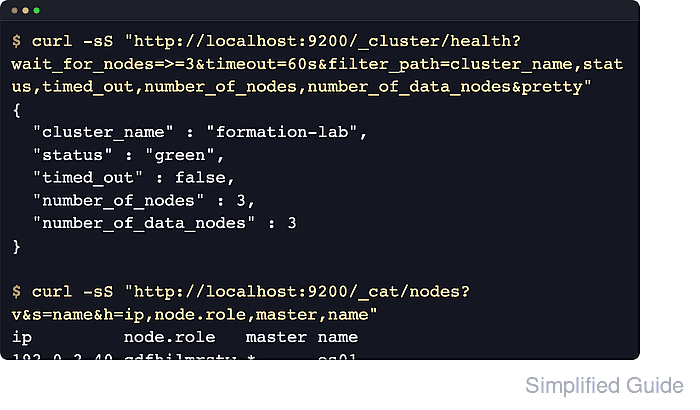
$ curl --silent --show-error --user elastic "https://es01.example.net:9200/_cluster/health?wait_for_nodes=>=3&timeout=60s&filter_path=cluster_name,status,timed_out,number_of_nodes,number_of_data_nodes,active_primary_shards,active_shards,unassigned_shards&pretty"
{
  "cluster_name" : "formation-lab",
  "status" : "green",
  "timed_out" : false,
  "number_of_nodes" : 3,
  "number_of_data_nodes" : 3,
  "active_primary_shards" : 2,
  "active_shards" : 4,
  "unassigned_shards" : 0
}
wait_for_nodes=>=3 waits for at least three nodes before returning. timed_out must be false and number_of_nodes must match the cluster size being checked.
Use --header "Authorization: ApiKey $ELASTIC_API_KEY" instead of --user elastic when your operations path uses API keys.
- Read the cluster state identity and joined node names.
$ curl --silent --show-error --user elastic "https://es01.example.net:9200/_cluster/state/master_node,nodes?filter_path=cluster_uuid,master_node,nodes.*.name&pretty"
{
  "cluster_uuid" : "nWSVEtePTyGY3xiLkWIQCQ",
  "master_node" : "URA8cSAUSWSEqCftmZ-yRw",
  "nodes" : {
    "URA8cSAUSWSEqCftmZ-yRw" : {
      "name" : "es02"
    },
    "Ujd7OwPwTieepLmCT176eA" : {
      "name" : "es03"
    },
    "4wDxvsBNQwacpm7LjswXWQ" : {
      "name" : "es01"
    }
  }
}
The nodes object should contain every expected node name under one cluster_uuid. A missing node means it has not joined the cluster state being returned by this endpoint.
If another node reports a different cluster_uuid, stop writes to that node and recheck discovery.seed_hosts plus the one-time bootstrap settings before indexing data.
- List all joined nodes and confirm there is exactly one master marker.
$ curl --silent --show-error --user elastic "https://es01.example.net:9200/_cat/nodes?v&s=name&h=ip,node.role,master,name"
ip         node.role   master name
192.0.2.10 cdfhilmrstw -      es01
192.0.2.11 cdfhilmrstw *      es02
192.0.2.12 cdfhilmrstw -      es03
The master column must show one * and the rest - . The compact node.role string includes m on master-eligible nodes.
- Identify the elected master node explicitly.
$ curl --silent --show-error --user elastic "https://es01.example.net:9200/_cat/master?v&h=id,host,ip,node"
id                     host       ip         node
URA8cSAUSWSEqCftmZ-yRw 192.0.2.11 192.0.2.11 es02
The _cat/master response names the node currently responsible for cluster coordination. CAT APIs are for terminal checks, not application integrations.
If the request returns 503 or the node field is empty, master election has not completed or the cluster is losing its master.
- Check the master stability indicator.
$ curl --silent --show-error --user elastic "https://es01.example.net:9200/_health_report/master_is_stable?verbose=false&filter_path=cluster_name,indicators.master_is_stable.status,indicators.master_is_stable.symptom&pretty"
{
  "cluster_name" : "formation-lab",
  "indicators" : {
    "master_is_stable" : {
      "status" : "green",
      "symptom" : "The cluster has a stable master node"
    }
  }
}
Use verbose=false when polling this endpoint repeatedly. A non-green result means the cluster formed recently or is still experiencing master changes that need investigation.

Mohd Shakir Zakaria is a cloud architect with deep roots in software development and open-source advocacy. Certified in AWS, Red Hat, VMware, ITIL, and Linux, he specializes in designing and managing robust cloud and on-premises infrastructures.


