Connecting an existing container to another Docker network changes which services it can reach without recreating the container. It is useful when a workload was started on the default bridge or on the wrong application network and now needs access to a different set of containers.
docker network connect attaches the container to an existing network by container name or ID. On a user-defined network such as a custom bridge, Docker also provides container-name DNS on that network, so a newly attached container can usually reach peers by service name as soon as the additional endpoint exists.
Adding another network endpoint changes the container's topology, not just its reachability. Current Docker releases include --gw-priority for cases where one network must remain the default route, and static --ip or --ip6 assignments must stay available or the container can fail to start after a restart.
Steps to connect a container to a Docker network:
- List the available networks and confirm the target user-defined network already exists.
$ docker network ls
NETWORK ID     NAME      DRIVER    SCOPE
e0c30d9275c3   app-net   bridge    local
ffc917447fb2   bridge    bridge    local
792cc9a5f08a   host      host      local
4a72c46ff4af   none      null      local
##### snipped #####
docker network connect does not create the network. Use an existing network name such as a custom bridge, overlay, or macvlan network.
- Check the target container's current network attachments before adding another endpoint.
$ docker container ls --format 'table {{.Names}}\t{{.Status}}\t{{.Networks}}'
NAMES        STATUS          NETWORKS
backend-db   Up 2 minutes    app-net
web-app      Up 2 minutes    bridge
##### snipped #####
The NETWORKS column shows whether the container is still only on the default bridge network or is already attached elsewhere.
- Connect the existing container to the target network.
$ docker network connect app-net web-app
A successful attach is silent. Add --alias before the network name when the container should answer to an additional DNS name on that network.
Attaching another network can change which gateway the container uses for outbound traffic. Use --gw-priority when one network must remain the default route.
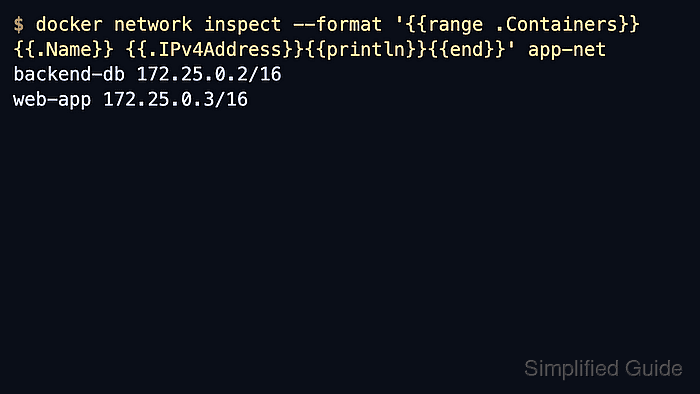
- Verify that the target network now includes both containers.
$ docker network inspect --format '{{range .Containers}}{{.Name}} {{.IPv4Address}}{{println}}{{end}}' app-net
backend-db 172.25.0.2/16
web-app 172.25.0.3/16
docker network inspect checks the network from Docker's side, so it shows exactly which container endpoints are present and which per-network IP addresses were assigned.
- Test name resolution and reachability across the newly shared network.
$ docker exec web-app ping -c 1 backend-db
PING backend-db (172.25.0.2): 56 data bytes
64 bytes from 172.25.0.2: seq=0 ttl=64 time=0.391 ms

--- backend-db ping statistics ---
1 packets transmitted, 1 packets received, 0% packet loss
round-trip min/avg/max = 0.391/0.391/0.391 ms
The name resolves through Docker's embedded DNS on the user-defined network, so a successful reply proves both name resolution and basic connectivity on that network.
If the application image has no ping utility, use the service's own client or another simple network check inside the container instead.
Tool: Ping Results Analyzer
Notes
- docker network connect attaches a container to an existing network only. To place the container on the network from the start, use docker run --network app-net ... when the container is created.
- Container-name DNS is available on user-defined networks. Containers that stay only on the default bridge network generally need direct IP addresses instead of peer names.
- --alias adds an extra network-scoped DNS name on the newly attached network without changing the container's primary container name.
- Static addresses from --ip or --ip6 are re-applied when the container starts again, and --gw-priority controls which attached network provides the default gateway when route selection must stay predictable.

Mohd Shakir Zakaria is a cloud architect with deep roots in software development and open-source advocacy. Certified in AWS, Red Hat, VMware, ITIL, and Linux, he specializes in designing and managing robust cloud and on-premises infrastructures.


