Pruning unused Docker images reclaims disk space from tags and image records that are no longer needed by current containers. The cleanup is most useful on build hosts and deployment hosts where older application tags accumulate after frequent pulls, rebuilds, or rollouts.
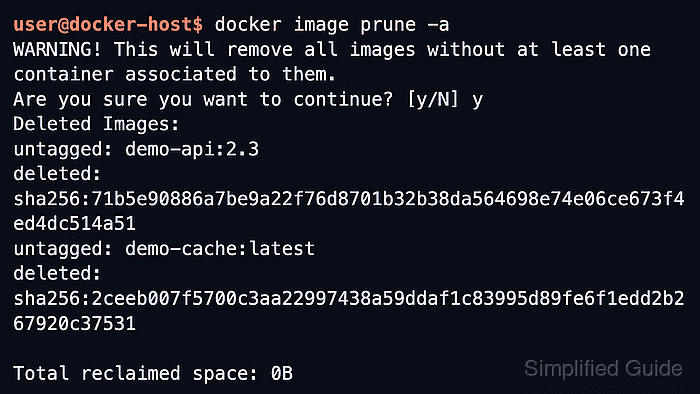
docker image prune removes dangling images by default, which means untagged image records left behind after a rebuild or retag. Adding --all changes the scope to any image that is not referenced by an existing container, so images still tied to running, stopped, or merely created containers remain protected until those containers are removed intentionally.
The risky part is docker image prune -a because older rollback tags and test images disappear as soon as no container points to them. Save any image that still matters before pruning it, and narrow the cleanup window with --filter "until=24h" when only older unused images should be eligible.
Steps to prune unused Docker images:
- List the existing containers so the protected image set is clear before anything is deleted.
$ docker ps -a
CONTAINER ID   IMAGE             COMMAND              CREATED        STATUS                     PORTS      NAMES
b7d1cb4f9d40   demo-api:2.4      "node server.js"     2 hours ago    Up 2 hours                8080/tcp   demo-api
3fdab4ce2f71   demo-worker:1.9   "python worker.py"   3 days ago     Exited (0) 2 days ago                demo-worker-old
A stopped or merely created container still counts as an existing container, so its image is not removed by docker image prune -a.
- Remove only dangling images when the goal is to clear untagged leftovers from replaced builds and retags.
$ docker image prune
WARNING! This will remove all dangling images.
Are you sure you want to continue? [y/N] y
Deleted Images:
deleted: sha256:970b2726324d37a8ce4bbddef02fcc01f9890fde26c5b9a2ad7ec38e9a3540d4

Total reclaimed space: 0B
The default prune path does not touch tagged images such as demo-api:2.4 or demo-worker:1.9.
- Remove every image that has no container association when the older tagged images are no longer needed.
$ docker image prune -a
WARNING! This will remove all images without at least one container associated to them.
Are you sure you want to continue? [y/N] y
Deleted Images:
untagged: demo-api:2.3
deleted: sha256:71b5e90886a7be9a22f76d8701b32b38da564698e74e06ce673f4ed4dc514a51
untagged: demo-cache:latest
deleted: sha256:2ceeb007f5700c3aa22997438a59ddaf1c83995d89fe6f1edd2b267920c37531

Total reclaimed space: 0B
Add --filter "until=24h" when only older unused images should be eligible, and remove any stale created or stopped containers first if an old image still refuses to become unused.
Any image kept only for a quick rollback disappears here unless a container still points to it or it has already been exported elsewhere.
- List the remaining images with a fixed table layout to confirm that only the still-needed tags are left.
$ docker image ls --format 'table {{.Repository}}\t{{.Tag}}\t{{.ID}}\t{{.Size}}'
REPOSITORY    TAG    IMAGE ID       SIZE
demo-api      2.4    8f0d7c3a6d15   214MB
demo-worker   1.9    64a1c2927e41   156MB
The exact size and image IDs vary by build and architecture, but the prune is complete when only the expected tags remain.

Mohd Shakir Zakaria is a cloud architect with deep roots in software development and open-source advocacy. Certified in AWS, Red Hat, VMware, ITIL, and Linux, he specializes in designing and managing robust cloud and on-premises infrastructures.


