A CAA lookup shows which public certificate authorities a DNS name permits to issue certificates. Check this policy when a certificate order is rejected, before changing certificate providers, or after editing CAA records; it does not list existing certificates or prove that every other issuance check will pass.
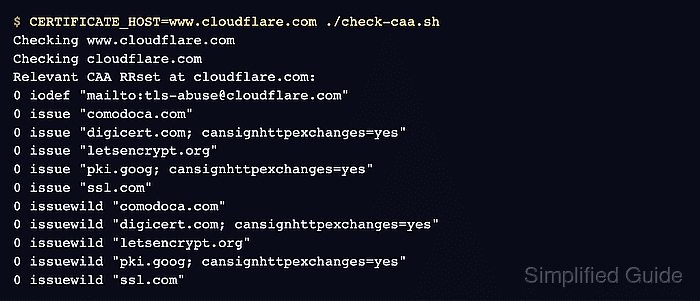
Each answer row contains a numeric flag, a property tag, and a value. The issue tag authorizes ordinary certificates and also controls wildcard issuance when issuewild is absent; issuewild takes precedence for wildcard certificates, while iodef only supplies a policy-violation reporting destination.
CAA processing chases aliases for each query and climbs from the certificate hostname toward the DNS root until it finds the first non-empty CAA record set. Only that Relevant CAA record set controls authorization; a flag value of 128 makes its property issuer-critical, so the intended CA must declare that it processes the tag before the set can authorize issuance.
Steps to check CAA records with dig:
- Set the certificate hostname to the public www.cloudflare.com example.
$ CERTIFICATE_HOST=www.cloudflare.com
- Set the intended certificate authority name to DigiCert for the same example.
$ INTENDED_CA=DigiCert
- Set the documented DigiCert CAA issuer identifier to digicert.com.
$ CAA_ISSUER_ID=digicert.com
DigiCert's current Public Trust CP/CPS lists digicert.com as a recognized CA identifier, and its CAA instructions use that value for public TLS certificates.
- Create check-caa.sh with strict error handling and normalized certificate-host input.
- check-caa.sh
#!/bin/sh
set -eu

resolver=1.1.1.1
candidate=${CERTIFICATE_HOST:?Set CERTIFICATE_HOST to the certificate hostname}
candidate=${candidate%.}

if [ -z "$candidate" ]; then
    printf 'CERTIFICATE_HOST must not be empty.\n' >&2
    exit 2
fi
@1.1.1.1 uses Cloudflare's public resolver; private DNS namespaces require the resolver that serves their internal records.
- Append the CNAME-chasing section to check-caa.sh.
resolve_cname() {
    query_name=$1
    while :; do
        alias=$(dig "@$resolver" +short +nocookie "$query_name" CNAME)
        [ -n "$alias" ] || break
        printf 'CNAME %s -> %s\n' "$query_name" "$alias"
        query_name=${alias%.}
    done
}
- Append the parent-label search that stops at the first non-empty CAA record set.
while [ "$candidate" != "." ]; do
    resolve_cname "$candidate"
    printf 'Checking %s\n' "$candidate"

    rrset=$(dig "@$resolver" +short +nocookie "$query_name" CAA)
    if [ -n "$rrset" ]; then
        relevant_name=$query_name
        break
    fi

    case "$candidate" in
        *.*) candidate=${candidate#*.} ;;
        *) candidate=. ;;
    esac
done
- Append the terminal reporting for a found record set or an empty search through the final top-level label.
if [ -n "${rrset:-}" ]; then
    printf 'Relevant CAA RRset at %s:\n%s\n' "$relevant_name" "$rrset"
    exit 0
fi

printf 'No Relevant CAA RRset before the DNS root.\n'
- Verify the assembled check-caa.sh file against this consolidated version.
- check-caa.sh
#!/bin/sh
set -eu

resolver=1.1.1.1
candidate=${CERTIFICATE_HOST:?Set CERTIFICATE_HOST to the certificate hostname}
candidate=${candidate%.}

if [ -z "$candidate" ]; then
    printf 'CERTIFICATE_HOST must not be empty.\n' >&2
    exit 2
fi

resolve_cname() {
    query_name=$1
    while :; do
        alias=$(dig "@$resolver" +short +nocookie "$query_name" CNAME)
        [ -n "$alias" ] || break
        printf 'CNAME %s -> %s\n' "$query_name" "$alias"
        query_name=${alias%.}
    done
}

while [ "$candidate" != "." ]; do
    resolve_cname "$candidate"
    printf 'Checking %s\n' "$candidate"

    rrset=$(dig "@$resolver" +short +nocookie "$query_name" CAA)
    if [ -n "$rrset" ]; then
        relevant_name=$query_name
        break
    fi

    case "$candidate" in
        *.*) candidate=${candidate#*.} ;;
        *) candidate=. ;;
    esac
done

if [ -n "${rrset:-}" ]; then
    printf 'Relevant CAA RRset at %s:\n%s\n' "$relevant_name" "$rrset"
    exit 0
fi

printf 'No Relevant CAA RRset before the DNS root.\n'
- Make the CAA lookup script executable.
$ chmod +x check-caa.sh
- Run the lookup script with the selected certificate hostname in its command environment.
$ CERTIFICATE_HOST=www.cloudflare.com ./check-caa.sh
Checking www.cloudflare.com
Checking cloudflare.com
Relevant CAA RRset at cloudflare.com:
0 iodef "mailto:tls-abuse@cloudflare.com"
0 issue "comodoca.com"
0 issue "digicert.com; cansignhttpexchanges=yes"
0 issue "letsencrypt.org"
0 issue "pki.goog; cansignhttpexchanges=yes"
0 issue "ssl.com"
0 issuewild "comodoca.com"
0 issuewild "digicert.com; cansignhttpexchanges=yes"
0 issuewild "letsencrypt.org"
0 issuewild "pki.goog; cansignhttpexchanges=yes"
0 issuewild "ssl.com"
- Treat only the first non-empty set printed by the script as the Relevant CAA record set.
The empty www.cloudflare.com answer inherits the displayed cloudflare.com policy, so authorization must not fail merely because the hostname itself has no CAA rows. If every query through the final top-level label is empty, the script reaches the root and reports that no Relevant CAA set restricts issuance.
- Select issue rows for an ordinary certificate or issuewild rows for a wildcard certificate when issuewild is present.
The www.cloudflare.com example is an ordinary certificate check, so its issue rows control the decision.
- Check every flag 128 property tag against the intended CA's current CP/CPS processing declaration.
DigiCert's current Public Trust CP/CPS declares processing for issue and issuewild.
- Stop the intended CA path when its current CP/CPS does not declare processing for a flag 128 tag in the Relevant CAA record set.
RFC 8659 prohibits issuance when a Relevant CAA record contains an unknown or unsupported issuer-critical property. DigiCert does not declare processing for the RFC's illustrative tbs tag, so CAA 128 tbs "Unknown" terminates this DigiCert decision path.
- Confirm that an applicable issue row starts with the exact $CAA_ISSUER_ID issuer-domain-name for the ordinary $CERTIFICATE_HOST certificate.
The observed issue "digicert.com; cansignhttpexchanges=yes" row authorizes $INTENDED_CA because its issuer-domain-name is digicert.com; text after the semicolon contains issuer parameters. Fail authorization only when that identifier is absent from the first non-empty Relevant CAA set, while issue ";" authorizes no issuer.

Mohd Shakir Zakaria is a cloud architect with deep roots in software development and open-source advocacy. Certified in AWS, Red Hat, VMware, ITIL, and Linux, he specializes in designing and managing robust cloud and on-premises infrastructures.


