Unpatched Debian hosts become risky when security fixes depend on someone remembering to run apt upgrade. unattended-upgrades lets APT install selected package updates through Debian's scheduled daily package job, so routine fixes can apply between maintenance windows.
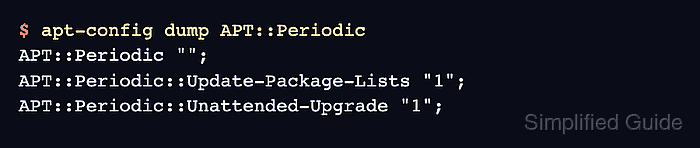
unattended-upgrades performs the package upgrade work, while APT::Periodic settings decide whether APT refreshes package lists and runs the unattended upgrade backend each day. The enable file is 20auto-upgrades, and the allowed package origins are controlled by 50unattended-upgrades.
Use automatic upgrades on Debian stable systems where security and point-release updates are acceptable without an interactive package review. Systems tracking testing or unstable should usually download updates automatically at most and leave installation to a supervised upgrade, because dependency changes can be more disruptive.
Related: How to install a package on Debian with apt
Related: View system logs using journalctl
Steps to enable Debian automatic updates:
- Refresh the APT package index.
$ sudo apt update
Hit:1 http://deb.debian.org/debian trixie InRelease
Hit:2 http://deb.debian.org/debian trixie-updates InRelease
Hit:3 http://security.debian.org/debian-security trixie-security InRelease
Reading package lists... Done
- Install unattended-upgrades.
$ sudo apt install unattended-upgrades
Reading package lists... Done
Building dependency tree... Done
The following NEW packages will be installed:
  unattended-upgrades
##### snipped #####
Setting up unattended-upgrades (2.12) ...
Creating config file /etc/apt/apt.conf.d/20auto-upgrades with new version
Creating config file /etc/apt/apt.conf.d/50unattended-upgrades with new version
Current Debian stable packages can create the enable file during installation. Keep the next step explicit so the final state is easy to audit.
- Open the automatic-upgrade enable file.
$ sudoedit /etc/apt/apt.conf.d/20auto-upgrades
- Enable daily package-list refreshes and unattended upgrades.
APT::Periodic {
  Update-Package-Lists "1";
  Unattended-Upgrade "1";
};
These settings let APT refresh package metadata and call unattended-upgrade. They do not approve every repository; the policy file still controls which origins can be installed automatically.
- Review the allowed origins file before relying on unattended upgrades.
$ sudoedit /etc/apt/apt.conf.d/50unattended-upgrades
The default Debian stable policy includes Debian and Debian Security origins for the installed codename. Leave backports, proposed updates, and automatic reboot options disabled unless the system owner has approved that behavior.
- Verify the enable file contains both settings.
$ sudo cat /etc/apt/apt.conf.d/20auto-upgrades
APT::Periodic {
  Update-Package-Lists "1";
  Unattended-Upgrade "1";
};
Run apt-config dump APT::Periodic when you need the merged APT parser view after every package-manager config file is applied.
- Check the daily upgrade timer on a normal Debian systemd host.
$ systemctl is-enabled apt-daily-upgrade.timer
enabled
On non-systemd Debian systems, unattended-upgrade is run through the APT periodic cron path instead of apt-daily-upgrade.service.
- Run a dry run to confirm unattended-upgrades can read the policy and package state.
$ sudo unattended-upgrade -v --dry-run
Starting unattended upgrades script
##### snipped #####
No packages found for unattended upgrade
The last line changes when eligible packages exist. A successful dry run should start the script, read the allowed origins, and finish without configuration or package-manager errors.

Mohd Shakir Zakaria is a cloud architect with deep roots in software development and open-source advocacy. Certified in AWS, Red Hat, VMware, ITIL, and Linux, he specializes in designing and managing robust cloud and on-premises infrastructures.


