Transient HTTP failures can make shell automation report a failed deployment, health check, or download even though the service would have recovered on the next attempt. A bounded retry policy lets curl absorb brief timeouts, 503 responses, or rate-limit replies while still surfacing real outages.
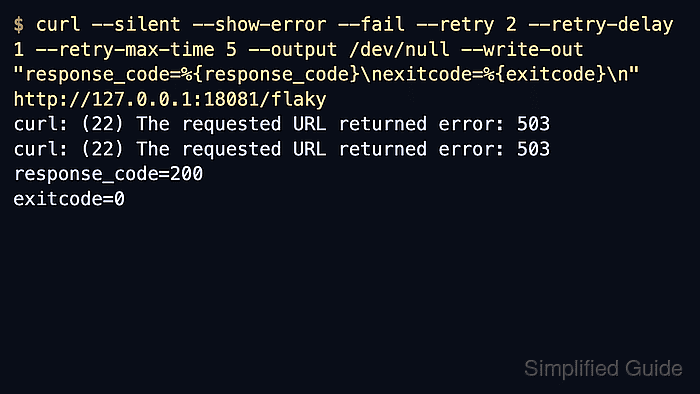
Use --retry to repeat a transfer after curl classifies the failure as transient. That includes timeout errors, FTP 4xx replies, and HTTP 408, 429, 500, 502, 503, 504, 522, and 524 responses; --retry-connrefused expands the set to refused TCP connections when a service is still starting.
Apply retries only to requests that are safe to repeat, such as GET, HEAD, or endpoints designed to be idempotent. Pair the retry count with --retry-delay or the default backoff, --retry-max-time for the total retry budget, --max-time for each attempt, and --fail when the final HTTP error should still return a non-zero status.
Related: How to handle timeouts in cURL
Related: How to fail on HTTP errors with cURL
Related: How to capture response metrics with cURL write-out
Tool: cURL Command Generator
Steps to configure retries for transient errors with cURL:
- Retry a duplicate-safe GET with a fixed attempt count, a short delay, and a bounded retry window.
$ curl --silent --show-error --fail --retry 2 --retry-delay 1 --retry-max-time 5 https://api.example.net/health
curl: (22) The requested URL returned error: 503
curl: (22) The requested URL returned error: 503
status=ok retry_recovered=true
The failed attempts stay visible, but the final response body confirms that curl recovered before the retry budget expired. Omit --retry-delay when the default exponential backoff is a better fit; if the server sends Retry-After, curl uses that header for retry timing.
- Cap the total retry window and each transfer attempt so a persistent outage stops quickly.
$ curl --show-error --fail --retry 5 --retry-delay 1 --retry-max-time 2 --max-time 3 --no-progress-meter --output /dev/null --write-out "response_code=%{response_code}\nexitcode=%{exitcode}\n" https://api.example.net/maintenance
curl: (22) The requested URL returned error: 503
Warning: Problem : HTTP error. Will retry in 1 second. 5 retries left.
curl: (22) The requested URL returned error: 503
Warning: Problem : HTTP error. Will retry in 1 second. 4 retries left.
curl: (22) The requested URL returned error: 503
response_code=503
exitcode=22
--retry-max-time limits the retry loop, including sleep time between attempts. --max-time limits a single transfer attempt, so a slow response cannot consume the whole retry budget by itself.
Related: How to handle timeouts in cURL - Add --retry-connrefused when the target port may reject connections briefly during startup or a rolling restart.
$ curl --show-error --fail --retry 2 --retry-delay 1 --retry-max-time 4 --retry-connrefused --no-progress-meter --output /dev/null http://127.0.0.1:8080/ready
curl: (7) Failed to connect to 127.0.0.1 port 8080 after 0 ms: Could not connect to server
Warning: Problem : connection refused. Will retry in 1 second. 2 retries left.
curl: (7) Failed to connect to 127.0.0.1 port 8080 after 0 ms: Could not connect to server
Warning: Problem : connection refused. Will retry in 1 second. 1 retry left.
curl: (7) Failed to connect to 127.0.0.1 port 8080 after 0 ms: Could not connect to server
Keep connection-refused retries short. They are useful for startup races, but a wrong port, dead service, or bad service name should still fail quickly and visibly.
- Leave --retry-all-errors disabled unless every retryable request in the command is safe to repeat after any kind of failure.
--retry-all-errors can repeat permanent failures and duplicate redirected input or output. Use it only for controlled commands where the HTTP method, endpoint behavior, and output handling are already known to be duplicate-safe.

Mohd Shakir Zakaria is a cloud architect with deep roots in software development and open-source advocacy. Certified in AWS, Red Hat, VMware, ITIL, and Linux, he specializes in designing and managing robust cloud and on-premises infrastructures.


