CSS layering bugs often appear as menus, tooltips, or sticky panels that stay underneath another element even after a much larger z-index is assigned. The visible order is decided by the stacking context that competes with the covering layer, so a child set to 9999 can still sit below a sibling header whose ancestor is higher in the page stack.
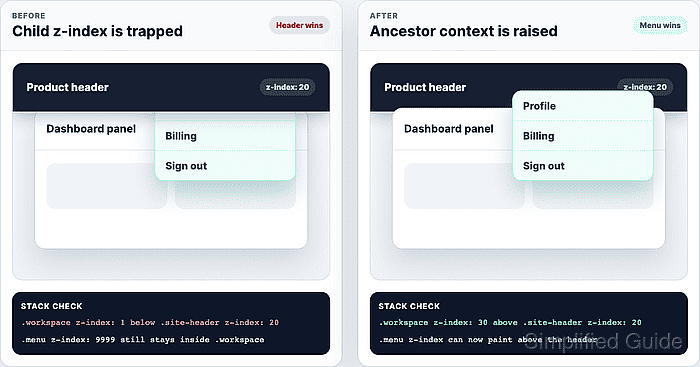
A stacking context can come from positioned elements with a z-index value, transform, opacity below 1, isolation, containment, and several other CSS features. DevTools should be used on the hidden element and on its ancestors, because the declaration that looks strongest on the child may not be the declaration that decides the cross-component order.
Keep the reproduction at the viewport and component state where the overlap fails. A focused fix usually raises the competing ancestor, lowers the covering layer, or removes an accidental context trigger; increasing numbers across unrelated components only makes the next layering problem harder to reason about.
Related: How to debug CSS specificity
Related: How to position an overlay with CSS anchor positioning
Related: How to set CSS cascade layer order
Steps to debug CSS z-index layering:
- Reproduce the overlap with the hidden element visible in the DOM.
Keep the same route, viewport width, open menu state, sticky header state, and scroll position that caused the bug. Shorter demo content can miss the layer that actually covers the element.
- Inspect the element that should appear on top.
> getComputedStyle(document.querySelector(".menu")).zIndex
"9999"
A large child z-index only competes inside the stacking context that contains that child.
- Check the nearest ancestor that may create a stacking context.
> ({
  position: getComputedStyle(document.querySelector(".workspace")).position,
  zIndex: getComputedStyle(document.querySelector(".workspace")).zIndex,
  transform: getComputedStyle(document.querySelector(".workspace")).transform
})
{position: "absolute", zIndex: "1", transform: "matrix(1, 0, 0, 1, 0, 0)"}
A transform value other than none creates a stacking context. Other common triggers include opacity below 1, isolation: isolate, contain, container-type, filter, and positioned elements with a non-auto z-index.
- Compare that ancestor with the layer that covers it.
> ({
  workspace: getComputedStyle(document.querySelector(".workspace")).zIndex,
  header: getComputedStyle(document.querySelector(".site-header")).zIndex
})
{workspace: "1", header: "20"}
In this state, the menu stays inside .workspace. Raising .menu again will not beat .site-header because the parent context is still below the header.
- Raise the competing ancestor only while the overlay needs to cross the header.
.workspace {
  position: relative;
}

.workspace.is-menu-open {
  z-index: 30;
}
Set the value on the context that competes with the covering layer. If the context was created by an old transform or opacity rule that is no longer needed, removing that trigger can be smaller than adding a new stack value.
- Retest the original overlap from the same viewport and state.
> (() => {
  const menu = document.querySelector(".menu").getBoundingClientRect();
  const header = document.querySelector(".site-header").getBoundingClientRect();
  const x = menu.left + 24;
  const y = Math.max(menu.top, header.top) + 22;

  return document.elementFromPoint(x, y).closest(".menu") !== null;
})()
true
A true result means the menu receives the overlap point. If the check still returns false, repeat the ancestor inspection on the next parent that creates a stacking context.
- Remove temporary layer probes after the fix is saved in the real stylesheet.
Do not leave DevTools-only z-index edits, colored debug outlines, or arbitrary values such as 999999 in the source; a page refresh or a later component state can hide the unresolved stacking context.

Mohd Shakir Zakaria is a cloud architect with deep roots in software development and open-source advocacy. Certified in AWS, Red Hat, VMware, ITIL, and Linux, he specializes in designing and managing robust cloud and on-premises infrastructures.


