A component shared by English and Arabic pages needs spacing that follows each text direction. CSS logical properties replace left and right spacing with inline start and end, allowing one component rule to serve both layouts.
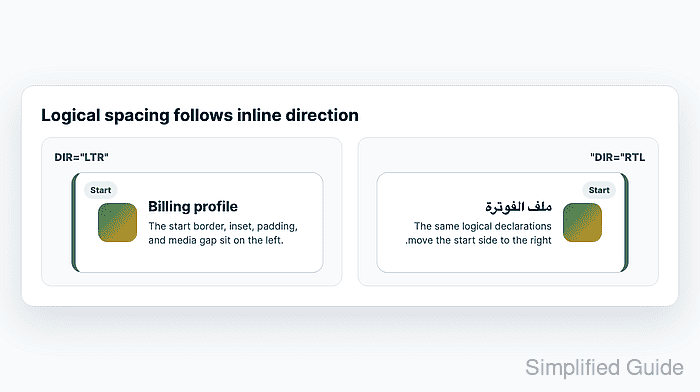
In horizontal writing, inline-start is left for left-to-right text and right for right-to-left text. The same mapping applies to margins, padding, borders, and positioned offsets. The HTML dir attribute supplies the content direction, so a component can inherit it from its surrounding page or section.
Only spacing meant to follow the text needs this conversion. Symmetric spacing such as gap and decoration that must stay on a physical side can remain unchanged. A layout that also supports vertical writing needs a separate writing-mode check because its inline axis is no longer horizontal.
Steps to replace left and right spacing with CSS logical properties:
- Create index.html in an example folder using your text editor.
- index.html
<!doctype html>
<html lang="en">
<meta charset="utf-8">
<meta name="viewport" content="width=device-width, initial-scale=1">
<title>Logical spacing</title>
<link rel="stylesheet" href="styles.css">
<h1>Logical spacing</h1>
<section>
  <h2>Left-to-right</h2>
  <div class="frame" dir="ltr">
    <article class="profile-card">
      <span class="badge">Start</span>
      <h3>Billing profile</h3>
      <p>Contact information</p>
    </article>
  </div>
</section>
<section>
  <h2>Right-to-left</h2>
  <div class="frame" dir="rtl" lang="ar">
    <article class="profile-card">
      <span class="badge" lang="en">Start</span>
      <h3>ملف الفوترة</h3>
      <p>معلومات الاتصال</p>
    </article>
  </div>
</section>
</html>
Both cards use the same classes and stylesheet. Their surrounding dir attributes control the layout direction; lang=“ar” identifies the Arabic text.
- Create styles.css beside index.html with the page layout rules.
- styles.css
body { margin: 16px; font: 16px/1.5 sans-serif; color: #163432; }
h1 { font-size: 24px; margin: 0 0 12px; }
h2 { font-size: 16px; margin: 12px 0 6px; }
h3, p { margin: 0; }
.frame { border: 1px dashed #718980; }
- Append the component's physical spacing rules to styles.css.
- styles.css
.profile-card {
  position: relative;
  background: #ecfdf5;
  margin-block: 12px;
  padding-block: 40px 14px;
  margin-left: 24px;
  margin-right: 8px;
  padding-left: 32px;
  padding-right: 16px;
  border-left: 6px solid #0f766e;
}
.badge {
  position: absolute;
  top: 8px;
  left: 12px;
  font-size: 12px;
  font-weight: bold;
}
These physical declarations keep the border and badge on the left in both cards. The unequal margins and padding make their direction visible against the dashed frame.
- Replace the five declarations from margin-left through border-left in styles.css with their logical equivalents.
- styles.css
  margin-inline-start: 24px;
  margin-inline-end: 8px;
  padding-inline-start: 32px;
  padding-inline-end: 16px;
  border-inline-start: 6px solid #0f766e;
Removing the old physical declarations prevents an unwanted left border or competing side values in the right-to-left card. For child spacing that follows text direction, margin-inline-end similarly replaces margin-right in a left-to-right design.
Related: How to add CSS feature-query fallbacks - Replace left: 12px; in the .badge rule with inset-inline-start: 12px;.
The badge now sits at the start edge in either direction. Its top value stays physical because this horizontal layout keeps the same vertical position.
- Save the changes to styles.css.
- Open the saved example/index.html file from your browser's address bar.
A local file address starts with file:/// and ends with the path to example/index.html on your computer. No web server is needed.
- Compare both cards for mirrored borders, badges, outer margins, and text padding.
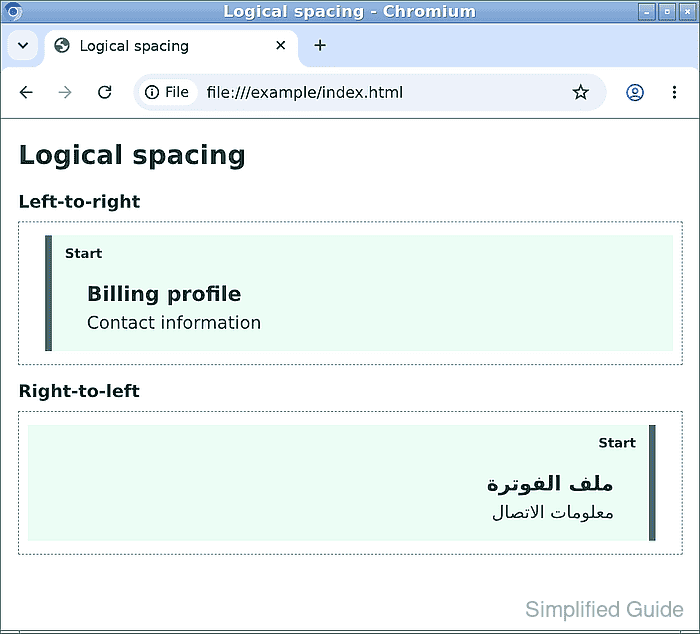
The left-to-right card has its teal border and Start badge on the left; the right-to-left card has them on the right. The larger outer margin and inner text padding follow the same change. A border remaining on both sides indicates a leftover physical declaration.
Related: How to fix CSS horizontal overflow