A completed Codex Cloud task is not in the local checkout until its patch is applied. Applying the task diff locally moves reviewed remote changes into the repository copy where local tests, editor state, and follow-up commits already live.
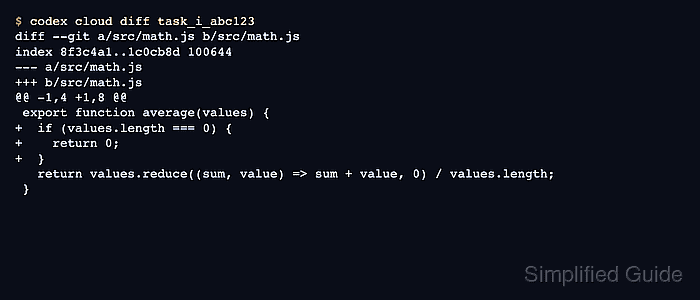
The codex apply command accepts a Codex Cloud task ID and applies the task's latest diff to the current working tree through git apply. Use codex cloud diff first when the task came from another device, a chat handoff, or a notification and the local branch has not seen the patch yet.
The local repository and branch still matter because the patch is applied against files on disk. A different branch, uncommitted local edits, or a stale checkout can make the patch fail or mix generated changes with unrelated work, so start from the matching checkout and review the resulting diff before committing it.
Steps to apply a Codex task diff locally:
- Change to the repository checkout that should receive the task diff.
$ cd ~/src/example-app
Use the same repository and branch family that the Codex Cloud task used. If the task was created from a feature branch, check out that branch before applying the patch.
Related: How to set the working directory for Codex - Check the current Git state before applying anything.
$ git status --short --branch
## main...origin/main
A clean status keeps the Codex patch separate from local edits. Review, commit, or stash existing changes before continuing.
Related: How to review uncommitted changes with Codex - Confirm that the current shell is signed in to Codex.
$ codex login status
Logged in using ChatGPT
If this prints Not logged in, complete login in this shell or profile before requesting the cloud task.
Related: How to check Codex login status - Review the task diff from Codex Cloud.
$ codex cloud diff task_i_abc123
diff --git a/src/math.js b/src/math.js
index 8f3c4a1..1c0cb8d 100644
--- a/src/math.js
+++ b/src/math.js
@@ -1,4 +1,8 @@
 export function average(values) {
+  if (values.length === 0) {
+    return 0;
+  }
   return values.reduce((sum, value) => sum + value, 0) / values.length;
 }
Replace task_i_abc123 with the raw task ID from the Codex task URL or codex cloud list. Use codex cloud diff --attempt N TASK_ID when a specific task attempt should be reviewed.
- Apply the latest task diff to the local working tree.
$ codex apply task_i_abc123
src/math.js
codex apply applies the latest diff for the task. Use codex cloud apply --attempt N TASK_ID only when a non-latest attempt is the version to bring local.
If git apply reports conflicts or rejected paths, return to the matching branch or clean up overlapping local edits before retrying.
- Inspect the local patch before testing or committing it.
$ git diff --stat
 src/math.js | 4 ++++
 1 file changed, 4 insertions(+)
- Check the applied diff for patch-level problems.
$ git diff --check
No output means Git found no whitespace errors or conflict-marker leftovers in the current diff.

Mohd Shakir Zakaria is a cloud architect with deep roots in software development and open-source advocacy. Certified in AWS, Red Hat, VMware, ITIL, and Linux, he specializes in designing and managing robust cloud and on-premises infrastructures.


