Before a Codex session depends on an MCP tool, list the configured servers from the same environment that will run the task. The list shows whether Codex knows the server name, which transport it will use, and whether the entry is enabled.
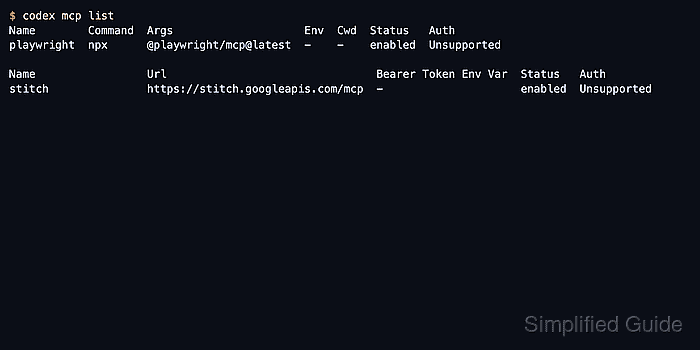
Codex stores Model Context Protocol server entries in config.toml under CODEX_HOME, with project-scoped configuration available in trusted projects. The codex mcp list command reads the resolved configuration and separates local stdio launchers from remote streamable HTTP endpoints.
The list output is a configuration check, not a runtime tool check. It does not prove that a local command can start, that a remote endpoint can answer, or that a login flow will succeed. Treat Unsupported in the Auth column as normal when a server does not advertise an interactive OAuth flow.
Related: How to get Codex MCP server details
Related: How to add a URL-based MCP server to Codex
Related: How to remove a Codex MCP server
Steps to list Codex MCP servers:
- Open a terminal in the Codex environment that owns the configuration.
- List the configured MCP servers in the default table view.
$ codex mcp list
Name      Command  Args                      Env  Cwd  Status   Auth
context7  npx      -y @upstash/context7-mcp  -    -    enabled  Unsupported

Name         Url                                Bearer Token Env Var  Status   Auth
openai-docs  https://developers.openai.com/mcp  -                     enabled  Unsupported
The first table shows local stdio servers. The second table shows remote streamable HTTP servers and the bearer-token environment variable, when one is configured.
- Check the Status column before relying on a server entry.
enabled means Codex will consider the server during session startup. A disabled row can remain in configuration without being launched.
- Export the same server list as JSON when a script or handoff needs transport fields.
$ codex mcp list --json
[
  {
    "name": "context7",
    "enabled": true,
    "disabled_reason": null,
    "transport": {
      "type": "stdio",
      "command": "npx",
      "args": [
        "-y",
        "@upstash/context7-mcp"
      ],
      "env": null,
      "env_vars": [],
      "cwd": null
    },
    "startup_timeout_sec": null,
    "tool_timeout_sec": null,
    "auth_status": "unsupported"
  },
  {
    "name": "openai-docs",
    "enabled": true,
    "disabled_reason": null,
    "transport": {
      "type": "streamable_http",
      "url": "https://developers.openai.com/mcp",
      "bearer_token_env_var": null,
      "http_headers": null,
      "env_http_headers": null
    },
    "startup_timeout_sec": null,
    "tool_timeout_sec": null,
    "auth_status": "unsupported"
  }
]
Use transport.type to distinguish stdio command launchers from streamable_http endpoints.
- Copy the exact Name value before requesting server details or removing an entry.
$ codex mcp get context7
context7
  enabled: true
  transport: stdio
  command: npx
  args: -y @upstash/context7-mcp
  cwd: -
  env: -
  remove: codex mcp remove context7
Codex commands such as codex mcp get and codex mcp remove use the server name exactly as it appears in the list.
Related: How to get Codex MCP server details - Treat an empty list as a setup gap.
$ codex mcp list
No MCP servers configured yet. Try `codex mcp add my-tool -- my-command`.
Add the needed server before expecting MCP tools in a session.
Related: How to add a URL-based MCP server to Codex
Related: How to add OpenAI Docs MCP server to Codex

Mohd Shakir Zakaria is a cloud architect with deep roots in software development and open-source advocacy. Certified in AWS, Red Hat, VMware, ITIL, and Linux, he specializes in designing and managing robust cloud and on-premises infrastructures.


