Automation that launches codex exec needs an event stream when the final assistant message is not enough. The --json flag changes stdout to JSON Lines so scripts can watch thread, turn, item, and error events while the run is active.
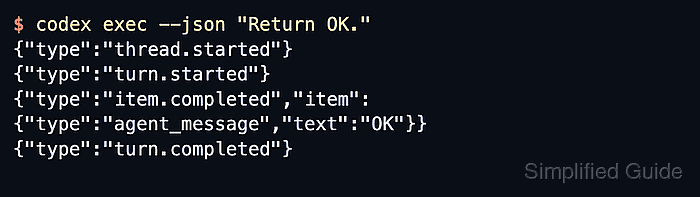
Each nonblank stdout line is one JSON object. The top-level type field identifies the event, while item.* records can carry agent messages, reasoning, command executions, file changes, MCP tool calls, web searches, and plan updates. Keep stderr separate from parser input because connection, authentication, or transport logs can still appear there during failures.
Use JSONL mode when another program needs progress, usage, or failure signals from the whole run. Use --output-last-message when only the final text should be written to a file, and --output-schema when downstream code needs one final schema-shaped JSON object. Start from the repository that should own the run, or bypass the repository check only for a known isolated directory.
Steps to enable JSON output in Codex exec:
- Run codex exec with --json from the repository that should own the task.
$ codex exec --json "Return OK."
{"type":"thread.started","thread_id":"00000000-0000-7000-8000-000000000000"}
{"type":"turn.started"}
{"type":"item.completed","item":{"id":"item_1","type":"agent_message","text":"OK"}}
{"type":"turn.completed","usage":{"input_tokens":1234,"cached_input_tokens":1024,"output_tokens":12,"reasoning_output_tokens":0}}
Each stdout line is a complete JSON object. Related: How to fix the Codex trusted-directory error
Related: How to skip Codex git repository checks - Redirect stdout to a file when another tool should read the stream later.
$ codex exec --json "Return OK." > codex-run.jsonl
The file receives JSONL from stdout. Keep stderr out of the redirected stream when a parser expects one JSON object per line.
- Open the saved file and confirm the run finished with a turn.completed event.
$ cat codex-run.jsonl
{"type":"thread.started","thread_id":"00000000-0000-7000-8000-000000000000"}
{"type":"turn.started"}
{"type":"item.completed","item":{"id":"item_1","type":"agent_message","text":"OK"}}
{"type":"turn.completed","usage":{"input_tokens":1234,"cached_input_tokens":1024,"output_tokens":12,"reasoning_output_tokens":0}}
A turn.failed or error event means the run did not finish normally.
- Extract event names with jq when a script only needs selected fields.
$ jq -r '.type' codex-run.jsonl
thread.started
turn.started
item.completed
turn.completed
jq reads each JSONL line independently. Use JSON Lines mode when checking the saved stream in a browser.
Tool: JSON Validator

Mohd Shakir Zakaria is a cloud architect with deep roots in software development and open-source advocacy. Certified in AWS, Red Hat, VMware, ITIL, and Linux, he specializes in designing and managing robust cloud and on-premises infrastructures.


