Ceph RBD mirroring copies block-image changes from one Ceph cluster to another for disaster recovery or site migration. A mirrored image has a primary side that accepts writes and a secondary side where the rbd-mirror daemon replays those updates.
Mirroring is enabled at the pool level first, then selected images are enabled when the pool uses image mode. Journal mode records each image write before the data change is applied, so the secondary cluster can replay updates in order and keep a crash-consistent copy.
Use an administration host that can reach both clusters through separate Ceph configuration files such as /etc/ceph/site-a.conf and /etc/ceph/site-b.conf. The pool must already exist with the same name on both clusters, and the rbd-mirror daemon on the secondary side must be able to reach monitors and OSDs on both sites.
Related: How to create a Ceph RBD pool
Related: How to check Ceph cluster health
Related: How to manage Ceph services with cephadm
Steps to enable Ceph RBD mirroring:
- Check the source cluster health.
$ ceph --cluster site-a -s
  cluster:
    id:     11111111-2222-3333-4444-555555555555
    health: HEALTH_OK

  services:
    mon: 3 daemons, quorum ceph-node1,ceph-node2,ceph-node3
    mgr: ceph-node1(active), standbys: ceph-node2
    osd: 9 osds: 9 up, 9 in

  data:
    pools:   4 pools, 96 pgs
    objects: 262.15k objects, 1.1 TiB
    usage:   3.4 TiB used, 56 TiB / 60 TiB avail
    pgs:     96 active+clean
Delay mirroring work when either cluster reports degraded, backfilling, remapped, or stuck placement groups. Mirroring copies block-image changes; it does not repair an unhealthy storage map.
Related: How to check Ceph cluster health
- Check the secondary cluster health.
$ ceph --cluster site-b -s
  cluster:
    id:     66666666-7777-8888-9999-aaaaaaaaaaaa
    health: HEALTH_OK

  services:
    mon: 3 daemons, quorum ceph-node4,ceph-node5,ceph-node6
    mgr: ceph-node4(active), standbys: ceph-node5
    osd: 9 osds: 9 up, 9 in

  data:
    pools:   4 pools, 96 pgs
    objects: 251.62k objects, 1.0 TiB
    usage:   3.1 TiB used, 57 TiB / 60 TiB avail
    pgs:     96 active+clean
The same RBD pool name must exist on both clusters before peer bootstrap. Create and initialize the pool first when the secondary site does not already have it.
Related: How to create a Ceph RBD pool - Enable image mode mirroring on the source pool.
$ rbd --cluster site-a mirror pool enable --site-name site-a rbd image
Image mode requires each mirrored image to be enabled explicitly. Use pool mode only when every journal-enabled image in the pool should be mirrored.
- Enable image mode mirroring on the secondary pool.
$ rbd --cluster site-b mirror pool enable --site-name site-b rbd image
- Create a peer bootstrap token on the source cluster.
$ rbd --cluster site-a mirror pool peer bootstrap create --site-name site-a rbd > site-a-rbd.token
The token contains peer connection and authentication material. Transfer it through a protected channel and do not paste the token into tickets, chat, screenshots, or shared logs.
- Import the peer token on the secondary cluster as receive-only.
$ rbd --cluster site-b mirror pool peer bootstrap import --site-name site-b --direction rx-only rbd site-a-rbd.token
--direction rx-only makes site-b receive updates from site-a for one-way disaster recovery. Use the default rx-tx direction only when both clusters will host primary images and each site runs an rbd-mirror daemon.
- Remove the temporary bootstrap token file from the administration host.
$ rm site-a-rbd.token
- Create a cephadm service spec for the rbd-mirror daemon on the secondary cluster.
- rbd-mirror-site-b.yml
service_type: rbd-mirror
placement:
  hosts:
    - ceph-node6
Run the daemon on the site that receives mirrored updates. For one-way site-a to site-b mirroring, the daemon belongs on site-b and must be able to connect to both clusters.
- Apply the rbd-mirror service spec on the secondary cluster.
$ ceph --cluster site-b orch apply -i rbd-mirror-site-b.yml
Scheduled rbd-mirror update...
Use the service-management path that matches the cluster. Non-cephadm clusters can run the packaged rbd-mirror daemon under systemd with a unique mirror client ID.
- Confirm that the rbd-mirror daemon is running on the secondary cluster.
$ ceph --cluster site-b orch ps --refresh
NAME                         HOST        PORTS  STATUS         REFRESHED  AGE  MEM USE  MEM LIM  VERSION  IMAGE ID      CONTAINER ID
rbd-mirror.ceph-node6.abc123 ceph-node6         running        7s ago     35s    86.4M        -  20.2.0   1a2b3c4d5e6f  aa11bb22cc33
##### snipped #####
The rbd-mirror row should show running and a recent REFRESHED value before image mirroring is enabled.
- Enable journal-based mirroring for the selected source image.
$ rbd --cluster site-a mirror image enable rbd/vm-100-disk-0 journal
Journal mode is the default image mirror mode and automatically enables the image journaling feature when needed. Expect additional write latency because each image write is recorded in the journal before it is replayed by the secondary cluster.
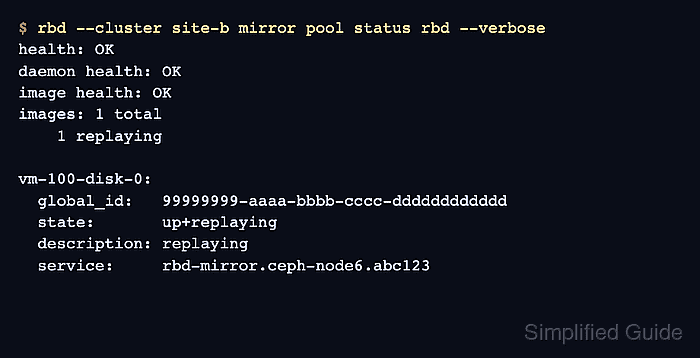
- Check the mirrored pool status from the secondary cluster.
$ rbd --cluster site-b mirror pool status rbd --verbose
health: OK
daemon health: OK
image health: OK
images: 1 total
    1 replaying

vm-100-disk-0:
  global_id:   99999999-aaaa-bbbb-cccc-dddddddddddd
  state:       up+replaying
  description: replaying
  service:     rbd-mirror.ceph-node6.abc123
  last_update: 2026-06-29 09:22:04
Health: OK and state: up+replaying show that the secondary daemon has discovered the mirrored image and is replaying source updates. A state such as unknown, error, or down means the peer token, daemon connectivity, image mode, or cluster health needs review before failover planning.

Mohd Shakir Zakaria is a cloud architect with deep roots in software development and open-source advocacy. Certified in AWS, Red Hat, VMware, ITIL, and Linux, he specializes in designing and managing robust cloud and on-premises infrastructures.


