CephFS turns a Ceph storage cluster into a shared POSIX filesystem for Linux clients and application hosts. Creating the filesystem allocates the metadata and data pools, registers the filesystem name, and starts Metadata Server daemons so clients can mount a single namespace.
The ceph fs volume interface creates a CephFS volume and can ask cephadm to deploy MDS daemons in one operation. Supplying an explicit placement keeps the MDS service on the intended hosts instead of relying on any eligible host in the orchestrator inventory.
Start from a cephadm cluster that reports HEALTH_OK, has monitor quorum, and has enough OSD capacity for new pools. The filesystem name cephfs matches the surrounding CephFS pages, and automatic pool creation uses the cephfs.<name>.meta and cephfs.<name>.data naming pattern.
Related: How to mount CephFS on Linux
Steps to create a CephFS filesystem:
- Check cluster health before adding the CephFS pools and MDS service.
$ ceph -s
  cluster:
    id:     11111111-2222-3333-4444-555555555555
    health: HEALTH_OK

  services:
    mon: 3 daemons, quorum ceph-node1,ceph-node2,ceph-node3 (age 2h)
    mgr: ceph-admin.abc123(active, since 2h)
    osd: 6 osds: 6 up, 6 in
The cluster should already have monitors, a manager, and enough in-service OSDs before a new filesystem is added.
Related: How to check Ceph cluster health - Confirm that the target CephFS volume name is unused.
$ ceph fs volume ls
[]
- List orchestrator hosts that can run the MDS service.
$ ceph orch host ls
HOST        ADDR         LABELS  STATUS
ceph-admin  192.0.2.10  _admin
ceph-node1  192.0.2.11
ceph-node2  192.0.2.12
ceph-node3  192.0.2.13
Use hosts that are already managed by cephadm and are not marked offline or maintenance.
- Create the CephFS volume with two MDS daemons placed across the chosen hosts.
$ ceph fs volume create cephfs --placement="2 ceph-node1 ceph-node2 ceph-node3"
The placement string asks cephadm for two MDS daemons on the listed hosts. Omit --placement only when the cluster default placement policy is acceptable.
Choose custom metadata or data pools before creating the filesystem if the automatic pool names or pool settings do not fit the cluster policy.
- Inspect the created volume and pool names.
$ ceph fs volume info cephfs --human_readable { "mon_addrs": [ "192.0.2.11:6789", "192.0.2.12:6789", "192.0.2.13:6789" ], "pending_subvolume_deletions": 0, "pools": { "data": [ { "avail": "2.9 TiB", "name": "cephfs.cephfs.data", "used": "0 B" } ], "metadata": [ { "avail": "2.9 TiB", "name": "cephfs.cephfs.meta", "used": "96 KiB" } ] }, "used_size": "0 B" } - Check that the MDS orchestrator service is running the requested number of daemons.
$ ceph orch ls --service_type mds --service_name cephfs --refresh
NAME       PORTS  RUNNING  REFRESHED  AGE  PLACEMENT
mds.cephfs         2/2      10s ago    1m   count:2;ceph-node1;ceph-node2;ceph-node3
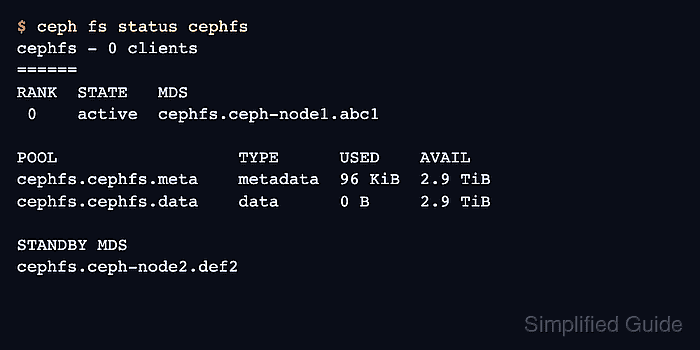
- Verify that CephFS has an active MDS rank and a standby daemon.
$ ceph fs status cephfs
cephfs - 0 clients
======
RANK  STATE   MDS
 0    active  cephfs.ceph-node1.abc1

POOL                  TYPE      USED    AVAIL
cephfs.cephfs.meta    metadata  96 KiB  2.9 TiB
cephfs.cephfs.data    data      0 B     2.9 TiB

STANDBY MDS
cephfs.ceph-node2.def2
The filesystem is ready for client-side mount preparation when one rank is active and the pool names match the volume information.

Mohd Shakir Zakaria is a cloud architect with deep roots in software development and open-source advocacy. Certified in AWS, Red Hat, VMware, ITIL, and Linux, he specializes in designing and managing robust cloud and on-premises infrastructures.


