Automation that starts, changes, or deletes AWS resources should not assume the next command can run as soon as the API accepts the request. AWS CLI waiters keep the shell blocked until a service-specific describe call reports the state the next step requires.
Waiters are service subcommands such as aws ec2 wait instance-running, aws ec2 wait instance-status-ok, and aws ec2 wait volume-available. Each waiter polls a documented API and checks a documented JMESPath condition, so the correct waiter name matters more than a generic sleep interval.
A successful waiter prints no output and exits with status 0. For documented EC2 waiters such as instance-running and instance-status-ok, AWS documents polling every 15 seconds and exit status 255 after 40 failed checks, so scripts should treat a nonzero waiter result as a blocked state transition instead of continuing silently.
Steps to wait for AWS EC2 resource state in AWS CLI:
- Start the stopped EC2 instance.
$ aws ec2 start-instances --instance-ids i-0123456789abcdef0 --profile operations --region us-east-1
{
    "StartingInstances": [
        {
            "InstanceId": "i-0123456789abcdef0",
            "CurrentState": {
                "Code": 0,
                "Name": "pending"
            },
            "PreviousState": {
                "Code": 80,
                "Name": "stopped"
            }
        }
    ]
}
Starting an instance changes live EC2 state. Confirm the selected profile, Region, and instance ID before running the command.
- Wait until EC2 reports the instance state as running.
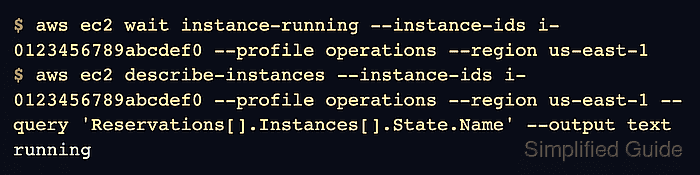
$ aws ec2 wait instance-running --instance-ids i-0123456789abcdef0 --profile operations --region us-east-1
No output with exit code 0 means the waiter reached the target state. Stop the script and inspect the resource when the waiter returns a nonzero exit code.
- Confirm the instance state before running the dependent task.
$ aws ec2 describe-instances --instance-ids i-0123456789abcdef0 --profile operations --region us-east-1 --query 'Reservations[].Instances[].State.Name' --output text
running
The describe command gives visible proof because the waiter itself does not print success output.
Related: How to use JMESPath queries in AWS CLI - Wait for EC2 status checks when the next action requires passed instance checks.
$ aws ec2 wait instance-status-ok --instance-ids i-0123456789abcdef0 --profile operations --region us-east-1
instance-running confirms the lifecycle state only. instance-status-ok waits for both EC2 instance and system status checks to return ok.
- Confirm both status check fields.
$ aws ec2 describe-instance-status --instance-ids i-0123456789abcdef0 --profile operations --region us-east-1 --query 'InstanceStatuses[].[InstanceStatus.Status,SystemStatus.Status]' --output text
ok	ok
- Check the waiter status before continuing in shell scripts.
aws ec2 wait instance-running \
  --instance-ids i-0123456789abcdef0 \
  --profile operations \
  --region us-east-1
status=$?
if [ "$status" -ne 0 ]; then
  printf 'EC2 instance did not reach running state; AWS CLI exit code %s\n' "$status" >&2
  exit "$status"
fi
Read $? immediately. Any command between the waiter and status=$? overwrites the status being tested.
Related: How to check AWS CLI command exit codes

Mohd Shakir Zakaria is a cloud architect with deep roots in software development and open-source advocacy. Certified in AWS, Red Hat, VMware, ITIL, and Linux, he specializes in designing and managing robust cloud and on-premises infrastructures.


