Large AWS CLI list commands can return too much data for an interactive review or make one service request large enough to time out. Pagination controls let the command ask the service for smaller pages, stop after a fixed number of returned items, or resume the next chunk with a token instead of starting the listing over.
The AWS CLI follows service pagination automatically for commands that support it. One control changes how many items the CLI asks the service to return in each API call, and another caps how many items print before the CLI adds a NextToken for a later command.
First-page mode belongs only where the initial service page is enough for the task. For repeatable chunks, keep the service page size and output item count aligned, copy the CLI NextToken from the previous truncated response, and pass that value to the next command.
Related: How to disable the AWS CLI pager
Related: How to use JMESPath queries in AWS CLI
Related: How to set AWS CLI read timeout
Related: How to save AWS CLI output to a file
Tool: API Pagination Window Calculator
Steps to control AWS CLI pagination:
- Request smaller service pages without reducing the final AWS CLI output.
$ aws s3api list-objects-v2 \
  --bucket example-prod-logs \
  --page-size 2 \
  --query 'Contents[].Key' \
  --output json
[
    "logs/2026-06-01.json",
    "logs/2026-06-02.json",
    "logs/2026-06-03.json",
    "logs/2026-06-04.json",
    "logs/2026-06-05.json"
]
--page-size can reduce timeout risk because each service call is smaller. It does not cap the total number of items printed by the command.
- Stop after the first service page when only an initial sample is needed.
$ aws s3api list-objects-v2 \
  --bucket example-prod-logs \
  --no-paginate \
  --output json
{
    "IsTruncated": true,
    "Contents": [
        {
            "Key": "logs/2026-06-01.json",
            "LastModified": "2026-06-12T10:00:00.000Z",
            "ETag": "\"7d793037a0760186574b0282f2f435e7\"",
            "Size": 1842,
            "StorageClass": "STANDARD"
        },
        {
            "Key": "logs/2026-06-02.json",
            "LastModified": "2026-06-12T10:00:00.000Z",
            "ETag": "\"7d793037a0760186574b0282f2f435e7\"",
            "Size": 1950,
            "StorageClass": "STANDARD"
        }
    ],
    "Name": "example-prod-logs",
    "Prefix": "",
    "MaxKeys": 2,
    "KeyCount": 2,
    "NextContinuationToken": "2"
}
--no-paginate disables the CLI's automatic follow-up calls. Do not treat the first page as the complete inventory when IsTruncated is true.
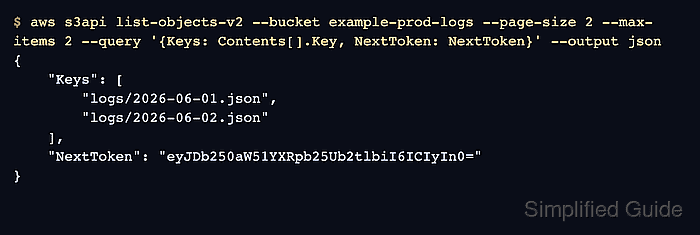
- Return a fixed-size CLI chunk and read the CLI NextToken.
$ aws s3api list-objects-v2 \
  --bucket example-prod-logs \
  --page-size 2 \
  --max-items 2 \
  --query '{Keys: Contents[].Key, NextToken: NextToken}' \
  --output json
{
    "Keys": [
        "logs/2026-06-01.json",
        "logs/2026-06-02.json"
    ],
    "NextToken": "eyJDb250aW51YXRpb25Ub2tlbiI6ICIyIn0="
}
Keep --page-size and --max-items the same for manual chunking. AWS warns that different values can produce missing or duplicated items when the service does not return items in the same order each time.
- Resume with the previous CLI NextToken.
$ aws s3api list-objects-v2 \
  --bucket example-prod-logs \
  --page-size 2 \
  --max-items 2 \
  --starting-token eyJDb250aW51YXRpb25Ub2tlbiI6ICIyIn0= \
  --query '{Keys: Contents[].Key, NextToken: NextToken}' \
  --output json
{
    "Keys": [
        "logs/2026-06-03.json",
        "logs/2026-06-04.json"
    ],
    "NextToken": "eyJDb250aW51YXRpb25Ub2tlbiI6ICI0In0="
}
Use the CLI NextToken returned with --max-items, not a service-specific token such as NextContinuationToken from an S3 response.
- Verify that the final chunk has no CLI NextToken.
$ aws s3api list-objects-v2 \
  --bucket example-prod-logs \
  --page-size 2 \
  --max-items 2 \
  --starting-token eyJDb250aW51YXRpb25Ub2tlbiI6ICI0In0= \
  --query '{Keys: Contents[].Key, NextToken: NextToken}' \
  --output json
{
    "Keys": [
        "logs/2026-06-05.json"
    ],
    "NextToken": null
}
No CLI NextToken means the command has reached the end of the result set for the current bucket, filters, region, profile, and permissions.
- Keep structured output while testing a chunk query that does not need a resume token.
$ aws s3api list-objects-v2 \
  --bucket example-prod-logs \
  --page-size 2 \
  --max-items 2 \
  --query 'Contents[].Key' \
  --output json
[
    "logs/2026-06-01.json",
    "logs/2026-06-02.json"
]
Include NextToken in the query when the next command must resume from this chunk. Switch to --output text only after the query already returns the exact scalar or columns needed, because text output can apply --query once per page on paginated commands.
Related: How to use JMESPath queries in AWS CLI

Mohd Shakir Zakaria is a cloud architect with deep roots in software development and open-source advocacy. Certified in AWS, Red Hat, VMware, ITIL, and Linux, he specializes in designing and managing robust cloud and on-premises infrastructures.


