Delimited text remains a common exchange format at application boundaries even when Apache Spark performs the processing. A typed DataFrame round trip makes the header, field types, quoting, and output layout explicit before another system receives the result.
The built-in PySpark CSV source accepts a DDL-formatted schema, so the input can be parsed without a separate inference pass. Header enforcement also catches a changed column name or order instead of binding values silently to the wrong fields.
Spark writes CSV data to a directory containing part files and commit metadata rather than to one named file. The local job selects two APAC orders, writes one part file for inspection, reads the directory back with the same schema, and compares every returned row with the DataFrame sent to the writer.
Related: How to run PySpark locally
Steps to read and write CSV files with PySpark:
- Create orders.csv with three orders and one quoted comma.
$ cat > orders.csv <<'CSV'
order_id,region,item_count,order_total,notes
ORD-1001,APAC,3,127.50,"bulk, expedited"
ORD-1002,EMEA,1,19.99,standard
ORD-1003,APAC,7,233.10,invoice reviewed
CSV
The quotes keep the comma in bulk, expedited inside the notes field.
Tool: Comma-Separated Values (CSV) Converter - Start spark_csv_check.py with the imports, local Spark session, and input schema.
- spark_csv_check.py
from pyspark.sql import SparkSession
from pyspark.sql import functions as F


spark = (
    SparkSession.builder.master("local[1]")
    .appName("spark-csv-read-write")
    .getOrCreate()
)
spark.sparkContext.setLogLevel("ERROR")

schema = (
    "order_id STRING, region STRING, "
    "item_count INT, order_total DOUBLE, notes STRING"
)
- Add the schema-bound CSV reader after the schema block.
orders = (
    spark.read.schema(schema)
    .option("header", True)
    .option("enforceSchema", False)
    .option("mode", "FAILFAST")
    .csv("orders.csv")
)
enforceSchema=false checks the header names against the schema by position. FAILFAST stops the job when Spark encounters a malformed record.
- Add the APAC order selection after the orders block.
priority_orders = (
    orders.where(
        (F.col("region") == "APAC")
        & (F.col("item_count") >= 3)
    )
    .select(
        "order_id",
        "region",
        "item_count",
        "order_total",
        "notes",
    )
    .orderBy("order_id")
)
- Add the output writer after the priority_orders block.
output_path = "output/csv-priority-orders"

(
    priority_orders.coalesce(1)
    .write.mode("overwrite")
    .option("header", True)
    .csv(output_path)
)
The overwrite mode replaces data already stored at output/csv-priority-orders, so that path must belong only to this result. coalesce(1) suits this tiny local dataset; distributed jobs should normally retain multiple output partitions.
- Add the schema-bound read-back DataFrame after the writer block.
read_back = (
    spark.read.schema(priority_orders.schema)
    .option("header", True)
    .option("enforceSchema", False)
    .csv(output_path)
    .orderBy("order_id")
)
- Append the row assertion, result display, and session shutdown after read_back.
assert read_back.collect() == priority_orders.collect()

print("Input rows:", orders.count())
print("Read-back rows:", read_back.count())
read_back.show(truncate=False)

spark.stop()
The assertion fails when the rows loaded from output/csv-priority-orders differ from the selected rows sent to the writer.
- Review the completed spark_csv_check.py file.
- spark_csv_check.py
from pyspark.sql import SparkSession
from pyspark.sql import functions as F


spark = (
    SparkSession.builder.master("local[1]")
    .appName("spark-csv-read-write")
    .getOrCreate()
)
spark.sparkContext.setLogLevel("ERROR")

schema = (
    "order_id STRING, region STRING, "
    "item_count INT, order_total DOUBLE, notes STRING"
)

orders = (
    spark.read.schema(schema)
    .option("header", True)
    .option("enforceSchema", False)
    .option("mode", "FAILFAST")
    .csv("orders.csv")
)

priority_orders = (
    orders.where(
        (F.col("region") == "APAC")
        & (F.col("item_count") >= 3)
    )
    .select(
        "order_id",
        "region",
        "item_count",
        "order_total",
        "notes",
    )
    .orderBy("order_id")
)

output_path = "output/csv-priority-orders"

(
    priority_orders.coalesce(1)
    .write.mode("overwrite")
    .option("header", True)
    .csv(output_path)
)

read_back = (
    spark.read.schema(priority_orders.schema)
    .option("header", True)
    .option("enforceSchema", False)
    .csv(output_path)
    .orderBy("order_id")
)

assert read_back.collect() == priority_orders.collect()

print("Input rows:", orders.count())
print("Read-back rows:", read_back.count())
read_back.show(truncate=False)

spark.stop()
- Run the completed Spark job.
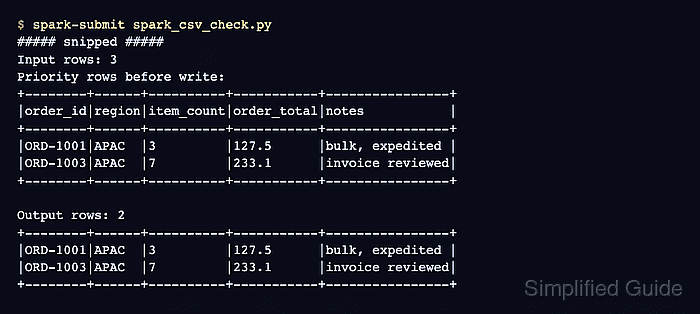
$ spark-submit spark_csv_check.py
##### snipped #####
Input rows: 3
Read-back rows: 2
+--------+------+----------+-----------+----------------+
|order_id|region|item_count|order_total|notes           |
+--------+------+----------+-----------+----------------+
|ORD-1001|APAC  |3         |127.5      |bulk, expedited |
|ORD-1003|APAC  |7         |233.1      |invoice reviewed|
+--------+------+----------+-----------+----------------+
- Verify the quoted notes field in the written CSV part file.
$ cat output/csv-priority-orders/part-*.csv
order_id,region,item_count,order_total,notes
ORD-1001,APAC,3,127.5,"bulk, expedited"
ORD-1003,APAC,7,233.1,invoice reviewed
Spark treats the output directory as the dataset and may also store commit metadata such as _SUCCESS beside the part file.

Mohd Shakir Zakaria is a cloud architect with deep roots in software development and open-source advocacy. Certified in AWS, Red Hat, VMware, ITIL, and Linux, he specializes in designing and managing robust cloud and on-premises infrastructures.


