Installing Apache Cassandra from Apache's RPM repository gives a Red Hat Enterprise Linux host package-managed binaries, a local cassandra user, and the service script expected by the RPM layout. This path fits lab nodes, development clusters, and server builds where DNF should own upgrades instead of a hand-unpacked tarball.
The current Cassandra 5.0 RPM line is selected with the 50x repository path. The package stores server configuration under /etc/cassandra/default.conf, writes data under /var/lib/cassandra, and ships cassandra, nodetool, and cqlsh commands for local validation.
Minimal RHEL-compatible images may not include the SysV helpers that the Cassandra RPM init script expects. Installing initscripts and chkconfig alongside Java 17 keeps service and boot enablement available before the node is checked with nodetool and cqlsh.
Steps to install Apache Cassandra on Red Hat Enterprise Linux with DNF:
- Open a terminal with sudo privileges.
- Install Java 17, Python, and the service helpers used by the Cassandra RPM.
$ sudo dnf install java-17-openjdk-headless python3 procps-ng initscripts chkconfig
Apache Cassandra 5.0 can run on Java 11 or Java 17. Java 17 is a suitable choice for new Cassandra 5.0 installs on current RHEL-family hosts.
- Confirm the active Java runtime.
$ java -version
openjdk version "17.0.19" 2026-04-21 LTS
OpenJDK Runtime Environment (Red_Hat-17.0.19.0.10-1)
OpenJDK 64-Bit Server VM (Red_Hat-17.0.19.0.10-1, mixed mode, sharing)
- Add the Apache Cassandra 5.0 RPM repository.
$ sudo tee /etc/yum.repos.d/cassandra.repo >/dev/null <<'EOF'
[cassandra]
name=Apache Cassandra
baseurl=https://redhat.cassandra.apache.org/50x/
gpgcheck=1
repo_gpgcheck=1
gpgkey=https://downloads.apache.org/cassandra/KEYS
EOF
The 50x path selects Cassandra 5.0 packages. Use a different Apache-supported series path only when the cluster is intentionally pinned to that Cassandra release line.
- Refresh the Cassandra repository metadata.
$ sudo dnf makecache --disablerepo="*" --enablerepo=cassandra
Apache Cassandra                                271 MB/s | 277 kB     00:00
Metadata cache created.
- Install the Cassandra package.
$ sudo dnf install cassandra
Dependencies resolved.
================================================================================
 Package            Architecture    Version            Repository          Size
================================================================================
Installing:
 cassandra          noarch          5.0.8-1            cassandra           68 M
##### snipped #####
Complete!
- Confirm the installed Cassandra RPM.
$ rpm -q cassandra
cassandra-5.0.8-1.noarch
- Confirm the Cassandra launcher version.
$ cassandra -v
5.0.8
- Start Cassandra through the packaged service script.
$ sudo service cassandra start
Starting Cassandra: OK
The current RPM installs /etc/rc.d/init.d/cassandra. On minimal hosts, initscripts supplies the helper functions used by that script.
- Enable Cassandra at boot.
$ sudo chkconfig cassandra on
- Confirm Cassandra is enabled for normal multi-user runlevels.
$ chkconfig --list cassandra
##### snipped #####
cassandra       0:off  1:off  2:on  3:on  4:on  5:on  6:off
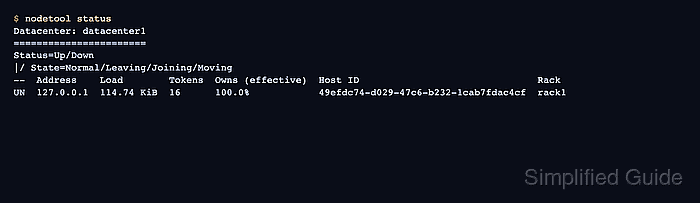
- Check the local node state with nodetool.
$ nodetool status
Datacenter: datacenter1
=======================
Status=Up/Down
|/ State=Normal/Leaving/Joining/Moving
--  Address    Load        Tokens  Owns (effective)  Host ID                               Rack
UN  127.0.0.1  114.74 KiB  16      100.0%            49efdc74-d029-47c6-b232-1cab7fdac4cf  rack1
UN means the node is up and normal from Cassandra's ring view. First startup can take a minute while local system keyspaces initialize.
Related: How to check Apache Cassandra cluster status with nodetool - Connect to the local native transport port with cqlsh.
$ env PYTHONPATH=/usr/lib/python3.6/site-packages cqlsh 127.0.0.1 9042 -e "SHOW HOST"
Connected to Test Cluster at 127.0.0.1:9042
Use the command-scoped PYTHONPATH prefix if cqlsh reports No module named 'cqlshlib' on a RHEL-family host. Omit it when plain cqlsh already finds its packaged Python modules.
Related: How to connect to Apache Cassandra with cqlsh

Mohd Shakir Zakaria is a cloud architect with deep roots in software development and open-source advocacy. Certified in AWS, Red Hat, VMware, ITIL, and Linux, he specializes in designing and managing robust cloud and on-premises infrastructures.


