Container startup failures can occur before AnythingLLM's web interface is available. Docker logs expose the application and document collector messages needed to identify the error.
Docker captures the container's standard output and standard error, including startup messages retained after the container exits. A log request can read those messages from a running or stopped container as long as the container still exists.
Use the Docker host that runs your existing AnythingLLM container and a shell with permission to access that Docker engine. Retrieving logs reveals application activity and errors; it does not establish that the web service is healthy.
Steps to view Docker logs for AnythingLLM:
- Set
CONTAINERto the name of your existing AnythingLLM container.$ CONTAINER="anythingllm"
The value anythingllm stands for your container's name. The remaining commands use this variable in the same shell.
- Confirm the image and state of the selected container.
$ docker container inspect \
  --format '{{.Config.Image}} {{.State.Status}}' \
  "$CONTAINER"
mintplexlabs/anythingllm:1.19.0 exited
The image identifies the AnythingLLM deployment. An exited container can still have logs; No such container means the name is wrong, the container has been removed, or the shell is connected to a different Docker engine.
Logs can contain API keys, document text, or other private data. If you share log excerpts, redact sensitive values first.
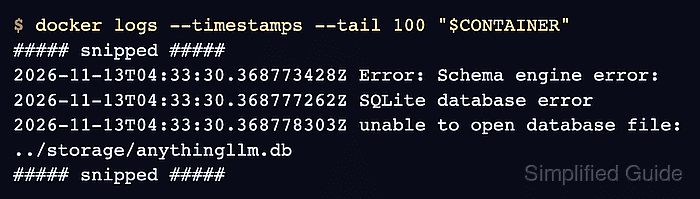
- Display the latest 100 log lines from the selected AnythingLLM container with timestamps.
$ docker logs --timestamps --tail 100 "$CONTAINER"
--tail 100 limits the history to the last 100 lines, and --timestamps adds the time Docker recorded each entry. Storage-failure output:
##### snipped #####
2026-11-13T04:33:30.368773428Z Error: Schema engine error:
2026-11-13T04:33:30.368777262Z SQLite database error
2026-11-13T04:33:30.368778303Z unable to open database file: ../storage/anythingllm.db
##### snipped #####
This error means AnythingLLM could not open its SQLite database; it does not identify every possible storage cause. Other failures produce different messages. If the relevant error is older than the displayed history, a larger --tail value includes more lines. Blank output does not prove a healthy application, and a logging-driver error means Docker could not retrieve the stream.