How to enable WordPress debug log
Enabling the WordPress debug log sends PHP notices, warnings, and fatal-error details into a file instead of leaving a white screen or failed admin action with no trail. It is useful when a problem appears only during real page loads, REST requests, scheduled tasks, or plugin and theme code paths that are hard to reproduce in a debugger.
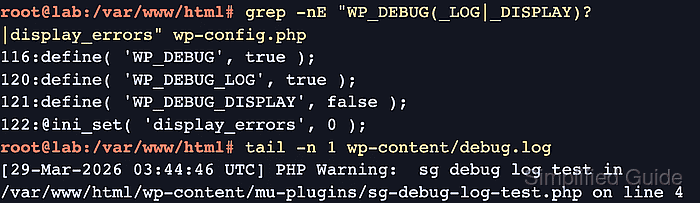
WordPress reads debug settings from wp-config.php. WP_DEBUG turns debug mode on, WP_DEBUG_LOG set to true writes to wp-content/debug.log, and WP_DEBUG_LOG set to a full file path writes somewhere else. WP_DEBUG_DISPLAY set to false keeps warnings out of public browser responses while the log captures them.
Use debug logging as a temporary troubleshooting window on production sites. Update existing constants instead of adding duplicate definitions, validate wp-config.php before reloading the failing request, and turn the settings off or restore the backup after collecting the error lines.
Steps to enable WordPress debug log:
- Open a terminal in the directory that contains the active wp-config.php file.
$ cd /var/www/example.com/public_html
Some hosts keep wp-config.php one directory above the public web root or generate part of it from platform settings. Edit the active file for the running site, not a copied or deployment-template file.
- Check for existing debug constants before editing.
$ grep -n "WP_DEBUG" wp-config.php
116:define( 'WP_DEBUG', false );
No output means the debug constants are not already defined in that file. If matching lines already exist, change those lines instead of adding a second copy.
- Back up wp-config.php.
$ sudo cp -a wp-config.php wp-config.php.bak
- Edit wp-config.php and place the debug settings above the final stop-editing line.
$ sudoedit wp-config.php
- wp-config.php
define( 'WP_DEBUG', true );
define( 'WP_DEBUG_LOG', true );
define( 'WP_DEBUG_DISPLAY', false );
@ini_set( 'display_errors', 0 );
Use a full file path for WP_DEBUG_LOG, such as /var/log/wordpress/debug.log, when the log must live outside wp-content or when wp-content is not writable by PHP.
- Validate the wp-config.php syntax.
$ php -l wp-config.php
No syntax errors detected in wp-config.php
- Reload the failing page, admin action, webhook, scheduled task, or API request.
- Read the debug log.
$ sudo cat wp-content/debug.log
[21-Jun-2026 03:04:19 UTC] PHP Warning:  Undefined array key "settings" in /var/www/example.com/public_html/wp-content/plugins/example-plugin/example.php on line 81
##### snipped #####
The first plugin, theme, or custom file path near the newest matching error is usually the line to investigate next.
Related: How to use WordPress recovery mode
Tool: Application Log Pattern Analyzer - Restore the previous debug policy after collecting the error details.
$ sudoedit wp-config.php
- wp-config.php
define( 'WP_DEBUG', false );
define( 'WP_DEBUG_LOG', false );
define( 'WP_DEBUG_DISPLAY', false );
@ini_set( 'display_errors', 0 );
If the site already had custom debug values, restore those original values or copy wp-config.php.bak back into place instead of forcing generic false values.
- Validate wp-config.php again.
$ php -l wp-config.php
No syntax errors detected in wp-config.php
- Remove the debug log when it contains sensitive troubleshooting details.
$ sudo rm wp-content/debug.log
The log can contain local paths, query fragments, stack traces, customer data, or plugin internals. Archive it somewhere private first if the investigation still needs the evidence.